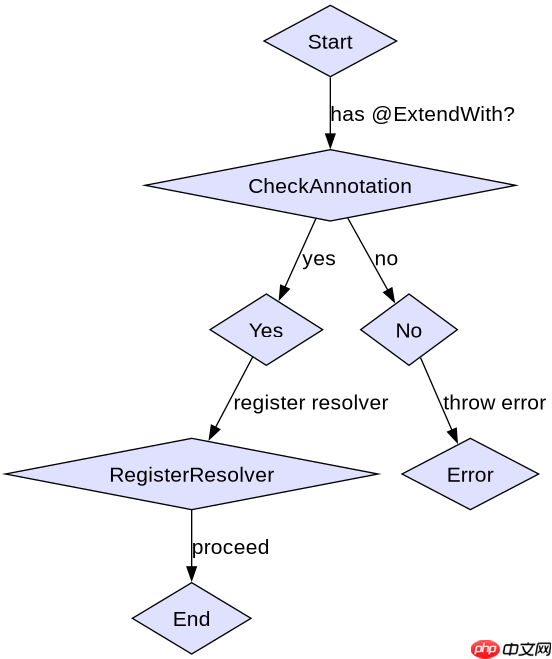
出现 no parameterresolver registered 错误是因为 junit jupiter 无法找到处理测试方法参数的解析器。解决方法是确保测试类或方法使用了正确的注解,如 @extendwith 或 @registerextension,并注册了相应的 parameterresolver 实现。如果使用的是 spring boot,需添加 @springboottest 和 @autowired 以启用自动注入。

如何手动注册自定义参数解析器?
通过实现 ParameterResolver 接口并注册到测试上下文,可以解决自定义类型注入问题。例如,创建一个解析器来处理特定类型的参数,并在测试类中使用 @ExtendWith 注解启用它。

JUnit 5.13.4
下载
JUnit 5.13.4 可用于旧项目兼容性排查;5.13 系列引入参数化测试类并改进测试发现诊断。该分支已不受支持,不建议用于生产项目;对应的 Platform 独立运行包为 1.13.4。
import org.junit.jupiter.api.extension.ExtendWith;
import org.junit.jupiter.params.ParameterizedTest;
import org.junit.jupiter.params.provider.ValueSource;

@ExtendWith(CustomResolver.class)
public class CustomTest {
    @ParameterizedTest
    @ValueSource(strings = {"test"})
    void testMethod(String input) {
        System.out.println(input);
    }
}
为什么 Spring Boot 测试中参数注入失败?
在 Spring Boot 测试中,若未正确配置测试上下文,可能导致依赖注入失败。确保使用 @SpringBootTest 注解加载完整应用上下文,并通过 @Autowired 注入所需组件。

import org.springframework.boot.test.context.SpringBootTest;
import org.junit.jupiter.api.Test;
import org.springframework.beans.factory.annotation.Autowired;

@SpringBootTest
class MyServiceTest {
    @Autowired
    private MyService myService;

    @Test
    void testService() {
        assertNotNull(myService);
    }
}
如何处理空值或未定义参数的情况?
当测试方法参数为空或未定义时,JUnit 会抛出异常。可通过提供默认值或使用 @Nullable 注解来避免此类问题。同时,确保所有必需参数都有对应的解析器支持。