








如何获取指定窗口的句柄
使用 pygetwindow 库的 getallwindows() 方法可以遍历当前所有窗口,通过标题或类名匹配找到目标窗口并获取其句柄。调用 window.handle 属性即可得到 windows api 所需的窗口句柄值。

import pygetwindow as gw

# 获取所有可见窗口
windows = gw.getAllWindows()

# 假设我们要找标题包含 "记事本" 的窗口
target_window = None
for w in windows:
    if "记事本" in w.title:
        target_window = w
        break

if target_window:
    print(f"窗口句柄: {target_window.handle}")
else:
    print("未找到窗口")
运行上述代码后,如果桌面上有打开的记事本窗口,控制台将输出类似 窗口句柄: 131086 的结果。句柄是一个整数,代表该窗口在操作系统中的唯一标识。如果没有找到匹配的窗口,程序会打印提示信息。这种方法适用于大多数标准 GUI 应用程序,前提是窗口标题或类名具有足够的区分度。
如何获取窗口内的控件信息
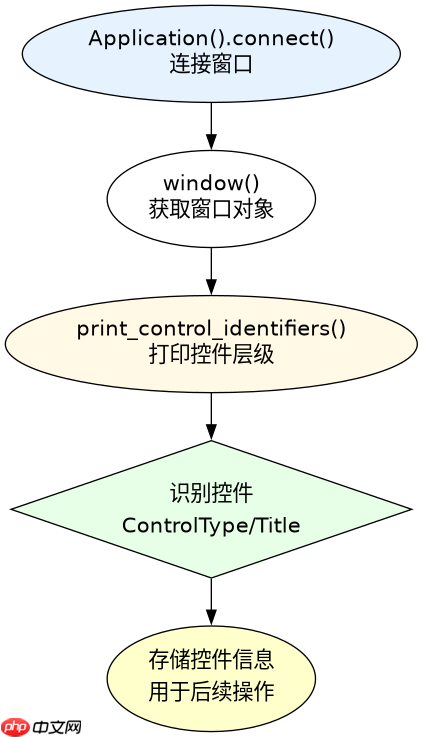
获取窗口句柄后,需要使用 pywinauto 库连接该窗口。通过 Application().connect(handle=...)` 建立连接,然后使用 <code>child_window() 和 print_control_identifiers() 方法可以列出窗口内所有控件的详细层级结构。每个控件都有唯一的控制 ID、类名和文本内容,可用于进一步操作。

Nodriver是Undetected-Chromedriver的官方继承者,提供异步浏览器自动化功能,可直接与Chrome DevTools Protocol通信,无需Selenium或WebDriver依赖。专为规避反机器人系统(包括Cloudflare和Imperva)的隐蔽网络自动化而构建。
立即学习“Python免费学习笔记(深入)”;
from pywinauto import Application

# 假设 handle 是上一步获取的窗口句柄
app = Application(backend="uia").connect(handle=handle)

# 获取主窗口对象
window = app.window(handle=handle)

# 打印所有控件的层级结构
window.print_control_identifiers()
执行这段代码会在控制台输出类似以下的树状结构:
ControlType: UIA_WindowControlTypeId - '记事本' (L131086, T450, B950, R1350)<br> ControlType: UIA_PaneControlTypeId - '' (L131086, T450, B950, R1350)<br> ControlType: UIA_EditControlTypeId - 'Untitled - Notepad' (L131100, T470, B940, R1340)。这里可以看到窗口本身是一个
UIA_Window,内部包含一个编辑框 UIA_Edit。通过这种方式,开发者可以精确识别出需要操作的按钮、输入框或其他元素。注意,不同应用程序可能使用不同的后端(如 win32 或 uia),通常推荐使用 uia 后端以支持更现代的界面元素。
基于窗口句柄和控件ID的具体问题:如何点击特定按钮
在获取到窗口句柄和控件信息后,可以通过控件的唯一标识符(如 title 或 control_type)来定位并点击特定按钮。例如,如果要点击“保存”按钮,可以使用 window.child_window(title="保存", control_type="Button").click()。这种方法比坐标点击更稳定,因为它是基于控件语义而非屏幕位置。
# 假设已经连接到目标窗口
window = app.window(handle=handle)

# 查找并点击“保存”按钮
save_button = window.child_window(title="保存", control_type="Button")
save_button.click()

# 或者通过索引查找(如果多个按钮同名)
# save_button = window.child_window(control_type="Button")[0]
# save_button.click()
运行此代码后,“保存”按钮将被激活,触发相应的保存操作。如果窗口中没有名为“保存”的按钮,程序会抛出 ElementNotFoundError 异常。因此,在实际应用中,建议先使用 print_control_identifiers() 确认控件的确切名称和类型。此外,对于动态变化的界面,可能需要结合等待机制(如 wait_for_idle())确保控件已加载完毕后再进行操作。
















