使用python 3.10引入的match-case语句重构文件类型分发逻辑,可以替代冗长的if-elif-else链,使代码更清晰且易于扩展。具体做法是将文件扩展名作为匹配对象,针对每种支持的格式定义独立的case分支,并在每个分支中调用相应的处理函数。若遇到不支持的文件类型,可通过case _通配符捕获并抛出异常或记录日志,从而确保所有可能的输入都被显式处理。

match-case如何简化多条件分支判断?
match-case通过模式匹配机制直接比较表达式的值与多个模式,当第一个匹配的模式被找到时执行对应代码块。相比传统的if-elif结构,它避免了重复的条件表达式书写,提高了可读性。在文件分发场景中,只需将文件扩展名传入match语句,即可根据具体的字符串值路由到不同的处理逻辑,无需手动编写复杂的布尔表达式。

def handle_file(filepath):
    ext = filepath.split('.')[-1].lower()
    match ext:
        case 'pdf':
            print(f"Processing PDF: {filepath}")
            return 'pdf_handled'
        case 'docx' | 'doc':
            print(f"Processing Word: {filepath}")
            return 'word_handled'
        case 'xlsx' | 'xls':
            print(f"Processing Excel: {filepath}")
            return 'excel_handled'
        case 'txt':
            print(f"Processing Text: {filepath}")
            return 'text_handled'
        case _:
            raise ValueError(f"Unsupported file type: {ext}")

# 测试示例
result = handle_file('report.pdf')
print(result)预期结果:对于'report.pdf',输出Processing PDF: report.pdf并返回'pdf_handled';对于'image.png',抛出ValueError。
立即学习“Python免费学习笔记(深入)”;

Nodriver是Undetected-Chromedriver的官方继承者,提供异步浏览器自动化功能,可直接与Chrome DevTools Protocol通信,无需Selenium或WebDriver依赖。专为规避反机器人系统(包括Cloudflare和Imperva)的隐蔽网络自动化而构建。
如何处理多种扩展名映射到同一逻辑的情况?
在文件分发中,常需将多个相似扩展名(如.doc和.docx)映射到相同的处理逻辑。match-case支持使用|操作符进行“或”匹配,允许在一个case子句中列出多个模式。这种语法不仅简洁,而且比在if中使用or连接条件更具语义清晰度。此外,还可以结合守卫子句(if条件)进一步细化匹配规则,例如检查文件是否存在或是否满足特定权限要求。
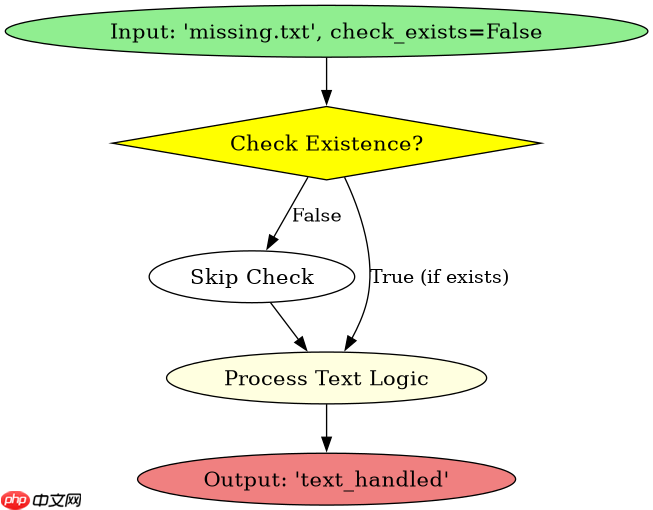
def advanced_handle_file(filepath, check_exists=True):
    import os
    ext = filepath.split('.')[-1].lower()
    match ext:
        case 'pdf':
            if check_exists and not os.path.exists(filepath):
                raise FileNotFoundError(f"File not found: {filepath}")
            print(f"Processing PDF: {filepath}")
            return 'pdf_handled'
        case 'docx' | 'doc':
            print(f"Processing Word: {filepath}")
            return 'word_handled'
        case 'xlsx' | 'xls':
            print(f"Processing Excel: {filepath}")
            return 'excel_handled'
        case 'txt':
            print(f"Processing Text: {filepath}")
            return 'text_handled'
        case _:
            raise ValueError(f"Unsupported file type: {ext}")

# 测试示例
try:
    result = advanced_handle_file('missing.txt', check_exists=False)
    print(result)
except Exception as e:
print(e)预期结果:对于'missing.txt'且check_exists=False,输出Processing Text: missing.txt并返回'text_handled';若check_exists=True且文件不存在,则抛出FileNotFoundError。
当文件扩展名为空或包含特殊字符时如何处理?
在实际应用中,文件路径可能不包含扩展名(如'README')或包含特殊字符(如'.hidden')。此时split('.')[-1]可能返回整个文件名或空字符串。为安全起见,应在匹配前对扩展名进行预处理,例如检查是否为空或使用默认值。此外,特殊字符可能导致意外匹配,建议对扩展名进行规范化处理(如去除首尾空格、转换为小写),并在case中使用精确模式以避免误匹配。若扩展名无效,可将其归类为未知类型并通过case _统一处理。