javascript 长任务分片大小通常设置为 50 毫秒,这是浏览器主线程处理任务的默认时间预算上限。具体做法是调用 requestidlecallback 并传入配置对象 {timeout: 50},或者在自定义调度器中通过 performance.now() 计算剩余时间,当剩余时间不足时暂停当前任务。这样做可以确保每次执行的任务不会阻塞用户交互超过 100 毫秒(包含事件循环开销),从而保持页面流畅。

使用 requestIdleCallback 进行自动分片
直接回答:使用 requestIdleCallback API 可以让浏览器自动在空闲时段执行任务,无需手动计算分片大小。该 API 会在浏览器完成渲染和用户交互后回调你的函数,并通过 deadline 对象提供剩余时间。开发者只需检查 deadline.timeRemaining(),如果大于零则继续处理数据块,否则返回以让出控制权。
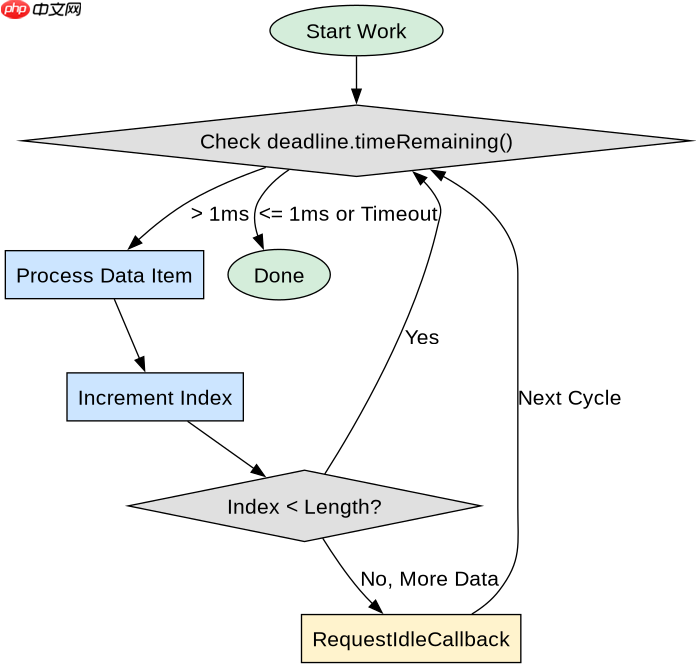
function processLargeData(data) {
  let index = 0;
  function work(deadline) {
    while (index < data.length && deadline.timeRemaining() > 1) {
      // 处理单个数据项
      console.log('Processing item:', data[index]);
      index++;
    }
    if (index < data.length) {
      // 还有剩余数据,请求下一次空闲回调
      requestIdleCallback(work);
    } else {
      console.log('All items processed');
    }
  }
  requestIdleCallback(work);
}
processLargeData(new Array(1000).fill('data'));
手动实现基于性能的时间片调度
直接回答:对于需要兼容旧环境或更精细控制的任务队列,可以手动实现基于 performance.now() 的分片逻辑。核心思路是将大任务拆分为小单元,每次执行一个单元后检查当前时间与起始时间的差值是否接近 50 毫秒。如果接近,则使用 setTimeout 将剩余任务推入下一个宏任务队列,从而释放主线程。

一个基于源码的 OpenAI Agents SDK JavaScript 和 TypeScript 技术文档。涵盖了代理编排、工具、转接、追踪以及实际安装路径。
立即学习“Java免费学习笔记(深入)”;
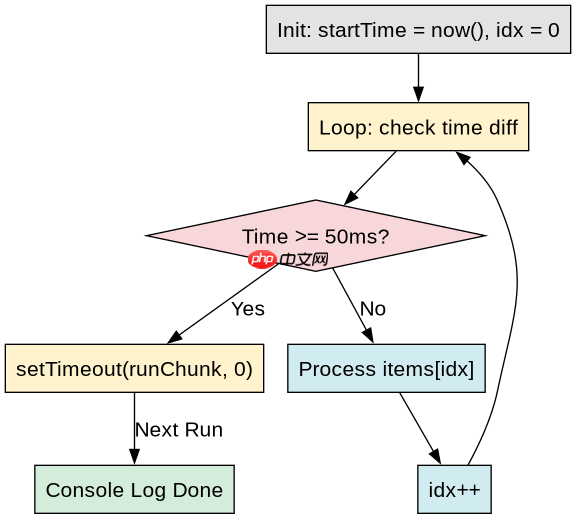
function manualChunking(items, chunkSize = 50) {
  let startTime = performance.now();
  let currentIndex = 0;

  function process() {
    const now = performance.now();
    if (now - startTime >= chunkSize || currentIndex >= items.length) {
      if (currentIndex < items.length) {
        setTimeout(process, 0); // 放入下一个宏任务
      } else {
        console.log('Finished manually');
      }
      return;
    }
    // 处理当前项
    console.log('Manual processing:', items[currentIndex]);
    currentIndex++;
    requestAnimationFrame(process); // 尝试在下一帧前继续,若超时则回退到setTimeout逻辑需结合状态机,此处简化为递归检查
  }
  // 简化版:直接使用setTimeout链式调用模拟分片
  function runChunk() {
    const start = performance.now();
    while (performance.now() - start < 50 && currentIndex < items.length) {
       console.log('Running chunk item:', items[currentIndex]);
       currentIndex++;
    }
    if (currentIndex < items.length) {
      setTimeout(runChunk, 0);
    }
  }
  runChunk();
}
manualChunking(new Array(100).fill('item'));
分片大小对 UI 响应性的具体影响
直接回答:当分片大小设置过大(如超过 100 毫秒)时,用户在任务执行期间无法点击按钮或滚动页面,导致界面“假死”。通过上述代码验证,将阈值设为 50 毫秒可保证在大多数设备上维持 60fps 的交互响应,因为浏览器通常每 16.6 毫秒刷新一次,50 毫秒允许约 3 次重绘周期,既利用了空闲时间又未造成明显卡顿。