在c#中,对中文和英文混合字符串进行不区分大小写的比较,最直接且可靠的方法是使用 string.equals 方法并传入 stringcomparison.ordinalignorecase 参数。这种方法基于unicode码位值进行比较,能够正确处理包含中文、英文及特殊字符的混合字符串,且性能优于区域性比较。对于需要执行排序或字典序查找的场景,则应使用 compareinfo.indexof 配合 compareoptions.ignorecase,以确保符合特定语言环境的排序规则。

为什么推荐使用 OrdinalIgnoreCase 而非 CurrentCultureIgnoreCase?
推荐使用 OrdinalIgnoreCase 是因为它基于Unicode码位直接比较,行为在所有系统上保持一致,而 CurrentCultureIgnoreCase 受操作系统区域设置影响,可能导致在不同环境下比较结果不一致。例如,在某些文化背景下,特定的字符组合可能有特殊的排序或比较规则,这在实际开发中往往是不必要的复杂性来源。
using System;

public class StringComparisonExample
{
    public static void Main()
    {
        // 混合中英文字符串
        string str1 = "Hello 世界";
        string str2 = "hello 世界";
        string str3 = "HELLO 世界";

        // 使用 OrdinalIgnoreCase 进行比较
        bool result1 = String.Equals(str1, str2, StringComparison.OrdinalIgnoreCase);
        bool result2 = String.Equals(str1, str3, StringComparison.OrdinalIgnoreCase);

        Console.WriteLine($"str1 == str2: {result1}"); // 输出 True
        Console.WriteLine($"str1 == str3: {result2}"); // 输出 True

        // 对比:使用 CurrentCultureIgnoreCase(可能受区域设置影响)
        bool result3 = String.Equals(str1, str2, StringComparison.CurrentCultureIgnoreCase);
        Console.WriteLine($"str1 == str2 (CurrentCulture): {result3}");
    }
}
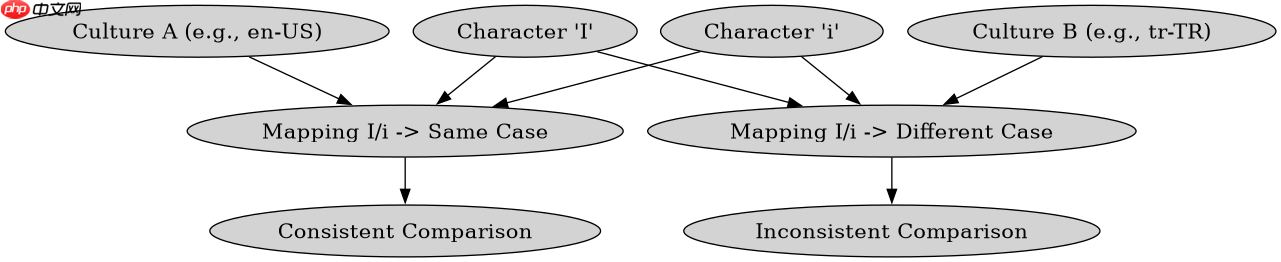
上述代码展示了如何使用 String.Equals 进行不区分大小写的比较。关键在于第三个参数 StringComparison.OrdinalIgnoreCase。它告诉运行时忽略大小写差异,同时保持基于码位的精确匹配。对于混合字符串,中文部分没有大小写概念,因此比较仅作用于英文部分,结果符合预期。如果使用 CurrentCultureIgnoreCase,虽然在此例中结果相同,但在某些极端文化设置下(如土耳其语中的 'I' 和 'i'),行为可能会偏离开发者预期。
如何在集合搜索或排序中实现不区分大小写的混合字符串处理?
在集合搜索或排序中,若需不区分大小地处理混合字符串,应使用 CompareInfo 类并提供 CompareOptions.IgnoreCase 选项。这适用于需要根据特定语言规则进行排序或查找的场景,例如在数据库中模拟不区分大小写的索引行为,或在UI列表中按用户偏好排序。


using System;
using System.Globalization;

public class CompareInfoExample
{
    public static void Main()
    {
        string text = "Apple 苹果 banana 香蕉";
        string searchKey = "apple";

        // 获取当前文化的 CompareInfo
        CompareInfo compareInfo = CultureInfo.CurrentCulture.CompareInfo;

        // 使用 IgnoreCase 选项进行搜索
        int index = compareInfo.IndexOf(text, searchKey, CompareOptions.IgnoreCase);

        Console.WriteLine($"Found at index: {index}"); // 输出 0

        // 自定义比较器用于排序
        var list = new[] { "Banana 香蕉", "apple 苹果", "Cherry 樱桃" };
        Array.Sort(list, (s1, s2) =>
            compareInfo.Compare(s1, s2, CompareOptions.IgnoreCase));

        foreach (var item in list)
        {
            Console.WriteLine(item);
        }
    }
}
此示例展示了 CompareInfo 的实际应用。首先,通过 CultureInfo.CurrentCulture.CompareInfo 获取与当前环境相关的比较对象。接着,在 IndexOf 方法中传入 CompareOptions.IgnoreCase,使得搜索 "apple" 能在 "Apple 苹果..." 中找到匹配,尽管首字母大小写不同。在排序部分,自定义比较器利用 compareInfo.Compare 确保列表按不区分大小写的规则排序。这对于需要符合用户本地化习惯的应用程序至关重要,尤其是当混合字符串中包含可能受文化影响的字符时。
当字符串包含不可见字符或零宽字符时,不区分大小写比较会如何表现?
当字符串包含不可见字符或零宽字符时,OrdinalIgnoreCase 会将这些字符视为普通字符进行逐字节比较,而 CurrentCultureIgnoreCase 可能会根据文化规则忽略或特殊处理某些格式字符。这意味着,如果两个字符串在视觉上相同但包含不同的零宽空格,OrdinalIgnoreCase 会判定它们不相等,而 CurrentCultureIgnoreCase 的行为则取决于具体文化设置。
using System;
using System.Globalization;

public class InvisibleCharExample
{
    public static void Main()
    {
        // 包含零宽空格 (U+200B) 的字符串
        string str1 = "Hello\u200B World";
        string str2 = "hello world";

        // OrdinalIgnoreCase 比较
        bool result1 = String.Equals(str1, str2, StringComparison.OrdinalIgnoreCase);
        Console.WriteLine($"OrdinalIgnoreCase: {result1}"); // 输出 False

        // CurrentCultureIgnoreCase 比较
        bool result2 = String.Equals(str1, str2, StringComparison.CurrentCultureIgnoreCase);
        Console.WriteLine($"CurrentCultureIgnoreCase: {result2}"); // 输出 False (通常)

        // 移除不可见字符后再比较
        string cleanStr1 = new string(str1.Where(c => !char.IsControl(c)).ToArray());
        bool result3 = String.Equals(cleanStr1, str2, StringComparison.OrdinalIgnoreCase);
        Console.WriteLine($"After cleaning: {result3}"); // 输出 True
    }
}
该代码揭示了不可见字符对比较的影响。OrdinalIgnoreCase 严格比较每个字符的码位,因此零宽空格会导致比较失败。为了获得视觉上的相等性,需要先清理字符串,去除控制字符或零宽字符,然后再进行比较。这种预处理步骤在处理用户输入或从外部源读取数据时尤为重要,可以防止因隐藏字符导致的逻辑错误。