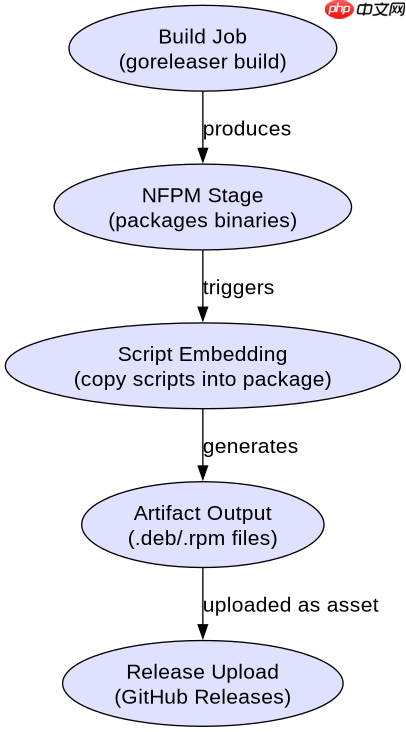
goreleaser 通过 .goreleaser.yaml 配置文件中的 builds 或全局 env 字段无法直接生成安装脚本,必须使用 nfpm 打包器配合自定义模板文件来实现。具体做法是在配置中启用 nfpm 并指定 scripts.setup 和 scripts.install 指向你的 shell 脚本,构建时 nfpm 会将这些脚本嵌入到 rpm/deb 包中,由包管理器在安装时自动执行。

如何配置 nfpm 以嵌入自定义安装逻辑
在 .goreleaser.yaml 中配置 nfpm 实例,并通过 scripts 字段关联外部 Shell 脚本,即可在包安装阶段自动运行特定逻辑。
version: 2

builds:
  - main: ./cmd/app
    binary: app
    env:
      - CGO_ENABLED=0

nfpm:
  formats:
    - deb
    - rpm
  scripts:
    setup: ./scripts/setup.sh
    install: ./scripts/install.sh
    remove: ./scripts/remove.sh
    upgrade: ./scripts/upgrade.sh
  nfd:
    description: My Go Application
    maintainer: Dev Team <dev@example.com>
    homepage: https://example.com
    license: MIT
上述配置中,setup.sh 会在包解压后、文件复制前执行,常用于创建系统用户或目录;install.sh 在文件复制后执行,适合设置权限或注册服务。确保脚本具有可执行权限(chmod +x),且路径相对于项目根目录。
一键 Shell 安装脚本的自动化托管策略
将生成的安装包上传至 GitHub Releases 或私有仓库,并通过 GitHub Actions 提供一键安装命令,实现自动化部署流程。


# .github/workflows/release.yml
name: Release
on:
  push:
    tags:
      - 'v*'

jobs:
  release:
    runs-on: ubuntu-latest
    steps:
      - uses: actions/checkout@v4
      - uses: goreleaser/goreleaser-action@v5
        with:
          version: latest
          args: release --clean
        env:
          GITHUB_TOKEN: ${{ secrets.GITHUB_TOKEN }}

  deploy-install-script:
    needs: release
    runs-on: ubuntu-latest
    steps:
      - uses: actions/checkout@v4
      - name: Generate install script
        run: |
          cat > install.sh << 'EOF'
          #!/bin/bash
          set -e
          VERSION=$(curl -s https://api.github.com/repos/${{ github.repository }}/releases/latest | grep tag_name | cut -d"'" -f4)
          curl -LO "https://github.com/${{ github.repository }}/releases/download/v${VERSION}/app_${VERSION}_linux_amd64.deb"
          sudo dpkg -i app_${VERSION}_linux_amd64.deb
          EOF
          chmod +x install.sh
      - name: Upload install script to releases
        uses: softprops/action-gh-release@v1
        with:
          files: install.sh
          tag_name: v${{ github.ref_name }}
该工作流在发布新版本时自动生成 install.sh,其中包含动态获取最新版本号和下载安装的逻辑,并将其作为独立资产上传至 GitHub Release。用户只需运行 curl -sL https://github.com/user/repo/releases/download/v1.0.0/install.sh | bash 即可完成一键安装。
基于 nfpm scripts.install 的实际行为验证
当使用 nfpm 打包时,scripts.install 指定的脚本会在包管理器安装过程中被调用,其退出码决定安装是否成功。若脚本返回非零值,安装将被中断。
例如,在 ./scripts/install.sh 中添加以下代码:
#!/bin/bash
# 检查目标目录是否存在
if [ ! -d /etc/myapp ]; then
  mkdir -p /etc/myapp
fi

# 设置配置文件权限
chown root:root /etc/myapp/config.yaml
chmod 600 /etc/myapp/config.yaml

exit 0
该脚本在 DEB/RPM 安装期间创建配置目录并设置安全权限。若 /etc/myapp 已存在但权限不正确,脚本仍会修正权限,确保环境一致性。此行为由包管理器触发,无需用户手动干预。