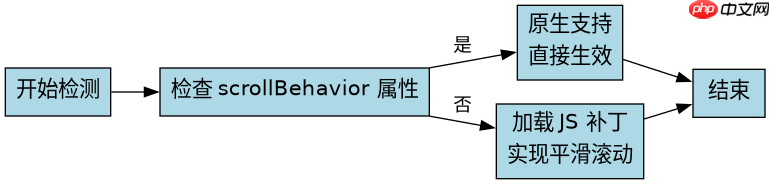
在旧版 safari 中,由于不支持 scroll-behavior: smooth,需要通过 javascript 实现平滑滚动补丁。核心做法是检测浏览器是否原生支持该属性,如果不支持则使用 element.scrollintoview() 或自定义动画函数来模拟平滑效果。
如何检测并应用全局平滑滚动补丁
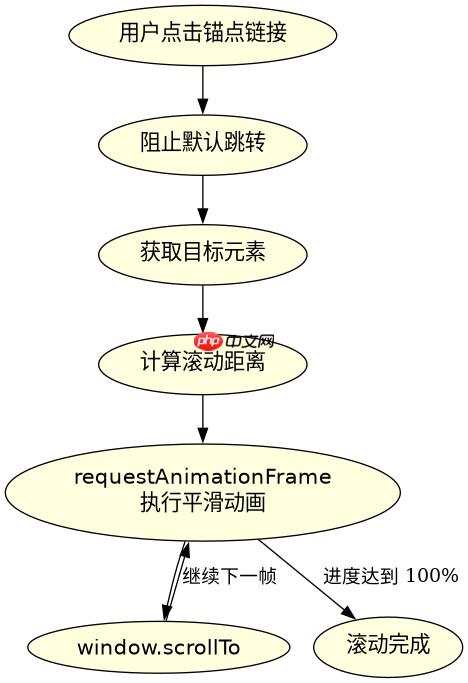
要解决旧版 Safari 的问题,首先需要判断当前环境是否支持 CSS 平滑滚动。如果检测到不支持,可以注入一个全局的补丁脚本,拦截所有触发滚动的行为,并将其替换为基于 requestAnimationFrame 的自定义动画逻辑。
// 检测是否支持 scroll-behavior: smooth
const supportsSmoothScroll = 'scrollBehavior' in document.documentElement.style;

if (!supportsSmoothScroll) {
  // 定义平滑滚动函数
  function smoothScroll(target, duration) {
    const targetPosition = target.getBoundingClientRect().top + window.pageYOffset;
    const startPosition = window.pageYOffset;
    const distance = targetPosition - startPosition;
    let startTime = null;

    function animation(currentTime) {
      if (startTime === null) startTime = currentTime;
      const timeElapsed = currentTime - startTime;
      const progress = Math.min(timeElapsed / duration, 1);

      // 使用 easeInOutCubic 缓动函数
      const ease = progress < 0.5
        ? 4 * progress * progress * progress
        : 1 - Math.pow(-2 * progress + 2, 3) / 2;

      window.scrollTo(0, startPosition + distance * ease);

      if (timeElapsed < duration) {
        requestAnimationFrame(animation);
      }
    }

    requestAnimationFrame(animation);
  }

  // 示例:点击链接时调用
  document.querySelectorAll('a[href^="#"]').forEach(anchor => {
    anchor.addEventListener('click', function (e) {
      e.preventDefault();
      const targetId = this.getAttribute('href');
      const targetElement = document.querySelector(targetId);
      if (targetElement) {
        smoothScroll(targetElement, 800); // 800ms 持续时间
      }
    });
  });
}
如何使用 Element.scrollIntoView 进行简化处理
除了自定义动画,还可以利用 Element.scrollIntoView() 方法。虽然旧版 Safari 可能不支持 { behavior: 'smooth' } 参数,但可以通过 polyfill 库或简单的封装来实现兼容。这里展示一个不依赖外部库的简单实现思路,即通过多次小幅滚动来模拟平滑效果。

htmlq 命令行 HTML 内容提取器,支持 CSS 选择器
下载
htmlq 是一个命令行工具,使用 CSS 选择器从 HTML 中提取内容,相当于 jq 的 HTML 版本。该工具使用 Rust 编写,允许你通过 CSS 选择器将 HTML 管道化,直接从终端提取文本、属性和结构化内容。
立即学习“前端免费学习笔记(深入)”;

// 简化的 scrollIntoView 平滑滚动补丁
function scrollIntoViewSmooth(element, options = {}) {
  const { duration = 500 } = options;
  const start = window.pageYOffset;
  const target = element.getBoundingClientRect().top + window.pageYOffset;
  const distance = target - start;
  let startTime = null;

  function step(timestamp) {
    if (!startTime) startTime = timestamp;
    const progress = Math.min((timestamp - startTime) / duration, 1);
    // 简单的线性插值,实际可使用更复杂的缓动
    window.scrollTo(0, start + distance * progress);
    if (progress < 1) {
      requestAnimationFrame(step);
    }
  }

  requestAnimationFrame(step);
}

// 使用示例
const section = document.getElementById('section1');
scrollIntoViewSmooth(section);}
当目标元素不在视口内时如何处理偏移量
在实际应用中,导航栏可能会遮挡目标内容。因此,在计算滚动位置时,需要减去导航栏的高度。以下代码展示了如何在平滑滚动前动态计算偏移量,确保目标内容完全可见。
// 考虑固定导航栏高度的平滑滚动
function smoothScrollWithOffset(target, duration, offset = 60) {
  const targetPosition = target.getBoundingClientRect().top + window.pageYOffset - offset;
  const startPosition = window.pageYOffset;
  const distance = targetPosition - startPosition;
  let startTime = null;

  function animation(currentTime) {
    if (startTime === null) startTime = currentTime;
    const timeElapsed = currentTime - startTime;
    const progress = Math.min(timeElapsed / duration, 1);

    const ease = progress < 0.5
      ? 4 * progress * progress * progress
      : 1 - Math.pow(-2 * progress + 2, 3) / 2;

    window.scrollTo(0, startPosition + distance * ease);

    if (timeElapsed < duration) {
      requestAnimationFrame(animation);
    }
  }

  requestAnimationFrame(animation);
}

// 假设有一个高度为 60px 的固定导航栏
const navHeight = 60;
const targetElement = document.querySelector('#content');
smoothScrollWithOffset(targetElement, 800, navHeight);}