在python中利用ttk.notebook实现选项卡动态增删,核心在于调用 .add() 方法传入子窗口控件来添加选项卡,以及使用 .forget() 方法传入目标选项卡的索引或标识符来移除选项卡。通过绑定按钮的点击事件并获取当前选中的选项卡索引,即可在运行时灵活地管理界面布局。

如何向Notebook中添加新的选项卡
要向 ttk.Notebook 中添加新的选项卡,需要实例化一个容器控件(如 tk.Frame),然后调用 Notebook.add() 方法将该容器作为新页面加入。通常建议在添加后设置 sticky='nsew' 使内容填满,并更新主窗口的布局管理器以确保新页面正确显示。
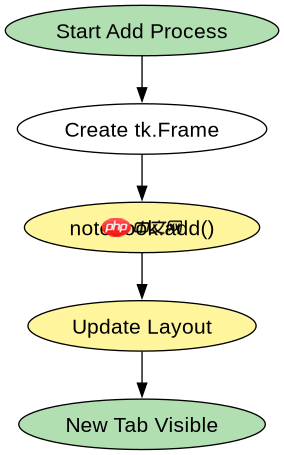
import tkinter as tk
from tkinter import ttk

def add_tab():
    new_frame = tk.Frame(notebook, bg='lightblue')
    new_frame.pack(fill='both', expand=True)
    notebook.add(new_frame, text=f"Tab {notebook.index('end') + 1}")

root = tk.Tk()
notebook = ttk.Notebook(root)
notebook.pack(expand=True, fill='both')

# 初始选项卡
initial_frame = tk.Frame(notebook, bg='white')
notebook.add(initial_frame, text="Initial")

btn_add = tk.Button(root, text="Add Tab", command=add_tab)
btn_add.pack(side='bottom')

root.mainloop()
如何从Notebook中删除指定的选项卡
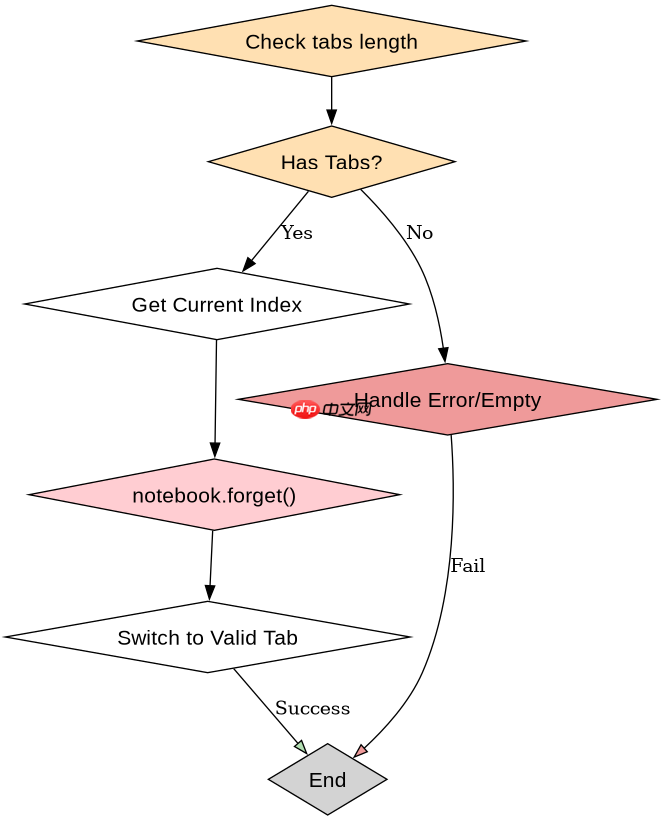
要从 ttk.Notebook 中删除选项卡,需先确定要移除的目标,可以通过其索引(整数)或唯一标识符(字符串)来定位。调用 Notebook.forget() 方法并传入该标识符即可将其从界面和内部列表中移除。若删除的是当前选中项,建议立即切换至其他有效选项卡以避免界面空白或错误。

Nodriver是Undetected-Chromedriver的官方继承者,提供异步浏览器自动化功能,可直接与Chrome DevTools Protocol通信,无需Selenium或WebDriver依赖。专为规避反机器人系统(包括Cloudflare和Imperva)的隐蔽网络自动化而构建。
立即学习“Python免费学习笔记(深入)”;
def remove_tab():
    try:
        # 获取当前选中选项卡的索引
        current_index = notebook.index(notebook.select())
        if current_index >= 0:
            # 获取要删除的帧对象(假设我们存储了引用或遍历查找)
            # 这里简化为直接通过索引对应的widget移除
            # 注意:forget接受的是widget实例或tab ID
            widget_to_remove = notebook.tabs()[current_index]
            notebook.forget(widget_to_remove)
    except Exception as e:
        print(f"Error removing tab: {e}")

btn_remove = tk.Button(root, text="Remove Current Tab", command=remove_tab)
btn_remove.pack(side='bottom')
当删除最后一个选项卡时程序行为如何
当使用 .forget() 删除最后一个剩余的选项卡时,Notebook 控件本身不会崩溃,但会处于无选项卡状态。此时若尝试访问 notebook.select() 或 notebook.index() 可能会引发异常,因为不存在选中的页面。因此,在删除操作前检查 notebook.tabs() 的长度是必要的,以防止对空 Notebook 进行操作导致的运行时错误。