goreleaser 提示 go 环境版本过低,通常是因为构建环境中安装的 go 版本低于项目 `go.mod` 文件声明的最低要求,或者未使用指定的工具链版本。解决此问题的核心做法是确保 ci/cd 或本地构建环境安装了与 `go.mod` 中 `toolchain` 指令或 `min_go_version` 配置相匹配的 go 版本,并在 `.goreleaser.yaml` 中显式指定 `go_version`。
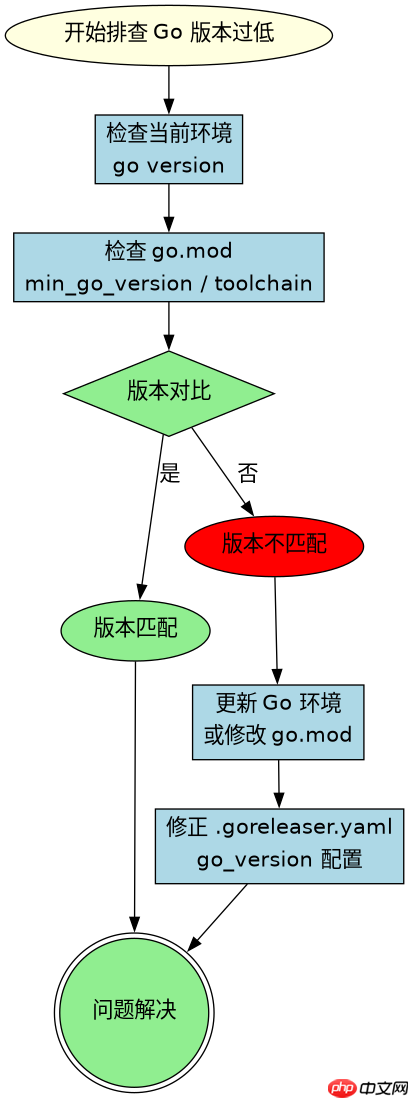
如何检查当前环境的 Go 版本是否满足 go.mod 要求
要排查版本不匹配问题,首先需要确认当前运行环境中的 Go 版本以及 `go.mod` 文件中声明的版本约束。通过执行 `go version` 可以查看当前编译器版本,而查看 `go.mod` 文件中的 `go` 和 `toolchain` 行可以得知项目要求的最低版本。如果当前版本低于 `go.mod` 中声明的版本,GoReleaser 就会报错。


package main

import (
	"fmt"
	"os/exec"
	"strings"
)

func checkVersion() {
	// 获取当前 Go 版本
	out, err := exec.Command("go", "version").Output()
	if err != nil {
		fmt.Println("Error getting go version:", err)
		return
	}
	currentVer := strings.TrimSpace(string(out))
	fmt.Println("Current Go Version:", currentVer)

	// 模拟读取 go.mod 中的 min_go_version (实际项目中应解析 go.mod)
	// 假设 go.mod 中声明了 go 1.21
	requiredVer := "go1.21"
	fmt.Printf("Required Version (from go.mod): %s\n", requiredVer)

	// 简单比较逻辑:如果当前版本字符串小于要求版本,则报错
	// 注意:实际比较需要解析版本号数字,这里仅做示意
	if strings.Contains(currentVer, "go1.19") || strings.Contains(currentVer, "go1.20") {
		fmt.Println("FAIL: Current Go version is too low.")
	} else {
		fmt.Println("PASS: Current Go version meets requirements.")
	}
}

func main() {
	checkVersion()
}
如何在 .goreleaser.yaml 中指定 Go 版本以对齐编译器
在确认版本后,需要在 `.goreleaser.yaml` 配置文件中明确指定 `go_version`,以便 GoReleaser 知道应该使用哪个版本的 Go 进行构建。这可以防止因环境默认 Go 版本不一致导致的构建失败。此外,如果使用了 Go 1.21+ 的 `toolchain` 管理功能,还需确保 CI 环境支持自动安装该工具链,或者手动安装对应版本。
# .goreleaser.yaml 示例配置
builds:
  - id: my-app
    main: ./cmd/main.go
    binary: my-app
    # 关键配置:指定使用的 Go 版本
    goos:
      - linux
      - darwin
    goarch:
      - amd64
      - arm64
    # 如果 go.mod 中有 toolchain 指令,Goreleaser 会尝试使用它
    # 如果没有,可以使用 go_version 强制指定
    go_version: "1.21.x"

# 全局配置也可以指定默认 Go 版本
goreleaser:
  build_command: go build
  go_version: "1.21.x"
当 go.mod 包含 toolchain 指令时 GoReleaser 如何处理
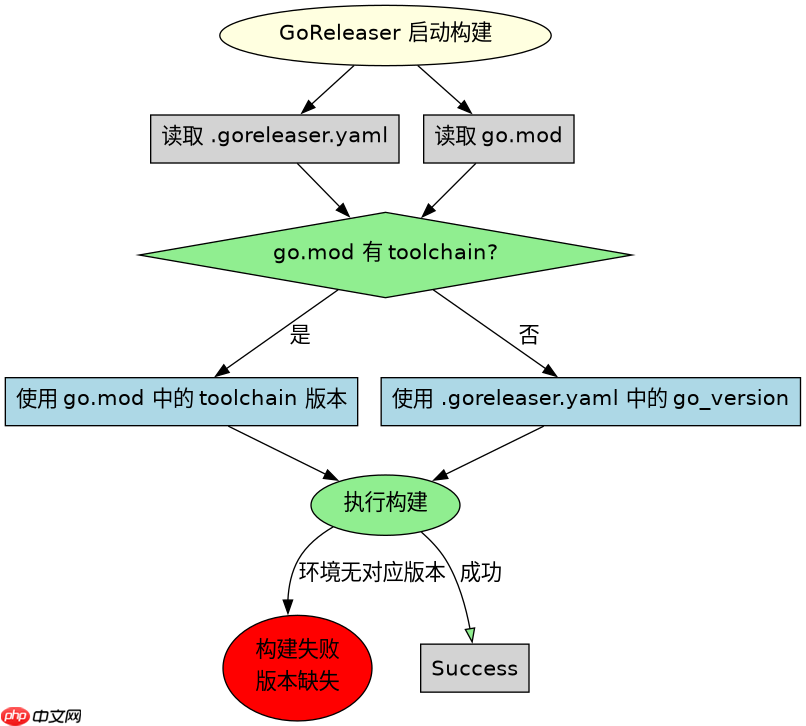
从 Go 1.21 开始,`go.mod` 文件支持 `toolchain` 指令来锁定具体的 Go 工具链版本。当 `go.mod` 中包含类似 `toolchain go1.21.3` 的声明时,GoReleaser 的行为会有所不同。它会优先尊重 `go.mod` 中的 `toolchain` 指令,而不是 `.goreleaser.yaml` 中的 `go_version`(如果两者冲突)。这意味着,即使你在 `.goreleaser.yaml` 中指定了其他版本,只要 `go.mod` 锁定了特定工具链,GoReleaser 就会尝试使用该锁定版本。如果构建环境中没有该版本且未启用自动下载,可能会再次出现版本错误。因此,在使用 `toolchain` 时,确保 CI 环境能够识别并处理这种锁定机制至关重要,通常建议保持 `.goreleaser.yaml` 中的 `go_version` 与 `go.mod` 中的 `toolchain` 版本一致,以避免混淆。