如何验证 Nginx 请求头透传结果
通过配置 $http_ 变量并输出到日志或响应体来验证。在 location 块中使用 add_header 将 $http_x_custom_id 等变量写入响应头,随后使用 curl -v 检查返回的 x-custom-id 字段是否与原始请求一致。

如何验证上游服务是否收到透传的头
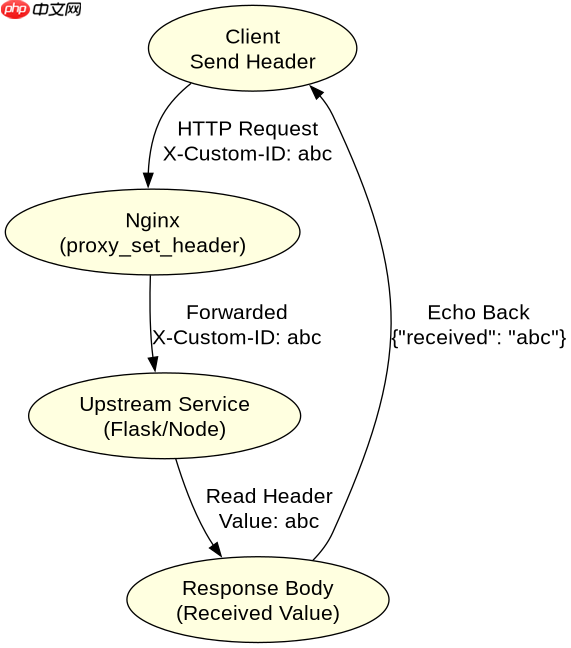
利用 Nginx 的 proxy_set_header 指令确保头被转发,并在上游服务(如 Python Flask)中读取该头并回显。通过对比客户端发送的值与服务器接收到的值,确认透传链路完整。
当请求头包含特殊字符时透传结果如何
Nginx 默认会过滤掉包含非法字符的请求头,导致 $http_ 变量为空。若需透传,需使用 more_set_headers 模块或调整 underscores_in_headers 设置,否则透传结果为空字符串。
以下是用于验证透传的 Nginx 配置片段:

Nginx 配置与调优技能。支持反向代理、负载均衡、SSL/TLS 终止、高性能静态资源服务。触发词:Nginx 配置、代理设置、SSL 证书、性能调优、负载均衡、反向代理。
server {
    listen 80;
    server_name localhost;

    location /test {
        # 将自定义请求头 X-Custom-ID 添加到响应头中
        add_header X-Custom-Id $http_x_custom_id always;

        # 转发给上游服务
        proxy_pass http://127.0.0.1:5000;
    }
}
对应的 Python 验证脚本:
from flask import Flask, request, jsonify

app = Flask(__name__)

@app.route('/test', methods=['GET'])
def test():
    custom_id = request.headers.get('X-Custom-ID')
    return jsonify({
        'received': custom_id,
        'status': 'ok' if custom_id else 'missing'
    })

if __name__ == '__main__':
    app.run(port=5000)
预期结果:当发送 curl -H "X-Custom-ID: 12345" http://localhost/test 时,响应体应包含 {"received": "12345", "status": "ok"},且响应头中包含 X-Custom-Id: 12345。
若未配置 proxy_set_header,Nginx 默认只转发标准头。对于非标准头,必须显式声明:proxy_set_header X-Custom-ID $http_x_custom_id;。否则上游服务收到的值为 None。
关于特殊字符,RFC 7230 规定 HTTP 头字段值不能包含控制字符。Nginx 内部实现中,若头名或值包含非法字符,可能被丢弃。此时 $http_x_custom_id 将为空,导致透传失败。