starlette 中设置响应 content-type 的最直接方式是实例化 starlette.responses.response 或其子类时传入 media_type 参数。该参数会自动映射为 http 响应头中的 content-type,开发者只需在返回对象时指定即可,无需手动操作头部字典。

如何自定义 Response 类以统一处理特定格式
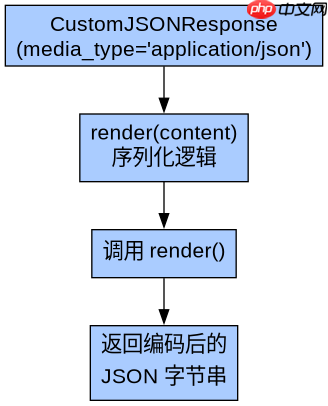
通过继承 starlette.responses.Response 并重写 render 方法,可以封装特定的序列化逻辑并固定 media_type。这种方式适合需要批量返回相同类型数据(如 JSON)的场景,调用者只需关注数据内容,无需重复指定媒体类型。

Starlette 1.5.1
下载
Starlette 1.5.1 是轻量级 Python ASGI 框架与工具集,提供路由、请求响应、中间件、WebSocket 和后台任务等组件,适合构建异步 Web 服务。本下载为官方 PyPI 通用 wheel 包,可使用 pip 安装,并由包管理器处理依赖;运行应用时还需配置 ASGI 服务器。
from starlette.applications import Starlette
from starlette.responses import Response
from starlette.routing import Route
import json

class CustomJSONResponse(Response):
    media_type = 'application/json'

    def render(self, content):
        return json.dumps(content).encode('utf-8')

async def homepage(request):
    data = {'status': 'ok', 'message': 'Hello World'}
    return CustomJSONResponse(data)

app = Starlette(routes=[Route('/', homepage)])
如何在中间件中修改已有响应的 Content-Type
当使用中间件拦截请求或响应时,可以直接修改 response.headers 字典中的 content-type 键值对。这种方法适用于需要在路由执行后动态调整内容类型的场景,例如根据客户端请求头强制覆盖默认类型。

from starlette.middleware.base import BaseHTTPMiddleware
from starlette.requests import Request
from starlette.responses import Response

class ContentTypeOverrideMiddleware(BaseHTTPMiddleware):
    async def dispatch(self, request: Request, call_next):
        response = await call_next(request)
        if response.status_code == 200:
            response.headers['content-type'] = 'text/plain; charset=utf-8'
        return response

# 假设 app 已定义
# app.add_middleware(ContentTypeOverrideMiddleware)
未指定 media_type 时的默认行为是什么
如果未显式指定 media_type,Starlette 的基类 Response 默认使用 text/plain。这意味着即使返回的是复杂对象或字节流,只要没有设置媒体类型,客户端都会将其视为纯文本处理,这可能导致解析错误。因此,始终建议显式设置 media_type 以确保兼容性。