使用pillow库的image类加载图片,调用resize方法配合lanczos重采样算法进行压缩,并通过os模块遍历目录批量处理。具体做法是设定目标宽度和质量参数,将处理后的图像保存到新路径,同时利用字符串操作或正则表达式生成新的文件名。

如何指定压缩尺寸和质量参数
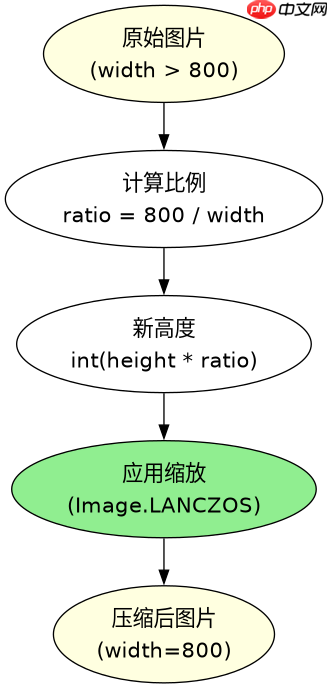
通过设置max_size元组限制最大宽高,并使用save方法的quality参数控制JPEG压缩率。例如将宽度限制为800像素,质量设为75,可在保持视觉清晰度的同时显著减小文件体积。
from PIL import Image
import os

def compress_image(input_path, output_path, max_width=800, quality=75):
    with Image.open(input_path) as img:
        # 仅当图片宽度超过限制时才调整大小
        if img.width > max_width:
            ratio = max_width / img.width
            new_height = int(img.height * ratio)
            img = img.resize((max_width, new_height), Image.LANCZOS)

        # 转换为RGB以支持JPEG格式(处理RGBA透明通道)
        if img.mode in ('RGBA', 'P'):
            img = img.convert('RGB')

        img.save(output_path, 'JPEG', quality=quality)

# 示例调用
compress_image('product_001.png', 'output/product_001.jpg')
如何实现批量遍历与自动重命名
结合os.listdir获取目录下所有图片文件,过滤后缀名后逐个处理。重命名逻辑可基于原始文件名添加前缀或后缀,例如将img.png变为thumb_img.jpg,确保输出路径唯一且符合规范。

Nodriver 异步无检测 Chrome 浏览器自动化 Python
下载
Nodriver是Undetected-Chromedriver的官方继承者,提供异步浏览器自动化功能,可直接与Chrome DevTools Protocol通信,无需Selenium或WebDriver依赖。专为规避反机器人系统(包括Cloudflare和Imperva)的隐蔽网络自动化而构建。
立即学习“Python免费学习笔记(深入)”;

import os
from PIL import Image

def batch_process(source_dir, dest_dir, prefix='thumb_'):
    os.makedirs(dest_dir, exist_ok=True)
    for filename in os.listdir(source_dir):
        if filename.lower().endswith(('.png', '.jpg', '.jpeg')):
            src_path = os.path.join(source_dir, filename)
            name, ext = os.path.splitext(filename)
            # 新文件名:前缀 + 原名称 + .jpg
            new_filename = f"{prefix}{name}.jpg"
            dst_path = os.path.join(dest_dir, new_filename)

            try:
                with Image.open(src_path) as img:
                    if img.width > 800:
                        ratio = 800 / img.width
                        img = img.resize((800, int(img.height * ratio)), Image.LANCZOS)
                    if img.mode in ('RGBA', 'P'):
                        img = img.convert('RGB')
                    img.save(dst_path, 'JPEG', quality=75)
                    print(f"Processed: {filename} -> {new_filename}")
            except Exception as e:
                print(f"Error processing {filename}: {e}")

batch_process('./input_images', './output_images')
如何处理非JPEG格式的透明通道问题
Pillow在保存JPEG时不支持Alpha通道,若输入包含透明度(如PNG),直接保存会报错。需在保存前调用convert('RGB')丢弃透明信息,或用白色背景合成,避免程序中断。