








在python中使用tortoise orm连接postgresql,核心是配置数据库url并初始化实例。你需要安装 tortoise-orm 和 asyncpg,构建形如 postgres://user:password@host:port/dbname 的连接字符串,并在应用启动时调用 tortoise.init() 传入该url及模型列表。关闭时调用 tortoise.close_connections() 即可安全断开。

如何正确构建PostgreSQL连接URL并处理认证信息?
连接URL必须包含协议、用户名、密码、主机、端口和数据库名。若密码含特殊字符需进行URL编码。推荐使用环境变量存储敏感信息以避免硬编码。示例中假设用户为 admin,密码为 secret,主机为 localhost,端口为 5432,数据库名为 mydb。
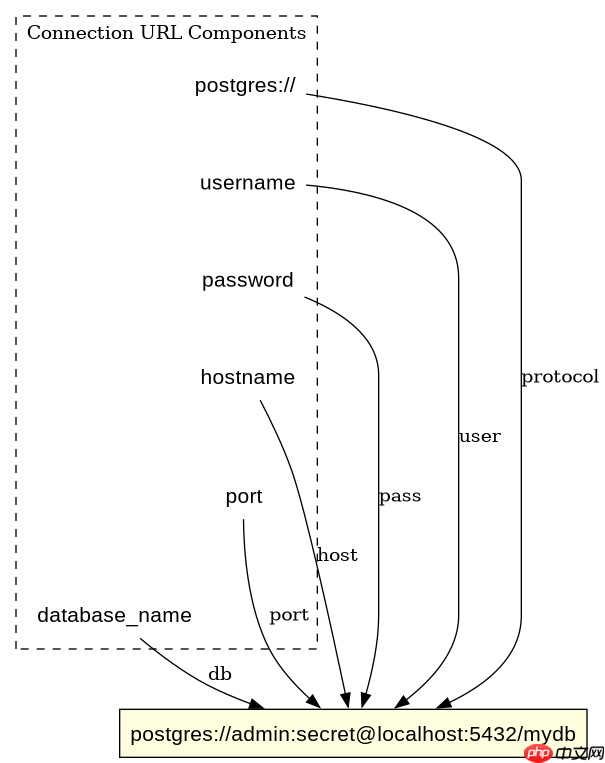
import os
from tortoise import Tortoise, run_async

# 模拟从环境变量获取配置
DB_URL = "postgres://admin:secret@localhost:5432/mydb"

async def main():
    await Tortoise.init(
        db_url=DB_URL,
        modules={"models": ["__main__"]} # 假设当前文件包含模型定义
    )
    print("Connected to PostgreSQL")
    await Tortoise.close_connections()

run_async(main())
初始化时需要指定哪些关键参数以确保模型注册?
Tortoise.init() 的 modules 参数至关重要,它告诉ORM哪些模块包含模型类。通常传入一个字典,键为别名(如 models),值为包含模型类的模块列表。若未正确注册,执行 Tortoise.generate_schemas() 时将找不到表定义。此外,可设置 use_tz 处理时区,默认开启。确保所有模型在初始化前已导入或可被解析。

Nodriver是Undetected-Chromedriver的官方继承者,提供异步浏览器自动化功能,可直接与Chrome DevTools Protocol通信,无需Selenium或WebDriver依赖。专为规避反机器人系统(包括Cloudflare和Imperva)的隐蔽网络自动化而构建。
立即学习“Python免费学习笔记(深入)”;

from tortoise import Tortoise
from tortoise.models import Model
from tortoise.fields import IntField, CharField

class User(Model):
    id = IntField(pk=True)
    name = CharField(max_length=50)

# 注意:在实际项目中,modules应指向包含User定义的模块路径
# 这里为了演示,假设当前模块即为目标模块
DB_URL = "postgres://admin:secret@localhost:5432/mydb"

async def init_db():
    await Tortoise.init(
        db_url=DB_URL,
        modules={"models": ["__main__"]}
    )
    # 生成表结构
    await Tortoise.generate_schemas(safe=True)
    print("Schemas generated")
    await Tortoise.close_connections()

if __name__ == "__main__":
    import asyncio
    asyncio.run(init_db())
当数据库连接失败时,Tortoise ORM会抛出什么异常以及如何捕获?
连接失败通常由网络问题、凭证错误或数据库未启动引起。Tortoise ORM底层使用 asyncpg,因此会抛出 asyncpg 相关的异常,如 asyncpg.PostgresConnectionError 或 asyncpg.InvalidAuthorizationSpecificationError。这些异常继承自 Exception,可直接用 try...except 捕获。建议捕获通用 Exception 以涵盖所有连接层错误,并记录日志以便排查。避免静默忽略,应明确处理重连或退出逻辑。

















