解决旧版浏览器对css clip-path 属性不支持的问题,核心策略是使用 polyfill 库将 css 声明转换为 javascript 绘制的 svg 或 canvas 元素。具体做法是引入如 css-clip-path-polyfill 这样的脚本,它会在检测到不支持该属性的环境中自动拦截样式并生成兼容的 dom 结构。这样做能让现代 css 语法在 ie11 等旧浏览器中也能正常显示裁剪效果,同时保持代码的简洁性。

clip-path: polygon() 在不同环境下的渲染差异是什么
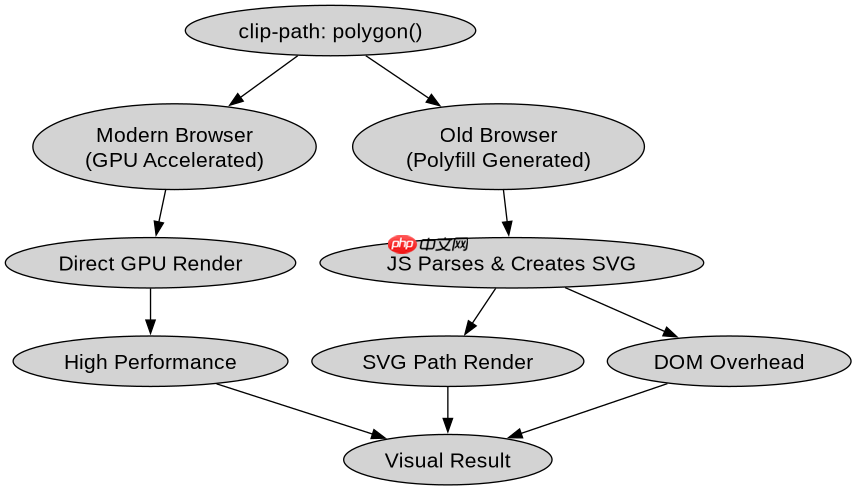
当使用多边形裁剪时,现代浏览器直接通过 GPU 加速渲染,而旧版浏览器通过 Polyfill 生成的 SVG 路径进行绘制。这种差异主要体现在性能开销和边缘抗锯齿上,Polyfill 方案会增加 DOM 节点数量并消耗更多 CPU 资源,但视觉效果基本一致。
<!DOCTYPE html>
<html lang="en">
<head>
    <meta charset="UTF-8">
    <title>Clip-Path Polyfill Demo</title>
    <style>
        .box {
            width: 300px;
            height: 300px;
            background-color: #3498db;
            /* 现代浏览器直接使用 clip-path */
            clip-path: polygon(50% 0%, 100% 50%, 50% 100%, 0% 50%);
        }
    </style>
</head>
<body>
    <div class="box"></div>
    <!-- 引入 polyfill 脚本 -->
    <script src="https://cdnjs.cloudflare.com/ajax/libs/css-clip-path-polyfill/1.0.0/clip-path-polyfill.min.js"></script>
    <script>
        // 初始化 polyfill
        if (typeof ClipPathPolyfill !== 'undefined') {
            ClipPathPolyfill.init();
        }
    </script>
</body>
</html>
如何检测浏览器是否支持 clip-path 并加载对应资源
可以通过检测 CSS.supports API 或检查 document.documentElement.style.clipPath 是否存在来判断支持情况。如果检测到不支持,则动态加载 Polyfill 脚本或应用降级样式。这种方法避免了在不需要的现代浏览器中加载额外代码,提高了页面加载效率。

Nodriver是Undetected-Chromedriver的官方继承者,提供异步浏览器自动化功能,可直接与Chrome DevTools Protocol通信,无需Selenium或WebDriver依赖。专为规避反机器人系统(包括Cloudflare和Imperva)的隐蔽网络自动化而构建。
立即学习“前端免费学习笔记(深入)”;

<script>
    function supportsClipPath() {
        return 'clipPath' in document.documentElement.style ||
               'clip-path' in document.documentElement.style;
    }

    if (!supportsClipPath()) {
        var script = document.createElement('script');
        script.src = 'path/to/clip-path-polyfill.min.js';
        document.head.appendChild(script);
    }
</script>
Polyfill 生成的 SVG 元素对父容器溢出隐藏的影响
Polyfill 通常会在目标元素内部或外部插入一个 SVG 元素来模拟裁剪效果。这个生成的 SVG 元素可能会受到父容器 overflow: hidden 的影响,导致裁剪区域显示异常。因此,在使用 Polyfill 时,需要确保父容器不会意外截断生成的 SVG 元素,或者调整 Polyfill 的配置以正确处理层级关系。