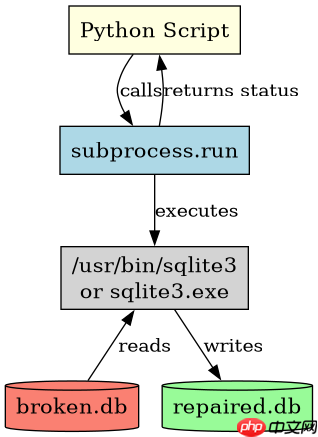
使用python自动化修复损坏的sqlite数据库文件,最直接且可靠的方法是调用系统自带的`sqlite3`命令行工具执行`repair database`命令。通过python的`subprocess`模块可以封装这一过程,自动读取损坏文件、生成修复后的新文件并验证完整性。该方案无需安装额外的第三方库,适用于大多数标准的sqlite损坏场景,如页校验失败或截断问题。

如何调用系统sqlite3工具进行修复
直接调用操作系统的`sqlite3`可执行文件是处理严重损坏的首选策略,因为Python内置的`sqlite3`模块在遇到底层I/O错误时通常会抛出异常而非尝试自动恢复。利用`subprocess.run`可以精确控制输入输出流,将损坏的数据库作为源文件传入,并通过重定向或参数指定输出路径。这种方法能绕过Python层的限制,直接利用SQLite引擎底层的修复机制。
import subprocess
import os

def repair_sqlite_db(input_path, output_path):
    # 检查文件是否存在
    if not os.path.exists(input_path):
        raise FileNotFoundError(f"Source DB {input_path} not found")

    # 构建命令: sqlite3 <source> ".repair <dest>"
    # 注意:不同版本的sqlite3命令行工具语法可能略有差异
    # 通用方式是通过管道发送命令
    cmd = [
        'sqlite3', input_path,
        f".restore {output_path}", # 部分版本支持.restore
        '.quit'
    ]

    try:
        # 尝试使用.backup命令,这是更通用的修复/复制手段
        # 如果.repair不可用,.backup可以将数据复制到新文件
        result = subprocess.run(
            ['sqlite3', input_path, '.backup main', output_path],
            capture_output=True,
            text=True,
            check=False
        )

        if result.returncode != 0:
            print(f"Repair failed: {result.stderr}")
            return False

        # 验证新文件
        verify_cmd = ['sqlite3', output_path, '.tables']
        verify_result = subprocess.run(verify_cmd, capture_output=True, text=True)

        if verify_result.returncode == 0:
            print(f"Successfully repaired to {output_path}")
            return True
        else:
            print("Verification failed")
            return False

    except Exception as e:
        print(f"Error during repair: {e}")
        return False

# 使用示例
if __name__ == '__main__':
    repair_sqlite_db('broken.db', 'repaired.db')
如何处理无法通过命令行修复的轻微损坏
当`sqlite3`命令行工具报告“database disk image is malformed”且`.backup`也失败时,可能需要更精细的处理。此时可以尝试使用`PRAGMA integrity_check`先诊断具体错误,或者使用第三方库如`sqlitedict`或手动解析B-Tree结构。但在纯标准库环境下,最稳妥的降级策略是尝试只读模式连接以提取可用数据,然后写入新的数据库文件。这虽然不能修复索引或元数据,但能抢救大部分用户数据。

UpdateStock MCP 服务技能 —— 通过 stdio 模式调用 UpdateStock 脚本, 提供 A 股 DuckDB 数据库管理功能:创建数据库、全量/增量更新股票数据、查询股票行情。 设计的数据库方案兼容 QuantAll(全A解析)计算引擎。 触发条件:用户提到"UpdateStock"、"创建股票数据库"、"更新股票数据"、"获取股票数据"等。
立即学习“Python免费学习笔记(深入)”;

import sqlite3
import shutil

def extract_data_from_broken_db(source_path, target_path):
    """
    尝试从严重损坏的数据库中读取数据并迁移到新数据库
    """
    conn_src = None
    conn_dst = None
    try:
        # 以只读模式打开,避免进一步损坏
        conn_src = sqlite3.connect(f'file:{source_path}?mode=ro', uri=True)
        conn_dst = sqlite3.connect(target_path)

        cursor_src = conn_src.cursor()
        cursor_dst = conn_dst.cursor()

        # 获取所有表名
        cursor_src.execute("SELECT name FROM sqlite_master WHERE type='table';")
        tables = [row[0] for row in cursor_src.fetchall()]

        for table_name in tables:
            if table_name.startswith('sqlite_'): continue

            try:
                # 获取表结构
                cursor_src.execute(f"SELECT sql FROM sqlite_master WHERE type='table' AND name='{table_name}';")
                create_sql = cursor_src.fetchone()[0]

                if create_sql:
                    cursor_dst.execute(create_sql)

                    # 尝试读取数据
                    cursor_src.execute(f"SELECT * FROM {table_name};")
                    rows = cursor_src.fetchall()

                    # 获取列名用于插入
                    cursor_src.execute(f"PRAGMA table_info({table_name});")
                    columns = [col[1] for col in cursor_src.fetchall()]
                    placeholders = ','.join(['?' for _ in columns])
                    insert_sql = f"INSERT INTO {table_name} VALUES ({placeholders});"

                    cursor_dst.executemany(insert_sql, rows)
                    print(f"Migrated table {table_name}: {len(rows)} rows")

            except Exception as e:
                print(f"Failed to migrate table {table_name}: {e}")
                continue

        conn_dst.commit()
        print("Data extraction completed.")
        return True

    except Exception as e:
        print(f"Extraction error: {e}")
        return False
    finally:
        if conn_src: conn_src.close()
        if conn_dst: conn_dst.close()

# 使用示例
extract_data_from_broken_db('broken.db', 'rescued.db')
修复后如何验证数据库完整性
在完成修复或数据迁移后,必须对新生成的数据库文件进行完整性验证,以确保没有静默数据丢失或结构不一致。可以通过运行`PRAGMA integrity_check`来全面扫描数据库文件,该命令会检查所有页、索引和引用一致性。如果返回结果为`ok`,则表明数据库结构完整;若返回具体错误行号或描述,则说明仍有未解决的损坏。此外,还可以对比修复前后的行数或哈希值,确保关键数据已正确保留。