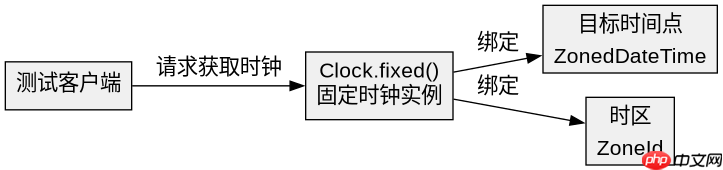
使用 clock.fixed() 方法可以创建一个固定时间的时钟对象,从而在测试中模拟特定的时间点。只需传入一个固定的 zoneddatetime 实例和对应的时区,即可替换掉系统默认时钟,确保每次运行测试时获取的时间都是预期值。
如何创建并注入固定时钟到业务逻辑中
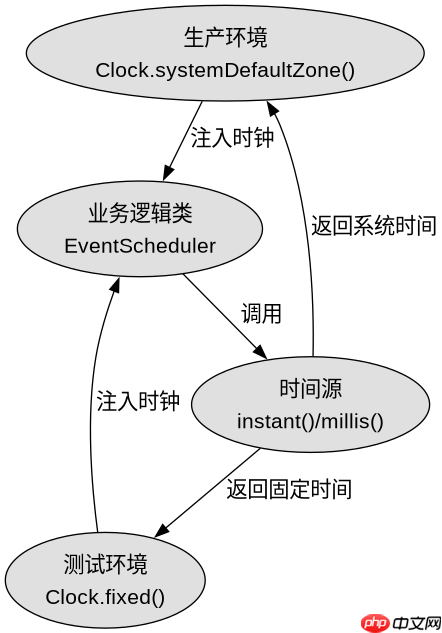
通过依赖注入将 Clock 接口传入业务类,并在需要获取当前时间时调用 clock.instant() 或 clock.millis()。这样在单元测试中就可以传入由 Clock.fixed() 生成的实例,而生产环境则使用 Clock.systemDefaultZone()。
import java.time.Clock;
import java.time.ZoneId;
import java.time.ZonedDateTime;

public class EventScheduler {
    private final Clock clock;

    public EventScheduler(Clock clock) {
        this.clock = clock;
    }

    public String getCurrentTimestamp() {
        return ZonedDateTime.ofInstant(clock.instant(), clock.getZone())
                .toString();
    }
}
上述代码展示了 EventScheduler 类如何通过构造函数接收 Clock 实例。在测试中,我们可以构造一个固定的时间点,例如 2023-01-01T12:00:00,并将其注入到 EventScheduler 中。当调用 getCurrentTimestamp() 时,返回的结果将始终是该固定时间,而不是系统当前时间。这种方法避免了因时间变化导致的测试不稳定问题。
固定时钟在不同时区下的行为差异
固定时钟不仅指定了具体的时间点,还绑定了时区信息。如果测试场景涉及跨时区操作,必须确保传入的 ZonedDateTime 包含正确的时区,或者在创建固定时钟时显式指定时区。否则,不同环境的时区设置可能导致测试结果不一致。

import org.junit.jupiter.api.Test;
import java.time.Clock;
import java.time.ZoneId;
import java.time.ZonedDateTime;

import static org.junit.jupiter.api.Assertions.assertEquals;

public class EventSchedulerTest {

    @Test
    void testGetCurrentTimestampWithFixedClock() {
        // 定义固定时间:2023年1月1日 12:00:00 UTC
        ZonedDateTime fixedTime = ZonedDateTime.of(2023, 1, 1, 12, 0, 0, 0, ZoneId.of("UTC"));
        Clock fixedClock = Clock.fixed(fixedTime.toInstant(), ZoneId.of("UTC"));

        EventScheduler scheduler = new EventScheduler(fixedClock);
        String result = scheduler.getCurrentTimestamp();

        assertEquals("2023-01-01T12:00:00Z[UTC]", result);
    }
}
在上面的测试用例中,我们使用了 Clock.fixed() 创建了一个基于 UTC 时区的固定时钟。测试断言验证了 getCurrentTimestamp() 返回的值是否与预期的固定时间字符串完全匹配。如果我们将时区改为 Asia/Shanghai,则需要相应调整 ZonedDateTime 的构建方式,以确保时间转换正确。这种机制使得开发者能够精确控制测试中的时间变量,提高测试的可预测性和可靠性。
固定时钟在定时任务触发判断中的应用
在实现定时任务或过期检查逻辑时,通常需要将当前时间与某个截止时间进行比较。使用固定时钟可以模拟“过去”、“现在”或“未来”的时间点,从而验证任务是否被正确触发或跳过。例如,若业务逻辑要求仅在时间到达特定阈值时才执行操作,固定时钟能直接提供该阈值时刻,无需等待真实时间流逝。