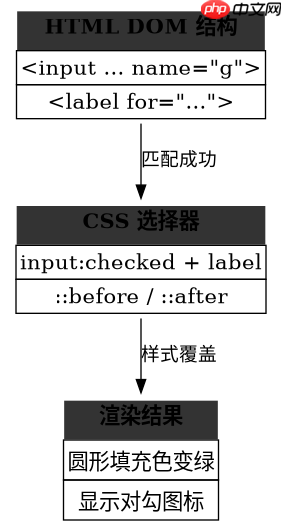
在css中给自定义单选框实现选中态,核心做法是隐藏原生并利用相邻兄弟选择器+ label根据:checked状态改变样式。具体操作是将input设为透明或绝对定位移出视口,当input:checked + label匹配时,通过修改label的背景色、边框颜色或伪元素内容来反馈选中状态。

:checked与+ label的选择逻辑是什么
该选择器利用DOM结构中的相邻关系,确保只有紧跟在选中单选框后的标签才会被触发样式变化。这种机制依赖于HTML标记的严格顺序,即input必须直接位于label之前且中间无其他同级元素干扰。
<style>
  .custom-radio {
    display: none;
  }
  .custom-radio + label {
    padding-left: 24px;
    position: relative;
    cursor: pointer;
    font-size: 16px;
  }
  /* 未选中时的默认样式 */
  .custom-radio + label::before {
    content: "";
    position: absolute;
    left: 0;
    top: 2px;
    width: 16px;
    height: 16px;
    border: 2px solid #ccc;
    border-radius: 50%;
    background-color: white;
    transition: all 0.2s;
  }
  /* 选中时的样式 */
  .custom-radio:checked + label::before {
    border-color: #007bff;
    background-color: #007bff;
  }
  /* 选中后内部的小圆点 */
  .custom-radio:checked + label::after {
    content: "";
    position: absolute;
    left: 4px;
    top: 6px;
    width: 8px;
    height: 4px;
    border: 2px solid white;
    border-top: none;
    border-right: none;
    transform: rotate(-45deg);
  }
</style>

<div class="radio-group">
  <input type="radio" id="opt1" name="group1" class="custom-radio" checked>
  <label for="opt1">选项一</label>

  <input type="radio" id="opt2" name="group1" class="custom-radio">
  <label for="opt2">选项二</label>
</div>
如何确保同一组单选框互斥且样式同步
互斥性由原生input的name属性保证,而样式同步则完全依赖CSS对每个独立input:checked + label组合的处理。只要HTML结构中name一致,浏览器会自动处理点击切换,CSS只需关注单个状态的视觉呈现即可。

htmlq 命令行 HTML 内容提取器,支持 CSS 选择器
下载
htmlq 是一个命令行工具,使用 CSS 选择器从 HTML 中提取内容,相当于 jq 的 HTML 版本。该工具使用 Rust 编写,允许你通过 CSS 选择器将 HTML 管道化,直接从终端提取文本、属性和结构化内容。
立即学习“前端免费学习笔记(深入)”;

<style>
  /* 复用之前的样式定义 */
  .custom-radio { display: none; }
  .custom-radio + label {
    padding-left: 24px;
    position: relative;
    cursor: pointer;
    margin-bottom: 10px;
    display: block;
  }
  .custom-radio + label::before {
    content: "";
    position: absolute;
    left: 0;
    top: 2px;
    width: 16px;
    height: 16px;
    border: 2px solid #999;
    border-radius: 50%;
    background: #fff;
  }
  .custom-radio:checked + label::before {
    border-color: #28a745;
    background: #28a745;
  }
  .custom-radio:checked + label::after {
    content: "";
    position: absolute;
    left: 4px;
    top: 6px;
    width: 8px;
    height: 4px;
    border: 2px solid white;
    border-top: none;
    border-right: none;
    transform: rotate(-45deg);
  }
</style>

<form>
  <input type="radio" id="status_a" name="status" class="custom-radio">
  <label for="status_a">激活</label>

  <input type="radio" id="status_b" name="status" class="custom-radio" checked>
  <label for="status_b">禁用</label>

  <input type="radio" id="status_c" name="status" class="custom-radio">
  <label for="status_c">未知</label>
</form>如果input和label之间有其他元素会怎样
如果两者之间存在其他同级元素,相邻兄弟选择器+将失效,导致选中态样式无法应用到标签上。此时需要改用通用兄弟选择器~或者调整HTML结构,确保input紧邻label。