在css中,使用 caret-color 属性可以直接改变输入框内光标(插入符)的颜色。只需选中目标元素并设置该属性的颜色值即可,例如 input { caret-color: red; }。这不会影响文本颜色,仅改变光标的视觉表现。

如何为特定类名的输入框设置蓝色光标
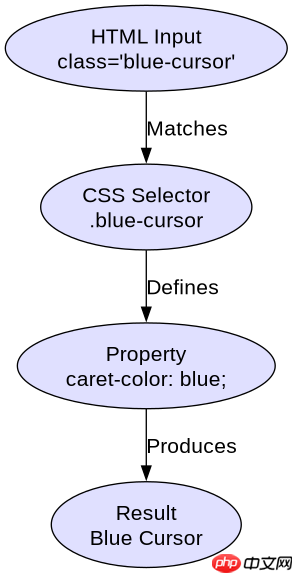
要为特定类名的输入框设置蓝色光标,只需在CSS选择器中指定该类名并应用 caret-color 属性。例如,对于类名为 .blue-cursor 的输入框,可以编写如下CSS规则:.blue-cursor { caret-color: blue; }。这将使该类下的所有输入框的光标变为蓝色。
<!DOCTYPE html>
<html lang="en">
<head>
    <meta charset="UTF-8">
    <title>Caret Color Example</>
    <style>
        .blue-cursor {
            caret-color: blue;
        }
    </style>
</head>
<body>
    <input type="text" class="blue-cursor" placeholder="Type here...">
</body>
</html>
如何为所有输入框设置绿色光标
要为所有输入框设置绿色光标,只需在全局选择器 input 上应用 caret-color 属性。例如,可以编写如下CSS规则:input { caret-color: green; }。这将使页面上所有输入框的光标变为绿色。

htmlq 命令行 HTML 内容提取器,支持 CSS 选择器
下载
htmlq 是一个命令行工具,使用 CSS 选择器从 HTML 中提取内容,相当于 jq 的 HTML 版本。该工具使用 Rust 编写,允许你通过 CSS 选择器将 HTML 管道化,直接从终端提取文本、属性和结构化内容。
立即学习“前端免费学习笔记(深入)”;

<!DOCTYPE html>
<html lang="en">
<head>
    <meta charset="UTF-8">
    <title>Global Caret Color Example</>
    <style>
        input {
            caret-color: green;
        }
    </style>
</head>
<body>
    <input type="text" placeholder="Type here...">
    <input type="password" placeholder="Password...">
</body>
</html>
当输入框被禁用时,光标颜色会怎样变化?
当输入框被禁用时,浏览器通常会忽略 caret-color 属性,因为禁用的输入框不允许用户交互,包括移动光标。因此,即使设置了 caret-color,禁用的输入框也不会显示自定义颜色的光标。