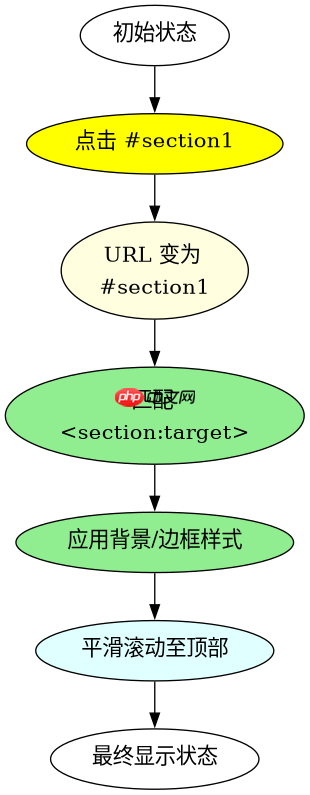
利用 :target 伪类实现平滑滚动导航,核心在于 css 的 scroll-behavior: smooth; 属性与锚点链接的配合。只需在根元素或 html 标签上设置该属性,浏览器会自动处理点击链接后的平滑过渡效果,无需 javascript 介入。这种方法适用于单页应用中的目录跳转,能显著提升用户体验。

:target 如何触发样式变化以高亮当前章节
当用户点击导航链接时,URL 的哈希部分会变为对应的 ID,此时 :target 选择器会匹配到目标元素。通过为 :target 状态下的元素定义特定的样式(如背景色、边框或阴影),可以直观地指示用户当前所在的位置。这种机制是纯 CSS 实现的,依赖于浏览器的原生支持。
<!DOCTYPE html>
<html lang="zh-CN">
<head>
    <meta charset="UTF-8">
    <title>CSS3 :target Smooth Scroll</title>
    <style>
        /* 启用平滑滚动 */
        html {
            scroll-behavior: smooth;
        }

        /* 基础布局样式 */
        body {
            font-family: sans-serif;
            line-height: 1.6;
            margin: 0;
            padding: 20px;
        }

        nav {
            position: fixed;
            top: 0;
            left: 0;
            width: 200px;
            height: 100vh;
            background: #f4f4f4;
            padding: 20px;
            box-sizing: border-box;
        }

        nav a {
            display: block;
            margin-bottom: 10px;
            text-decoration: none;
            color: #333;
        }

        section {
            margin-left: 220px;
            padding: 20px;
            min-height: 50vh;
            border-bottom: 1px solid #ddd;
        }

        /* :target 样式:高亮当前激活的部分 */
        section:target {
            background-color: #e8f4fd;
            border-left: 5px solid #007bff;
            padding-left: 15px;
        }
    </style>
</head>
<body>
    <nav>
        <a href="#section1">第一章</a>
        <a href="#section2">第二章</a>
        <a href="#section3">第三章</a>
    </nav>

    <section id="section1">
        <h2>第一章内容</h2>
        <p>这里是第一章的详细文本...</p><p><span>立即学习</span>“<a href="https://pan.quark.cn/s/cb6835dc7db1" style="text-decoration: underline !important; color: blue; font-weight: bolder;" rel="nofollow" target="_blank">前端免费学习笔记(深入)</a>”;</p>
    </section>

    <section id="section2">
        <h2>第二章内容</h2>
        <p>这里是第二章的详细文本...</p><div class="aritcle_card flexRow">
                                                        <div class="artcardd flexRow">
                                                                <a class="aritcle_card_img" href="/xiazai/skill13837" title="htmlq 命令行 HTML 内容提取器,支持 CSS 选择器"><img
                                                                                src="https://img.php.cn/upload/skill/001/246/273/6adaf20d3191a227.jpg" alt="htmlq 命令行 HTML 内容提取器,支持 CSS 选择器" ></a>
                                                                <div class="aritcle_card_info flexColumn">
                                                                        <a href="/xiazai/skill13837" title="htmlq 命令行 HTML 内容提取器,支持 CSS 选择器">htmlq 命令行 HTML 内容提取器,支持 CSS 选择器</a>
                                                                        <p>htmlq 是一个命令行工具,使用 CSS 选择器从 HTML 中提取内容,相当于 jq 的 HTML 版本。该工具使用 Rust 编写,允许你通过 CSS 选择器将 HTML 管道化,直接从终端提取文本、属性和结构化内容。</p>
                                                                </div>
                                                                <a href="/xiazai/skill13837" title="htmlq 命令行 HTML 内容提取器,支持 CSS 选择器" class="aritcle_card_btn flexRow flexcenter"><b></b><span>下载</span> </a>
                                                        </div>
                                                </div>
    </section>

    <section id="section3">
        <h2>第三章内容</h2>
        <p>这里是第三章的详细文本...</p>
    </section>
</body>
</html>
运行上述代码并点击导航链接,页面会平滑滚动至对应章节,同时该章节背景变为浅蓝色并带有左侧蓝色边框。这验证了 scroll-behavior 和 :target 样式的协同工作。
如何处理 :target 导致的 URL 历史堆栈问题
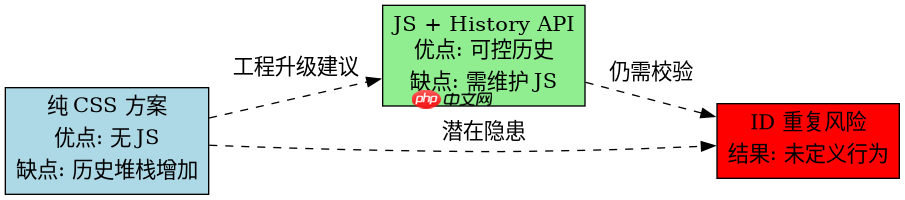
每次点击 :target 链接都会向浏览器历史记录添加一条新记录,导致用户按“后退”按钮时逐段返回而非直接回到顶部。解决此问题的常见做法是使用 JavaScript 拦截点击事件,或使用 history.replaceState() 替换当前状态。另一种更简单的 CSS 方案是利用 scroll-padding-top 避免内容被固定导航栏遮挡,但无法完全消除历史堆栈增长。若需严格管理历史,需结合 JS 进行微调。
// 可选:使用 JS 优化历史行为
const links = document.querySelectorAll('nav a');
links.forEach(link => {
    link.addEventListener('click', function(e) {
        e.preventDefault();
        const targetId = this.getAttribute('href').substring(1);
        const targetElement = document.getElementById(targetId);

        // 平滑滚动
        targetElement.scrollIntoView({ behavior: 'smooth' });

        // 更新 URL 而不添加新历史记录
        history.pushState(null, null, '#' + targetId);
    });
});
这段 JavaScript 代码展示了如何通过 history.pushState 手动控制 URL 变更,从而避免历史堆栈无限增长。虽然题目主要关注 CSS,但在实际工程中,这种混合方案更为稳健。对比纯 CSS 方案,JS 方案提供了对导航行为的更细粒度控制。
当多个元素共享同一 ID 时 :target 的行为表现
HTML 规范要求 ID 在文档中必须唯一。如果多个元素拥有相同的 ID,浏览器在处理 :target 时通常只会匹配第一个出现的元素。这意味着即使点击指向该 ID 的链接,也可能滚动到错误的位置,或者样式只应用于首个匹配项。这种行为是不确定的,且违反了语义化标准,应避免在生产环境中出现重复 ID。