ansible 使用 facts 变量做条件批量变更的核心做法是:在 play 中利用 gather_facts 收集目标主机的系统信息,随后通过 when 指令判断这些事实数据(如 ansible_os_family 或 ansible_distribution)来决定是否执行任务。例如,针对 debian 和 redhat 系列系统分别安装不同包名的软件,只需在任务块中设置对应的条件表达式即可实现自动化适配。

如何根据操作系统类型分发不同的软件包
当需要根据操作系统的发行版来安装特定软件时,可以利用 Ansible 自动收集的 ansible_distribution 事实变量。该变量包含具体的发行版名称,如 Ubuntu、CentOS 等。通过在 apt 或 yum 模块的任务定义中添加 when 语句,可以精确控制哪些主机执行哪些安装命令,从而避免在一个 play 中混合使用不兼容的模块。
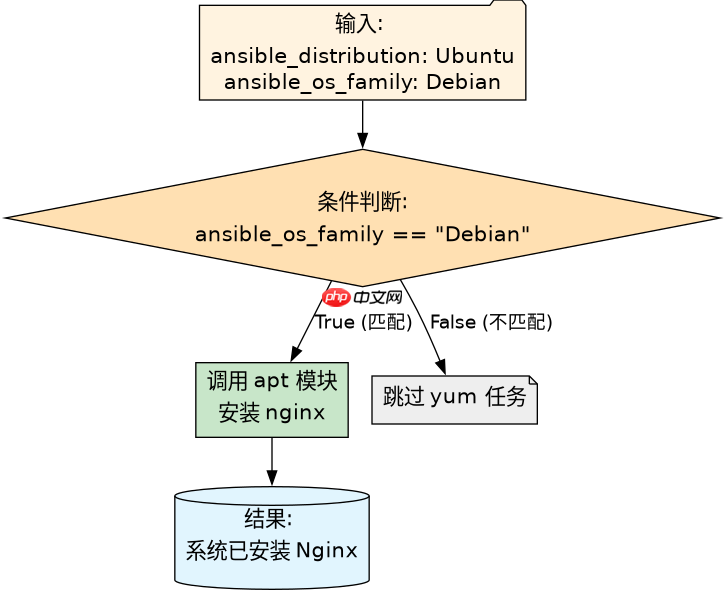
---
- name: Install Nginx based on OS
  hosts: webservers
  gather_facts: yes
  tasks:
    - name: Install Nginx on Debian/Ubuntu
      apt:
        name: nginx
        state: present
      when: ansible_os_family == "Debian"

    - name: Install Nginx on RedHat/CentOS
      yum:
        name: nginx
        state: present
      when: ansible_os_family == "RedHat"
如何利用内存大小决定服务配置参数
除了操作系统类型,硬件资源如内存大小也是常见的条件依据。Ansible 会将物理内存总量存入 ansible_memtotal_mb 变量中。开发者可以在任务中使用 Jinja2 表达式结合逻辑运算符,根据内存阈值动态调整配置文件的内容或服务启动的参数。这种做法允许同一套 Playbook 适应不同规格的服务器,无需为每台机器编写单独的剧本。

---
- name: Configure Database Memory Settings
  hosts: databases
  gather_facts: yes
  tasks:
    - name: Set max connections for large memory servers
      lineinfile:
        path: /etc/db/config.ini
        regexp: '^max_connections'
        line: 'max_connections = 500'
      when: ansible_memtotal_mb > 8192

    - name: Set max connections for small memory servers
      lineinfile:
        path: /etc/db/config.ini
        regexp: '^max_connections'
        line: 'max_connections = 100'
      when: ansible_memtotal_mb <= 8192
当主机缺少 Swap 分区时如何处理磁盘清理任务
在批量变更中,有时需要确保主机具备足够的交换空间以维持稳定性,或者在缺乏交换空间时采取额外措施。可以通过检查 ansible_swaptotal_mb 的值来判断。如果该值为 0,说明主机没有配置 Swap,此时可以触发一个额外的任务来创建临时文件或挂载交换文件,防止因内存溢出导致的服务崩溃。这种基于事实变量的条件判断确保了运维脚本的健壮性。