Apache 中 DocumentRoot 中的软链接指向外部目录报 403 怎么解决
在 apache 配置中,当 documentroot 下的软链接指向外部目录时出现 403 forbidden 错误,通常是因为 apache 的默认访问控制策略阻止了对链接目标目录的读取。要解决这个问题,需要在 apache 配置文件中显式地为该软链接或目标目录添加 require all granted 权限指令,并确保操作系统层面的文件系统权限允许 apache 用户(如 www-data 或 apache)访问该路径。

如何为特定软链接目录配置 Apache 访问权限
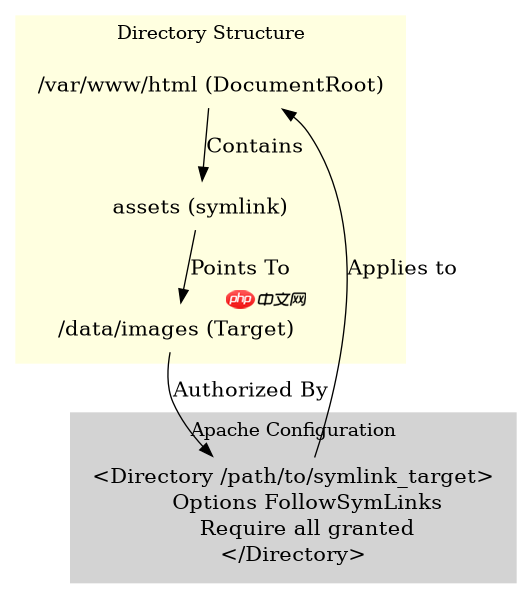
针对具体的软链接路径,最直接有效的解决方法是在 Apache 的主配置文件(如 httpd.conf 或 apache2.conf)或虚拟主机配置块中,使用 <directory></directory> 标签明确授权该链接指向的目标路径。这种方法比修改全局 DocumentRoot 设置更安全,因为它只影响特定的外部资源目录。
<Directory /var/www/html/assets>
    Options FollowSymLinks
    AllowOverride None
    Require all granted
</Directory>
上述配置假设你的 DocumentRoot 是 /var/www/html,而软链接 assets 指向了外部目录 /var/www/html/assets(或者更常见的情况是软链接本身在 DocumentRoot 下,但指向其他位置,此时需对软链接所在路径或目标路径进行授权)。关键指令 Options FollowSymLinks 确保 Apache 会跟随符号链接,而 Require all granted 则允许所有客户端访问。如果软链接指向的是 DocumentRoot 之外的目录,例如 /data/images,则需要对 /data/images 也添加类似的 <directory></directory> 配置块。

检查操作系统文件权限与 SELinux/AppArmor 限制
即使 Apache 配置正确,如果操作系统层面的文件权限或安全模块限制了 Apache 用户的访问,依然会返回 403 错误。需要确认运行 Apache 进程的用户(通常是 www-data、apache 或 nobody)对软链接及其目标目录具有至少“读”和“执行”(对于目录)的权限。此外,在 CentOS/RHEL 等系统中,SELinux 可能会阻止 Apache 访问非标准目录,需要检查并调整 SELinux 上下文。

# 检查当前 Apache 用户
ps aux | grep apache2 # Debian/Ubuntu
ps aux | grep httpd   # CentOS/RHEL

# 假设用户是 www-data,赋予其读取权限
sudo chown -R www-data:www-data /path/to/target/directory
sudo chmod -R 755 /path/to/target/directory

# 如果使用 SELinux,检查上下文
ls -Z /path/to/target/directory
# 如果需要,设置正确的上下文
sudo semanage fcontext -a -t httpd_sys_content_t "/path/to/target/directory(/.*)?"
sudo restorecon -Rv /path/to/target/directory
通过上述命令,可以验证并修正文件所有权和权限。如果使用了 SELinux,semanage 和 restorecon 命令会将目录标记为 Apache 可访问的内容类型。AppArmor(常见于 Ubuntu)也可能需要相应的配置文件更新以允许 Apache 访问特定路径。完成这些步骤后,重启 Apache 服务即可生效。