PHP 8.6以GitHub App身份访问仓库时,先用App私钥签发短期RS256 JWT,再为已安装的installation_id换取安装令牌,最后用该令牌读取授权仓库。App JWT和安装令牌用途不同;示例要求OpenSSL、curl扩展,且App已安装到目标仓库并获得所需读取权限。
用App私钥签发短期JWT
设置gh_app_client_id、gh_installation_id和gh_app_key_file。私钥文件位于web根目录外,仅运行账户可读。jwt的iat略向前调整,exp控制在官方允许的未来10分钟以内;不要通过延长有效期掩盖服务器时钟错误。
<?php
function b64url(string $s): string { return rtrim(strtr(base64_encode($s),'+/','-_'),'='); }
$clientId=getenv('GH_APP_CLIENT_ID') ?: throw new RuntimeException('App client ID required');
$installation=getenv('GH_INSTALLATION_ID') ?: '';
if (!ctype_digit($installation)) { throw new InvalidArgumentException('Installation ID required'); }
$file=getenv('GH_APP_KEY_FILE') ?: '';
$pem=is_file($file) ? file_get_contents($file) : false;
if ($pem===false) { throw new RuntimeException('Private key unavailable'); }
$key=openssl_pkey_get_private($pem);
if ($key===false) { throw new RuntimeException('Invalid private key'); }
$now=time();
$input=b64url(json_encode(['alg'=>'RS256','typ'=>'JWT'],JSON_THROW_ON_ERROR)).'.'.
    b64url(json_encode(['iat'=>$now-60,'exp'=>$now+540,'iss'=>$clientId],JSON_THROW_ON_ERROR));
if (!openssl_sign($input,$signature,$key,OPENSSL_ALGO_SHA256)) { throw new RuntimeException('JWT signing failed'); }
$jwt=$input.'.'.b64url($signature);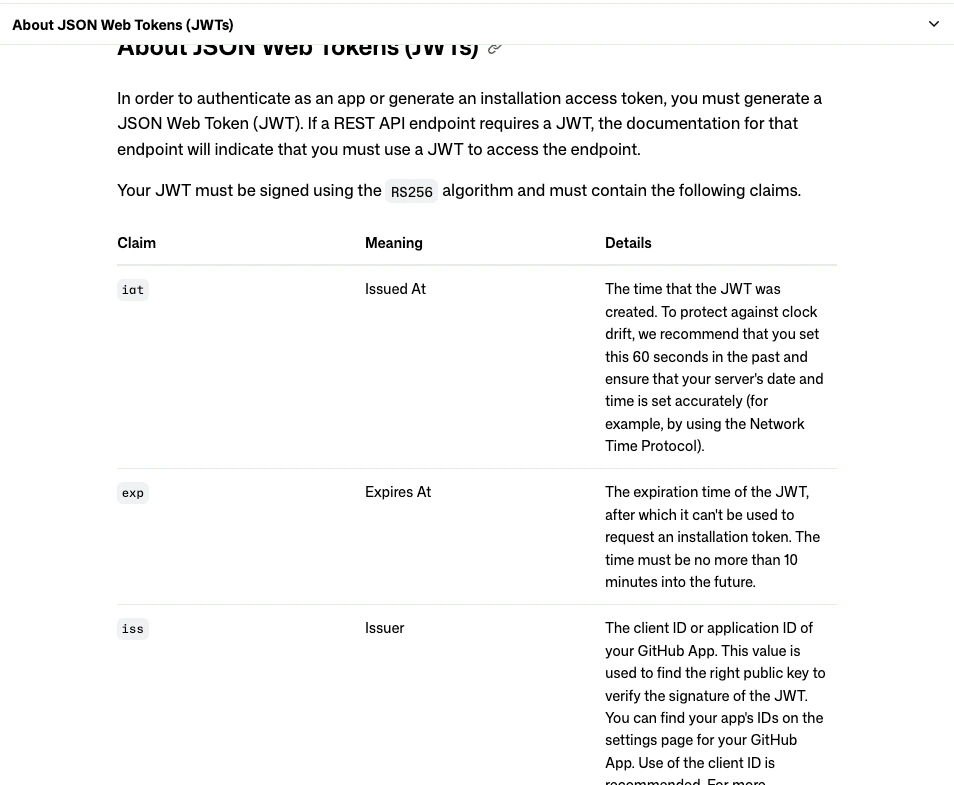
GitHub官方文档:App JWT的算法、时间与签发者字段
换取安装令牌并检查有效期
function appRequest(string $path,string $bearer,string $method='GET'): array {
    if (!str_starts_with($path,'/')) { throw new InvalidArgumentException('Relative API path required'); }
    $c=curl_init('https://api.github.com'.$path);
    curl_setopt_array($c,[CURLOPT_RETURNTRANSFER=>true,CURLOPT_FOLLOWLOCATION=>false,
        CURLOPT_CUSTOMREQUEST=>$method,CURLOPT_CONNECTTIMEOUT=>5,CURLOPT_TIMEOUT=>20,
        CURLOPT_HTTPHEADER=>['Authorization: Bearer '.$bearer,'Accept: application/vnd.github+json',
            'X-GitHub-Api-Version: 2022-11-28','User-Agent: PHP-App-Client']]);
    if ($method==='POST') { curl_setopt($c,CURLOPT_POSTFIELDS,'{}');curl_setopt($c,CURLOPT_HTTPHEADER,
        ['Authorization: Bearer '.$bearer,'Accept: application/vnd.github+json',
         'Content-Type: application/json','X-GitHub-Api-Version: 2022-11-28','User-Agent: PHP-App-Client']); }
    $raw=curl_exec($c);$status=curl_getinfo($c,CURLINFO_RESPONSE_CODE);curl_close($c);
    $expected=$method==='POST' ? 201 : 200;
    if ($raw===false || $status!==$expected) { throw new RuntimeException('App API failed; HTTP '.$status); }
    return json_decode($raw,true,512,JSON_THROW_ON_ERROR);
}
$grant=appRequest('/app/installations/'.$installation.'/access_tokens',$jwt,'POST');
$token=$grant['token'] ?? '';
$expiry=strtotime($grant['expires_at'] ?? '');
if (!is_string($token) || $token==='' || $expiry===false || $expiry<=time()) {
    throw new RuntimeException('Installation token response invalid');
}
默认令牌权限受App授权和安装范围约束,不会因为JWT签发成功而获得其他仓库访问权。令牌缓存应按App、安装和权限范围区分,并在expires_at之前留出刷新余量;不将令牌回传前端。

软术 Git 兼容版本控制系统
下载
Jujutsu (jj) 是一个功能强大的 Git 兼容版本控制系统,它通过自动变基、一级冲突跟踪和操作日志撤销来重新构想 VCS 工作流程。使用 Rust 构建,拥有 27k+ GitHub 星标,可直接在现有的 Git 仓库上工作。
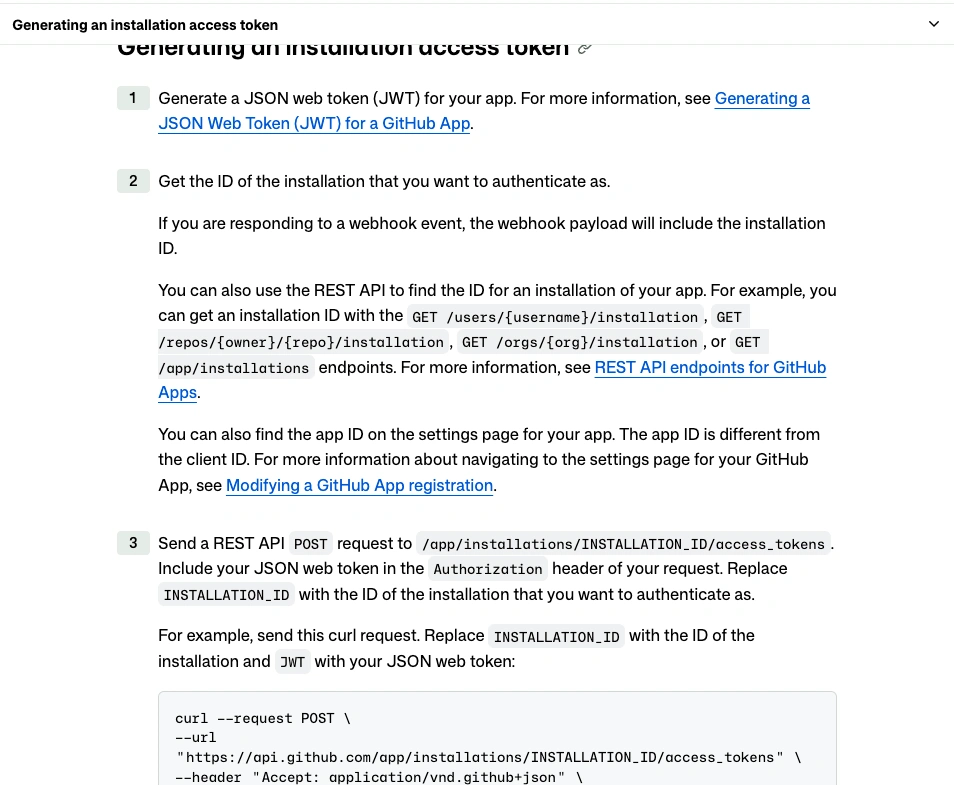
GitHub官方文档:用App身份换取安装访问令牌
用安装令牌读取指定仓库
$owner=getenv('GH_OWNER') ?: '';$repo=getenv('GH_REPO') ?: '';
if ($owner==='' || $repo==='') { throw new RuntimeException('Repository required'); }
$data=appRequest('/repos/'.rawurlencode($owner).'/'.rawurlencode($repo),$token);
echo json_encode(['id'=>$data['id'],'full_name'=>$data['full_name']],JSON_THROW_ON_ERROR);
输出只保留仓库标识,不输出JWT、私钥或安装令牌。404同时可能表示仓库不存在或当前安装无权访问;先核对安装范围,再检查权限,不能靠换成管理员个人令牌绕过设计。令牌请求超时后保留安全错误信息并重新评估,业务写入请求另做幂等设计。