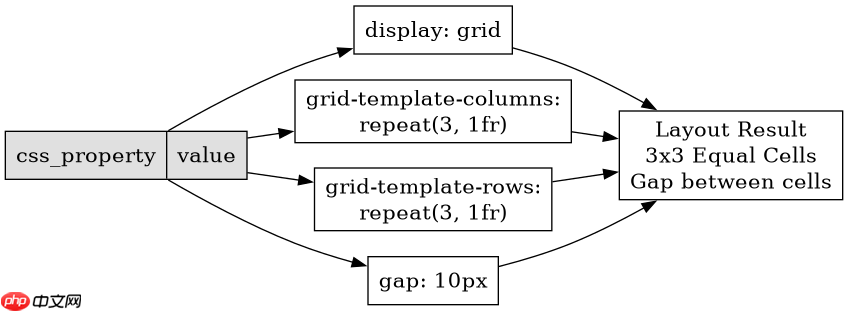
使用css grid布局配合媒体查询和百分比宽度,可以高效实现移动端自适应九宫格抽奖。核心做法是定义一个3x3的网格容器,将奖品项设为1fr 1fr 1fr,利用vw或百分比确保在任意屏幕宽度下保持正方形比例,并通过nth-child选择器定位中间的中奖位置。
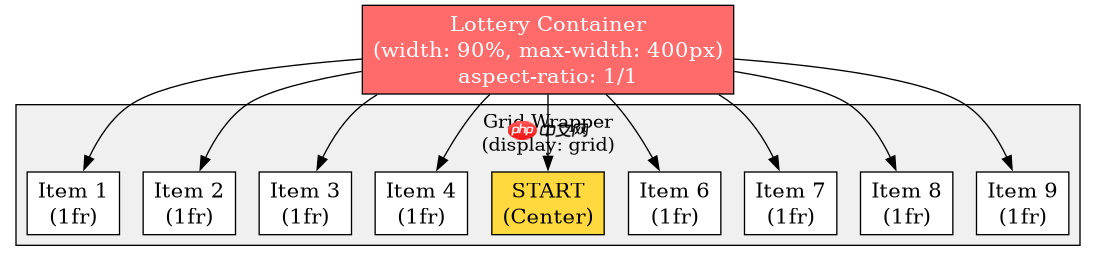
如何设置九宫格的行列结构与间距
通过display: grid属性创建网格,设置grid-template-columns和grid-template-rows为repeat(3, 1fr),并配合gap属性控制间距。这种方法比传统的float或flexbox更稳定,能自动处理对齐问题。
/* CSS Reset & Base */
* {
  box-sizing: border-box;
  margin: 0;
  padding: 0;
}

body {
  font-family: sans-serif;
  background-color: #f5f5f5;
  display: flex;
  justify-content: center;
  align-items: center;
  min-height: 100vh;
}

/* Lottery Container */
.lottery-container {
  width: 90%;
  max-width: 400px;
  aspect-ratio: 1 / 1; /* 保持正方形 */
  background-color: #ff6b6b;
  padding: 10px;
  border-radius: 10px;
  box-shadow: 0 4px 10px rgba(0,0,0,0.1);
}

.grid-wrapper {
  display: grid;
  grid-template-columns: repeat(3, 1fr);
  grid-template-rows: repeat(3, 1fr);
  gap: 10px;
  width: 100%;
  height: 100%;
}

.grid-item {
  background-color: #fff;
  border-radius: 8px;
  display: flex;
  justify-content: center;
  align-items: center;
  font-size: 14px;
  color: #333;
  position: relative;
  overflow: hidden;
  transition: all 0.2s ease;
}

/* Center Item (Start Button) */
.grid-item.center {
  background-color: #ffd93d;
  font-weight: bold;
  cursor: pointer;
}

.grid-item.active {
  transform: scale(1.05);
  box-shadow: 0 0 10px rgba(255, 215, 0, 0.8);
  border: 2px solid #ff0000;
  z-index: 10;
}
如何实现高亮选中状态的动画效果
通过JavaScript动态添加active类到当前选中的格子,并利用CSS transition实现平滑过渡。同时,使用nth-child选择器为不同位置的格子设置不同的背景色或图标,增强视觉区分度。

htmlq 命令行 HTML 内容提取器,支持 CSS 选择器
下载
htmlq 是一个命令行工具,使用 CSS 选择器从 HTML 中提取内容,相当于 jq 的 HTML 版本。该工具使用 Rust 编写,允许你通过 CSS 选择器将 HTML 管道化,直接从终端提取文本、属性和结构化内容。
立即学习“前端免费学习笔记(深入)”;
<!DOCTYPE html>
<html lang="zh-CN">
<head>
    <meta charset="UTF-8">
    <meta name="viewport" content="width=device-width, initial-scale=1.0">
    <title>Mobile Lottery</title>
    <style>
        /* ... previous CSS ... */
    </style>
</head>
<body>
    <div class="lottery-container">
        <div class="grid-wrapper" id="gridWrapper">
            <!-- Items will be generated by JS -->
        </div>
    </div>

    <script>
        const items = [
            { name: 'Prize 1', type: 'prize' },
            { name: 'Prize 2', type: 'prize' },
            { name: 'Prize 3', type: 'prize' },
            { name: 'Try Again', type: 'fail' },
            { name: 'START', type: 'center' },
            { name: 'Prize 4', type: 'prize' },
            { name: 'Prize 5', type: 'prize' },
            { name: 'Bonus', type: 'prize' },
            { name: 'Prize 6', type: 'prize' }
        ];

        // Order for clockwise rotation:
        // 0 1 2
        // 7   3
        // 6 5 4
        const order = [0, 1, 2, 3, 8, 7, 6, 5, 4];

        const wrapper = document.getElementById('gridWrapper');
        let currentIndex = -1;
        let isSpinning = false;

        // Generate Grid
        items.forEach((item, index) => {
            const div = document.createElement('div');
            div.className = 'grid-item';
            if (item.type === 'center') {
                div.classList.add('center');
                div.textContent = item.name;
                div.onclick = startLottery;
            } else {
                div.textContent = item.name;
                // Optional: Add different colors/styles based on type
                if(item.type === 'fail') div.style.backgroundColor = '#e0e0e0';
            }
            wrapper.appendChild(div);
        });

        function startLottery() {
            if (isSpinning) return;
            isSpinning = true;
            currentIndex = -1;
            let speed = 100;
            let rounds = 0;
            let targetIndex = Math.floor(Math.random() * 8); // Random prize
            let steps = 0;
            const totalSteps = 8 + targetIndex; // At least one full round

            function spin() {
                // Remove active from previous
                if (currentIndex !== -1) {
                    wrapper.children[order[currentIndex]].classList.remove('active');
                }

                currentIndex++;
                if (currentIndex >= 8) currentIndex = 0;

                // Add active to current
                wrapper.children[order[currentIndex]].classList.add('active');

                steps++;
                if (steps > totalSteps) {
                    isSpinning = false;
                    setTimeout(() => {
                        alert('You won: ' + items[order[currentIndex]].name);
                        wrapper.children[order[currentIndex]].classList.remove('active');
                    }, 500);
                    return;
                }

                // Slow down near the end
                if (steps > totalSteps - 4) {
                    speed += 50;
                }

                setTimeout(spin, speed);
            }

            spin();
        }
    </script>
</body>
</html>
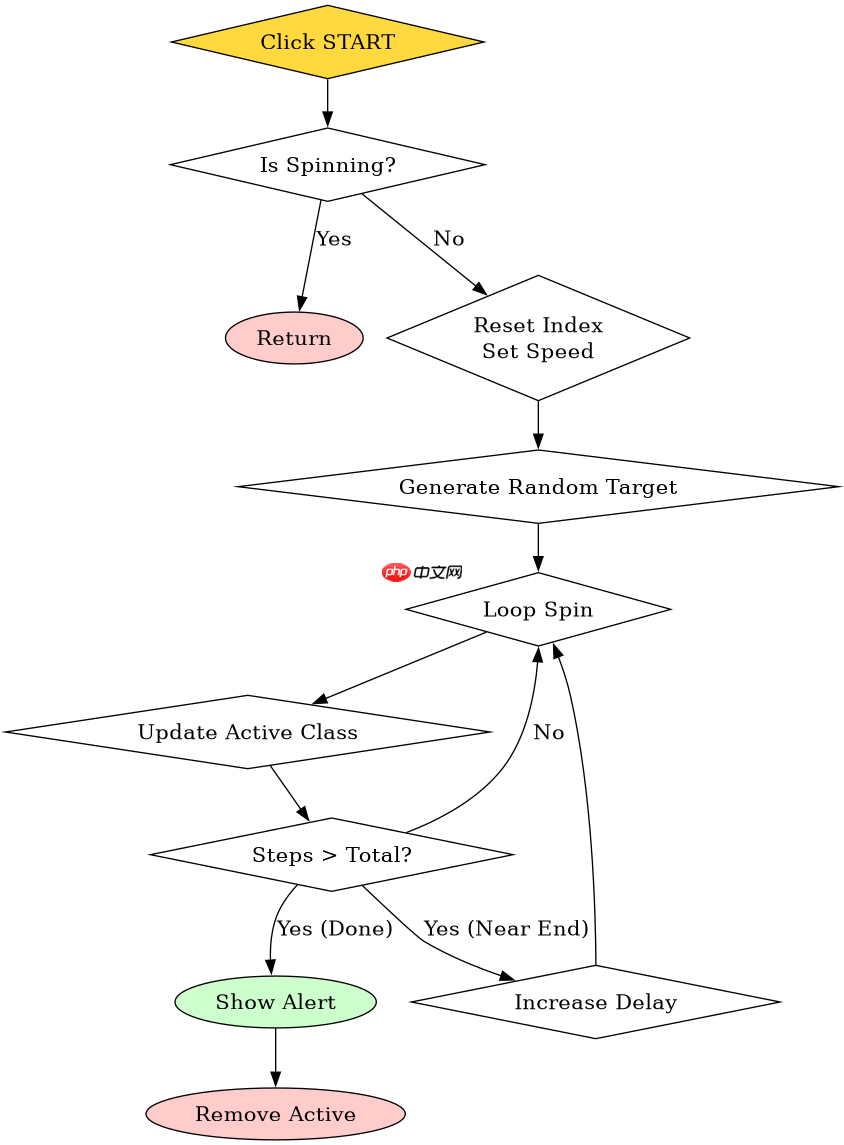
当点击开始按钮时,旋转顺序是如何确定的
旋转顺序通常按照顺时针方向排列,即从左上角开始,依次向右、向下、向左、向上循环。在代码中,我们通过定义一个固定的数组来映射DOM元素的索引到旋转顺序,确保动画路径符合用户预期。