使用 @emptysource 注解可以方便地让 junit jupiter 的 @parameterizedtest 自动传入空集合(如 collection.emptyset()、list.of() 等)作为测试参数,从而验证代码在输入为空时的行为。具体做法是在测试方法上同时添加 @parameterizedtest 和 @emptysource,并将方法的第一个参数声明为集合类型,junit 会自动注入对应的空实例。

如何配置 @ParameterizedTest 以接收空集合参数
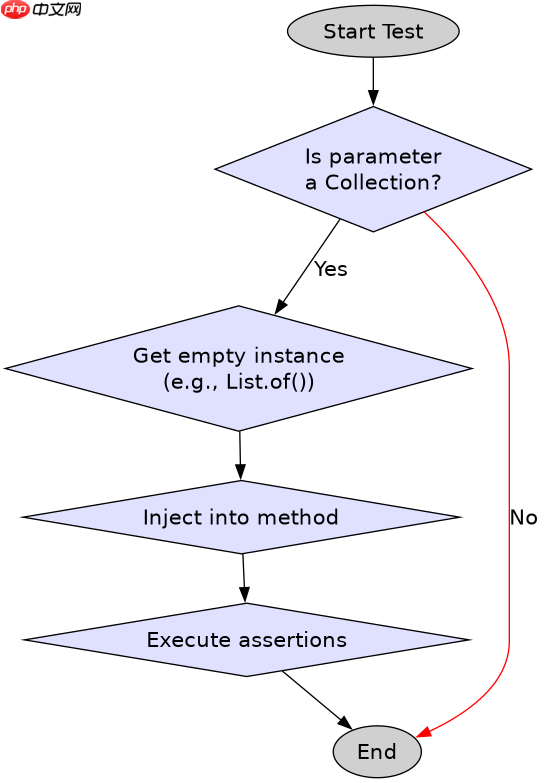
要启用空集合注入,必须在测试类路径中包含 junit-jupiter-params 依赖,并在测试方法上使用 @ParameterizedTest 配合 @EmptySource。当方法签名包含单个集合参数时,框架会尝试从标准库中获取该类型的空实例。例如,若参数类型为 Collection<string></string>,则传入 Collection.emptySet();若为 List<string></string>,则传入 List.of()。这种机制避免了手动编写多个测试用例来覆盖空值场景。
import org.junit.jupiter.api.Test;
import org.junit.jupiter.params.ParameterizedTest;
import org.junit.jupiter.params.provider.EmptySource;
import java.util.Collection;
import java.util.List;

import static org.junit.jupiter.api.Assertions.assertEquals;
import static org.junit.jupiter.api.Assertions.assertTrue;

class EmptySourceDemo {

    // 测试 Collection 类型的空源
    @ParameterizedTest
    @EmptySource
    void testWithCollection(Collection<String> items) {
        assertTrue(items.isEmpty());
        assertEquals(0, items.size());
    }

    // 测试 List 类型的空源
    @ParameterizedTest
    @EmptySource
    void testWithList(List<String> items) {
        assertTrue(items.isEmpty());
        assertEquals(0, items.size());
    }
}
运行上述测试时,JUnit 会为每个方法执行一次,分别传入空的 Collection 和空的 List。断言验证了集合确实为空且大小为 0。如果方法有多个参数,@EmptySource 仅作用于标记的参数位置,其他参数需通过 @ValueSource 或自定义提供者补充。
立即学习“Java免费学习笔记(深入)”;

一个围绕官方 Mailgun JavaScript SDK 构建的 ASE 技能,用于从 Node.js 发送电子邮件和管理 Mailgun API 工作流。它适用于需要事务性消息传递、域名感知电子邮件操作、事件处理以及与 Mailgun 平台直接集成的代理任务。
如何处理非集合类型的空值或混合数据源
当需要测试非集合类型(如 String 或 Integer)的空值,或需要同时测试空集合与其他有效数据时,应结合 @NullAndEmptySource 或自定义 ArgumentsProvider。@EmptySource 本身仅支持集合类型,若用于 String 会导致解析失败。对于混合场景,可使用 @MethodSource 返回包含空集合和其他值的流,或使用 @CsvSource 显式指定空字符串。此外,@NullAndEmptySource 是 @EmptySource 的扩展,可同时提供 null 和空集合,适用于需要区分空引用与空容器的业务逻辑。

import org.junit.jupiter.params.ParameterizedTest;
import org.junit.jupiter.params.provider.NullAndEmptySource;
import java.util.List;

import static org.junit.jupiter.api.Assertions.assertNotNull;
import static org.junit.jupiter.api.Assertions.assertTrue;

class NullAndEmptyDemo {

    @ParameterizedTest
    @NullAndEmptySource
    void testWithNullOrEmpty(List<String> items) {
        if (items == null) {
            assertNotNull(items); // 此断言在 null 时会失败,仅用于演示
        } else {
            assertTrue(items.isEmpty());
        }
    }
}
在 @NullAndEmptySource 示例中,测试会执行两次:一次传入 null,一次传入 List.of()。开发者需注意,若业务逻辑不允许 null,应在方法内部进行防御性检查或抛出异常,而非依赖测试框架跳过。对于更复杂的组合,建议创建实现 ArgumentsProvider 接口的类,精确控制每次调用的参数内容。
当输入为空集合时,过滤操作返回什么结果
当输入为空集合时,Java Stream 的过滤操作会返回一个空的 Stream,其后续终端操作(如 collect 或 toList)将产生空集合或默认值。例如,对空列表调用 .filter(...).toList() 会返回 List.of(),而非 null。这一行为确保了链式调用的安全性,无需额外检查空指针。在实际开发中,可利用此特性简化空值处理逻辑,避免在每一步都添加空判断。
import java.util.List;
import java.util.stream.Collectors;

public class FilterOnEmpty {
    public static void main(String[] args) {
        List<String> emptyList = List.of();
        List<String> result = emptyList.stream()
                .filter(s -> s != null && s.length() > 0)
                .collect(Collectors.toList());
        System.out.println(result); // 输出: []
        System.out.println(result.isEmpty()); // 输出: true
    }
}
该程序展示了空集合经过过滤后仍保持为空集合的特性。开发者可直接信任此行为,无需在过滤前添加 if (!list.isEmpty()) 检查。若需返回特定默认值,可在终端操作后使用 orElse 或三元运算符处理,但通常空集合已是预期结果。