go-zero 框架通过 timeout 字段控制服务超时,在 goctl 生成的代码中,该值直接赋值给底层客户端的超时参数。开发者只需在 .yaml 配置文件中设置 timeout 数值(毫秒),框架会自动将其应用于对应的 http 或 grpc 调用。若未显式配置,通常使用默认值或上下文传递的超时时间。

如何为 HTTP 客户端配置超时
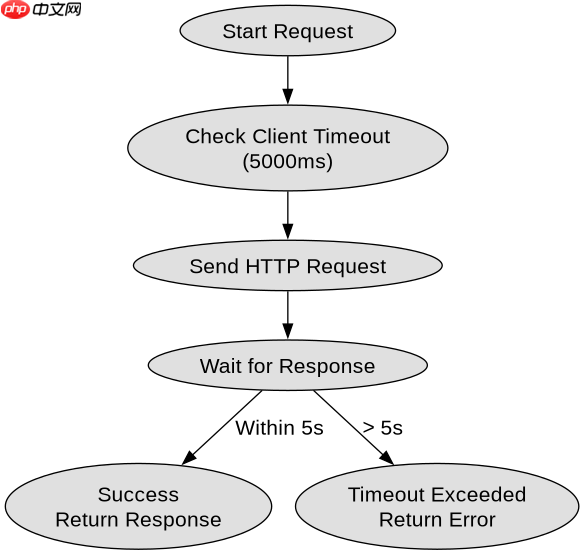
HTTP 客户端的超时由 rest.Config 中的 Timeout 字段决定。在配置文件中指定后,生成的 NewClient 函数会读取该值并初始化 http.Client 的超时属性。
package main

import (
    "context"
    "fmt"
    "net/http"
    "time"

    "github.com/zeromicro/go-zero/core/rest"
)

func main() {
    // 模拟配置:Timeout: 5000 (ms)
    timeout := 5000 * time.Millisecond

    client := rest.NewClient(&rest.RestConfig{
        Host:    "http://example.com",
        Timeout: timeout,
    })

    req, _ := http.NewRequestWithContext(context.Background(), http.MethodGet, "http://example.com/api", nil)
    resp, err := client.Do(req)
    if err != nil {
        fmt.Println("Error:", err)
        return
    }
    defer resp.Body.Close()
    fmt.Println("Status:", resp.Status)
}
运行上述代码时,如果目标服务器响应超过 5 秒,将返回 context deadline exceeded 错误。配置项 Timeout 的单位是毫秒,且仅影响发起请求到接收响应的总时长。

如何为 gRPC 客户端配置超时
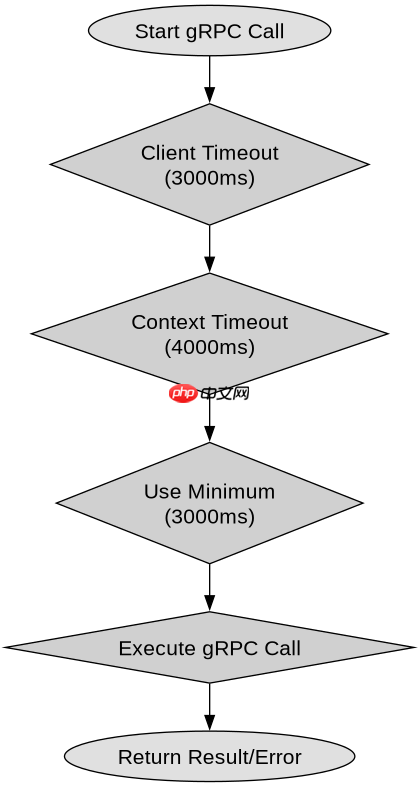
gRPC 客户端的超时同样通过 rpcclient.Config 中的 Timeout 字段进行配置。与 HTTP 不同,gRPC 的超时还受 Context 的影响,但框架层级的 Timeout 提供了默认的硬限制。
package main

import (
    "context"
    "fmt"
    "time"

    "github.com/zeromicro/go-zero/core/rpcclient"
    pb "your/proto/package" // 假设的 proto 包
)

func main() {
    // 模拟配置:Timeout: 3000 (ms)
    timeout := 3000 * time.Millisecond

    client := rpcclient.New(
        rpcclient.WithHostPort("127.0.0.1:8080"),
        rpcclient.WithTimeout(timeout),
    )

    ctx, cancel := context.WithTimeout(context.Background(), 4*time.Second)
    defer cancel()

    // 假设有一个生成的 Call 方法
    // resp, err := client.Call(ctx, &pb.Request{})
    // if err != nil {
    //     fmt.Println("Error:", err)
    //     return
    // }
    fmt.Println("Client configured with timeout:", timeout)
}
在此示例中,即使 Context 设置了 4 秒超时,由于客户端配置了 3 秒超时,实际调用可能在 3 秒时因客户端内部超时机制而中断。这种分层超时控制确保了服务调用的稳定性。
当超时时间设置为 0 时会发生什么
当 Timeout 配置为 0 时,Go-Zero 框架不会应用额外的超时限制,而是完全依赖传入的 context.Context 来控制超时行为。这意味着如果调用方没有设置 Context 超时,请求可能会无限期挂起,直到连接被底层网络断开或服务器主动关闭。