go-zero集成elasticsearch实现全文检索,核心做法是引入官方或社区维护的es客户端库(如github.com/elastic/go-elasticsearch),在api层定义搜索接口,在logic层实例化客户端并构建dsl查询语句。具体步骤包括:初始化es连接、编写索引映射与数据写入逻辑、构造包含match或multi_match的json请求体发送检索请求,最后将结果反序列化为业务结构体返回。

如何配置ES客户端连接与基础服务
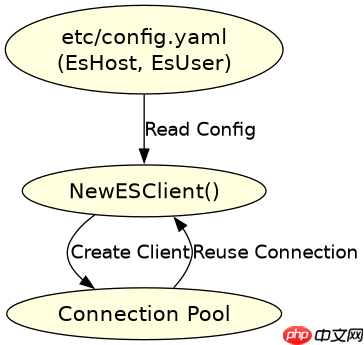
在Go-Zero项目中配置ES客户端,通常是在etc/目录下的配置文件里添加ES的地址和认证信息,然后在core/stores或自定义的client包中读取这些配置并创建客户端实例。这一步确保了后续的业务逻辑可以直接复用已建立的连接池,避免重复创建连接导致的资源浪费。
package client

import (
    "context"
    "github.com/elastic/go-elasticsearch/v8"
    "github.com/zeromicro/go-zero/core/logx"
)

type ESClient struct {
    Client *elasticsearch.Client
}

func NewESClient(host string) (*ESClient, error) {
    cfg := elasticsearch.Config{
        Addresses: []string{host},
    }
    es, err := elasticsearch.NewClient(cfg)
    if err != nil {
        return nil, err
    }
    return &ESClient{Client: es}, nil
}

func (e *ESClient) Search(ctx context.Context, index string, query string) (*elasticsearch.Response, error) {
    res, err := e.Client.Search(
        e.Client.Search.WithIndex(index),
        e.Client.Search.WithBody(strings.NewReader(query)),
        e.Client.Search.WithContext(ctx),
    )
    if err != nil {
        logx.Error(err)
        return nil, err
    }
    return res, nil
}
上述代码展示了如何封装一个基础的ES客户端。在实际的Go-Zero项目中,你会将这个ESClient注入到Service的Logic层中。配置部分通常在goctl生成的etc/xxx-api.yaml中定义EsHost: http://localhost:9200,然后在main.go或启动函数中解析YAML并调用NewESClient。这种解耦方式使得切换ES版本或地址变得非常简单。

如何构建全文检索的DSL查询语句
实现全文检索的关键在于构造正确的JSON DSL(Domain Specific Language)查询语句。对于简单的关键词匹配,使用match查询;对于多字段搜索,使用multi_match。在Go-Zero的Logic层中,你需要将这些查询条件序列化为字符串或Map结构,然后传递给ES客户端。搜索结果通常包含_hits数组,需要从中提取_source字段并进行反序列化。
package logic

import (
    "encoding/json"
    "strings"
    "context"
    "your-project/client"
    "your-project/model"
)

type SearchLogic struct {
    Ctx context.Context
    Svc *svc.ServiceContext
}

func (l *SearchLogic) Search(req model.SearchRequest) ([]model.Article, error) {
    query := map[string]interface{}{
        "query": map[string]interface{}{
            "multi_match": map[string]interface{}{
                "query":    req.Keyword,
                "fields":   []string{"title", "content"},
                "type":     "best_fields",
            },
        },
        "size": req.PageSize,
    }

    queryBytes, _ := json.Marshal(query)
    res, err := l.Svc.ESClient.Search(l.Ctx, "articles", string(queryBytes))
    if err != nil {
        return nil, err
    }

    var hits struct {
        Hits struct {
            Hits []struct {
                Source map[string]interface{} `json:"_source"`
            } `json:"hits"`
        } `json:"hits"`
    }
    json.NewDecoder(res.Body).Decode(&hits)

    var results []model.Article
    for _, h := range hits.Hits.Hits {
        var article model.Article
        // 简单转换,实际项目中建议使用mapstructure等库
        article.Title = h.Source["title"].(string)
        article.Content = h.Source["content"].(string)
        results = append(results, article)
    }
    return results, nil
}
这段代码演示了如何在Logic层构建查询。注意multi_match的配置,它允许用户在多个字段中搜索同一个关键词,并返回相关性最高的结果。返回的res.Body是一个IO流,直接解码为结构体可以高效地获取数据。如果需要对高亮显示进行处理,可以在DSL中加入highlight节点,并在解析时提取highlight字段而非_source。
如何处理搜索结果的分页与排序
在全文检索场景中,分页和排序是常见需求。ES默认按相关性得分(_score)降序排列,但也可以指定特定字段排序。在Go-Zero中,可以通过修改DSL中的sort和from/size参数来实现。例如,按时间倒序排列最新发布的文章,或者结合相关性得分与发布时间进行混合排序。处理分页时,需要注意ES的深分页问题,超过10000条记录需要使用search_after或scroll API,但在常规Web应用中,from/size通常足够。
query := map[string]interface{}{
    "query": map[string]interface{}{
        "match": map[string]interface{}{
            "content": req.Keyword,
        },
    },
    "sort": []map[string]interface{}{
        {"publish_time": map[string]string{"order": "desc"}},
        {"_score": map[string]string{"order": "desc"}},
    },
    "from": (req.Page - 1) * req.PageSize,
    "size": req.PageSize,
}
通过调整上述DSL结构,可以实现灵活的排序策略。例如,先按publish_time降序,再按_score降序。在Go-Zero的响应结构中,建议同时返回总记录数total,以便前端计算总页数。此外,如果搜索性能成为瓶颈,可以考虑在ES端设置缓存或使用search_type=dfs_query_then_fetch来优化评分准确性,但这会增加延迟,需根据场景权衡。