在tailwind css中利用has选择器实现父级css状态联动,核心做法是直接使用`peer`和`peer-has-*`变体类。当子元素(如输入框)获得焦点或处于特定状态时,通过给父容器添加`peer-has-:focus`等类名,即可触发父级的样式变化,例如改变边框颜色或显示隐藏内容。
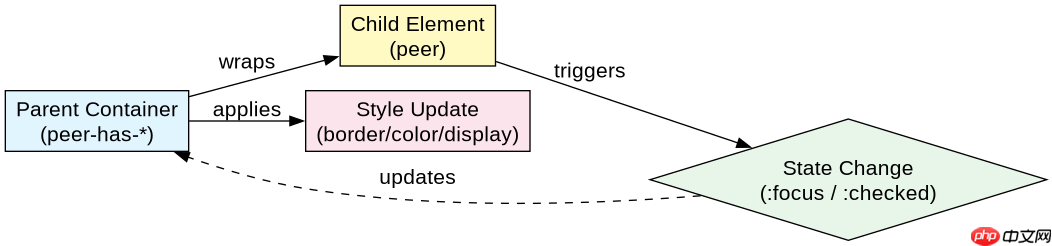
如何实现输入框聚焦时的父级样式联动
要实现输入框聚焦时父级样式的联动,需要在父容器上应用`peer`类,并在需要响应状态的父级元素上使用`peer-has-:focus`前缀的变体类。这种机制允许父级根据子元素的伪类状态自动调整外观,无需JavaScript介入。
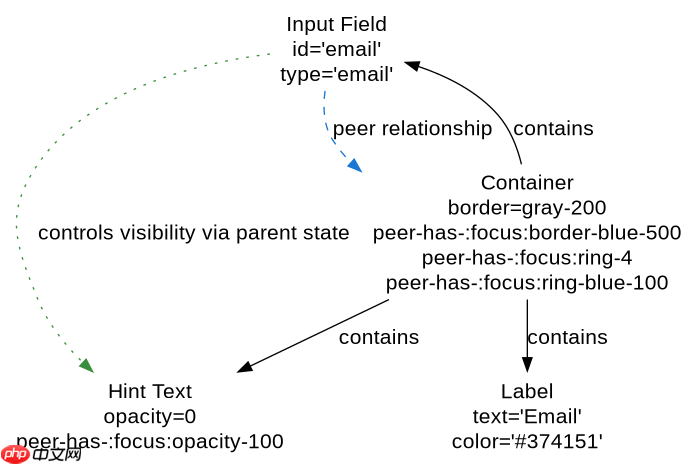
<div class="relative w-full max-w-md mx-auto p-6 bg-white rounded-lg shadow-sm border border-gray-200 peer-has-:focus:border-blue-500 peer-has-:focus:ring-4 peer-has-:focus:ring-blue-100 transition-all duration-200">
  <label for="email" class="block text-sm font-medium text-gray-700 mb-1">Email</label>
  <input type="email" id="email" class="peer block w-full px-3 py-2 border border-gray-300 rounded-md focus:outline-none focus:ring-0 focus:border-transparent">
  <p class="mt-2 text-xs text-gray-500 opacity-0 peer-has-:focus:opacity-100 transition-opacity">We'll never share your email.</p>
</div>
如何结合Checkbox实现展开内容的联动
对于复选框与展开内容的场景,同样使用`peer`和`peer-has-:checked`类。当复选框被选中时,父级或兄弟元素可以根据该状态显示或隐藏内容,常用于构建手风琴或高级选项面板。

Lightning CSS 高性能 CSS 解析器 转换器 和 压缩工具
下载
Lightning CSS 是由 Parcel 团队开发的基于 Rust 的 CSS 解析器、转换器、打包工具和压缩工具。此技能适用于需要优化样式表、为目标浏览器降低现代 CSS 语法以及将快速 CSS 处理集成到构建或重构工作流中的代理。
立即学习“前端免费学习笔记(深入)”;
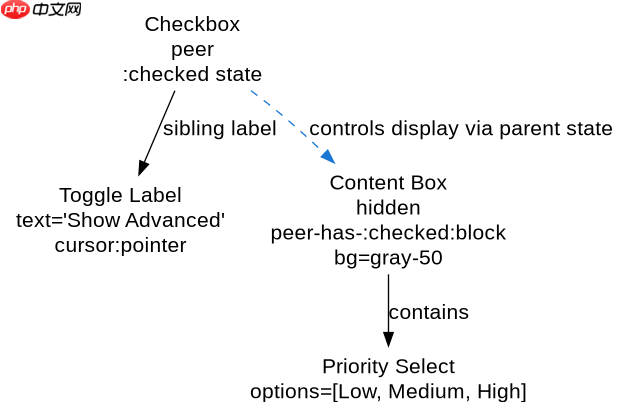
<div class="w-full max-w-md mx-auto bg-white rounded-lg shadow overflow-hidden">
  <div class="p-4 border-b border-gray-200">
    <label class="flex items-center space-x-3 cursor-pointer">
      <input type="checkbox" class="peer h-5 w-5 text-blue-600 border-gray-300 rounded focus:ring-blue-500">
      <span class="text-gray-900 font-medium">Show Advanced Options</span>
    </label>
  </div>
  <div class="p-4 bg-gray-50 peer-has-:checked:block hidden">
    <div class="space-y-3">
      <div>
        <label class="block text-sm text-gray-600">Priority</label>
        <select class="mt-1 block w-full pl-3 pr-10 py-2 text-base border-gray-300 focus:outline-none focus:ring-blue-500 focus:border-blue-500 sm:text-sm rounded-md">
          <option>Low</option>
          <option>Medium</option>
          <option>High</option>
        </select>
      </div>
    </div>
  </div>
</div>
当子元素失去焦点时父级状态如何恢复
当子元素失去焦点时,`peer-has-:focus`状态不再满足,父级样式会自动回退到默认状态。这意味着不需要编写额外的逻辑来处理“失焦”事件,Tailwind的原子类会自动处理状态的清除和样式的还原,确保界面的一致性。