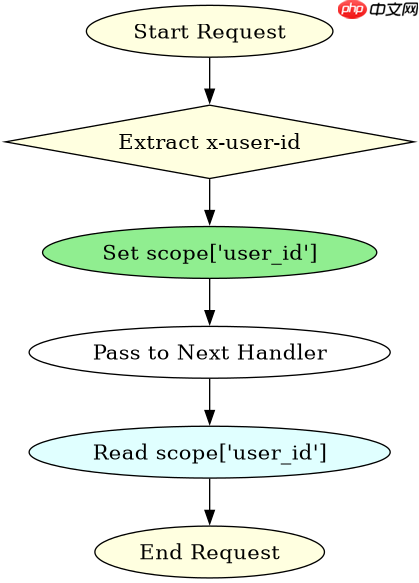
starlette 通过 request 对象的 scope 字典传递数据。在中间件或路由处理函数中,你可以直接修改 request.scope['key'] 将数据存入上下文,后续的处理逻辑即可读取该值。

如何在中间件中注入自定义数据
通过在中间件的 __call__ 方法中修改 scope 实现。例如,在请求到达路由前,向 scope 添加一个 'user_id' 字段,路由函数即可访问。

Starlette 1.5.1
下载
Starlette 1.5.1 是轻量级 Python ASGI 框架与工具集,提供路由、请求响应、中间件、WebSocket 和后台任务等组件,适合构建异步 Web 服务。本下载为官方 PyPI 通用 wheel 包,可使用 pip 安装,并由包管理器处理依赖;运行应用时还需配置 ASGI 服务器。
from starlette.applications import Starlette
from starlette.responses import JSONResponse
from starlette.routing import Route
import uuid

def add_user_to_scope(request):
    # 模拟从 Header 获取用户 ID
    user_id = request.headers.get('x-user-id', 'anonymous')
    # 将数据存入 scope
    request.scope['user_id'] = user_id
    return request

def get_user_info(request):
    # 从 scope 读取数据
    user_id = request.scope.get('user_id', 'unknown')
    return JSONResponse({'user_id': user_id})

app = Starlette(routes=[
    Route('/info', get_user_info)
])
# 实际使用中需将 add_user_to_scope 注册为中间件
如何确保数据在不同请求间隔离
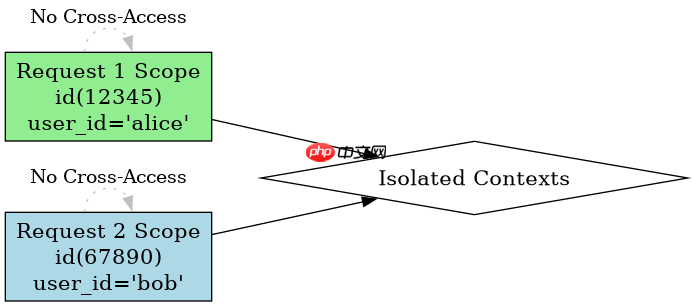
Starlette 的 scope 是每次请求独立创建的字典对象。因此,直接在 scope 中赋值天然具备请求级隔离性,无需额外使用线程局部存储(ThreadLocal)或异步上下文管理器(ContextVar)来保证基础数据的隔离。
import asyncio
from starlette.requests import Request
from starlette.datastructures import State

async def handle_request(scope, receive, send):
    # scope 在此处创建,每个请求拥有独立的 scope 字典
    scope['request_id'] = f"req-{id(scope)}"

    # 验证隔离性:不同请求的 scope 内存地址不同
    print(f"Scope ID: {id(scope)}, Request ID: {scope['request_id']}")

    response = b"OK"
    await send({
        'type': 'http.response.start',
        'status': 200,
        'headers': [[b'content-type', b'text/plain']],
    })
    await send({
        'type': 'http.response.body',
        'body': response,
    })
基于 scope 中已存入的 user_id 进行权限校验
当 scope 中已存在 'user_id' 时,可以在路由层直接判断其值是否为 'anonymous' 来决定是否返回 403 错误。若值为空或不存在,则视为未登录状态。
from starlette.responses import JSONResponse, Response

async def check_permission(request):
    user_id = request.scope.get('user_id')
    if not user_id or user_id == 'anonymous':
        return JSONResponse(
            {'error': 'Unauthorized'},
            status_code=403
        )
    return JSONResponse({'message': f'Access granted to {user_id}'})