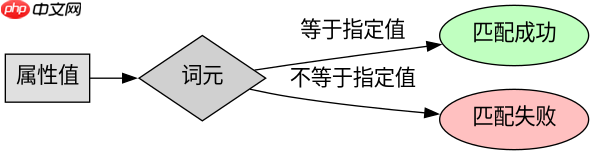
使用属性选择器匹配包含特定空格分词的属性,应使用波浪号加等号的 ~= 操作符。该操作符会检查属性值是否包含一个以空白字符分隔的完整单词,且该单词与指定值完全匹配。例如,要匹配 class 属性中包含 btn 的元素,可以使用 [class~="btn"]。
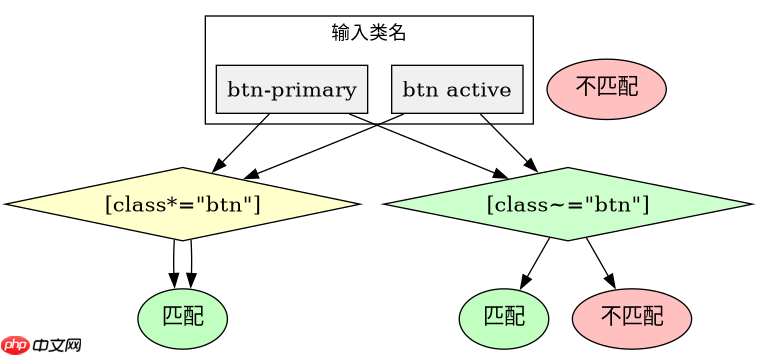
如何区分 ~= 和 *= 在匹配类名时的差异
当需要匹配 CSS 类名时,~= 确保匹配的是独立的单词,而 *= 则是子字符串匹配。如果类名是 btn-primary,使用 [class*="btn"] 会错误地匹配到它,因为 "btn" 是其子串;而使用 [class~="btn"] 则不会匹配,因为 "btn" 不是由空格分隔的独立词元。这种差异在处理复合类名时至关重要,能避免意外的样式覆盖。
<!DOCTYPE html>
<html lang="en">
<head>
    <meta charset="UTF-8">
    <title>Attribute Selector Demo</title>
    <style>
        /* 匹配 class 中包含独立单词 'active' 的元素 */
        [class~='active'] {
            color: red;
        }

        /* 对比:匹配 class 中包含子串 'act' 的元素 */
        [class*='act'] {
            font-weight: bold;
        }
    </style>
</head>
<body>
    <p class="text active">This is active text.</p>
    <p class="reactive">This is reactive text.</p>
    <p class="action-item">This is an action item.</p>
</body>
</html>
运行上述代码后,预期结果如下:
1. <p class="text active"></p><div class="aritcle_card flexRow">
<div class="artcardd flexRow">
<a class="aritcle_card_img" href="/xiazai/gongju/2905" title="CSS"><img
src="https://img.php.cn/upload/manual/000/969/633/6af2b1226ad9e733.png" alt="CSS" ></a>
<div class="aritcle_card_info flexColumn">
<a href="/xiazai/gongju/2905" title="CSS">CSS</a>
<p>CSS 官方网站入口。访问 W3C 的 CSS 页面,查看 CSS 标准、学习资料与工作组动态;CSS 是 Web 标准,无需下载安装。</p>
</div>
<a href="/xiazai/gongju/2905" title="CSS" class="aritcle_card_btn flexRow flexcenter"><b></b><span>下载</span> </a>
</div>
</div> 中的文本变为红色且加粗,因为它既包含独立单词 active(匹配 ~=),也包含子串 act(匹配 *=)。
2. <p class="reactive"></p> 中的文本仅加粗,因为 reactive 不包含独立单词 active,但包含子串 act。
3. <p class="action-item"></p> 中的文本无变化,因为它既不包含独立单词 active,也不包含子串 act。
立即学习“前端免费学习笔记(深入)”;
如何在多值属性中精确匹配特定词元
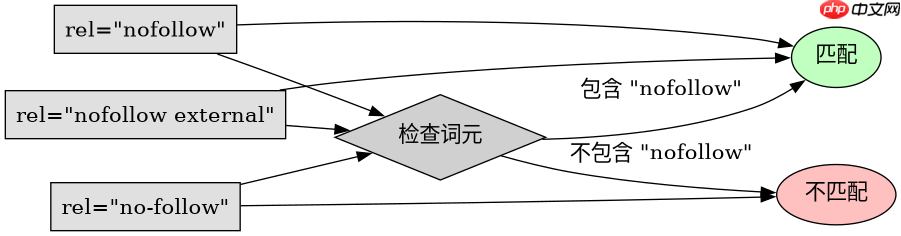
在多值属性如 class、rel 或 hreflang 中,~= 操作符能精确匹配由空格分隔的特定词元。例如,若 rel 属性值为 nofollow external,使用 [rel~="nofollow"] 将成功匹配,而 [rel~="external"] 也会匹配。但如果属性值是 no-follow,则 [rel~="nofollow"] 不会匹配,因为 no-follow 是一个整体词元,而非由空格分隔的 nofollow。这种机制确保了在多值列表中,只有完整的、被空格包围的词元才会被选中,从而避免了部分匹配带来的副作用。
<!DOCTYPE html>
<html lang="en">
<head>
    <meta charset="UTF-8">
    <title>Multi-value Attribute Match</title>
    <style>
        /* 匹配 rel 属性中包含独立单词 'nofollow' 的链接 */
        a[rel~='nofollow'] {
            color: gray;
        }
    </style>
</head>
<body>
    <a href="#" rel="nofollow">Link 1</a>
    <a href="#" rel="nofollow external">Link 2</a>
    <a href="#" rel="no-follow">Link 3</a>
    <a href="#" rel="external">Link 4</a>
</body>
</html>
运行上述代码后,预期结果如下:
1. <a rel="nofollow"></a> 和 <a rel="nofollow external"></a> 中的链接文本变为灰色,因为它们都包含独立单词 nofollow。
2. <a rel="no-follow"></a> 和 <a rel="external"></a> 中的链接文本保持默认颜色,因为它们不包含独立单词 nofollow。