starlette 解析 multipart 请求依赖第三方库 python-multipart,通过 request.form() 方法触发。调用该方法会读取请求体并构建一个类似字典的对象,其中包含表单字段和上传文件。若未安装该库或请求头缺少 boundary,解析将失败。

Request.form() 如何区分字段与文件
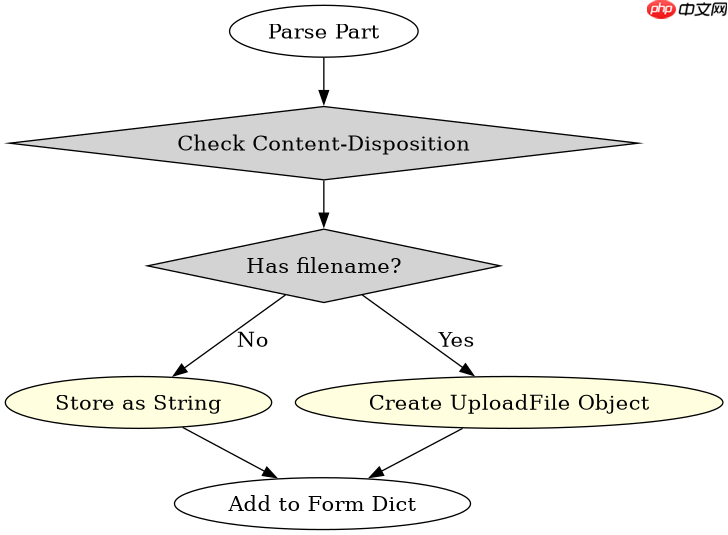
form() 方法根据 MIME 子类型自动区分普通文本字段和二进制文件。它使用 Content-Disposition 头部中的 name 属性作为键,并根据是否有 filename 属性决定存储方式。普通字段存入内存字符串,文件则提供异步读取接口。
from starlette.testclient import TestClient
from starlette.applications import Starlette
from starlette.responses import JSONResponse
import io

app = Starlette()

@app.route("/upload", methods=["POST"])
async def upload(request):
    form = await request.form()
    name = form.get("username")
    file_obj = form.get("avatar")

    result = {
        "field_name": name,
        "file_type": file_obj.content_type if file_obj else None,
        "file_size": len(await file_obj.read()) if file_obj else 0
    }
    return JSONResponse(result)

client = TestClient(app)
data = {"username": "dev"}
files = {"avatar": ("test.png", b"\x89PNG\r\n\x1a\n", "image/png")}
resp = client.post("/upload", data=data, files=files)
print(resp.json())
预期输出:{"field_name": "dev", "file_type": "image/png", "file_size": 8}

Starlette 1.5.1 是轻量级 Python ASGI 框架与工具集,提供路由、请求响应、中间件、WebSocket 和后台任务等组件,适合构建异步 Web 服务。本下载为官方 PyPI 通用 wheel 包,可使用 pip 安装,并由包管理器处理依赖;运行应用时还需配置 ASGI 服务器。
大文件流式处理机制
对于大型文件上传,python-multipart 不会一次性加载整个文件到内存。当检测到文件部分时,它会返回一个 UploadFile 对象。该对象的 read()、write() 和 seek() 方法底层操作的是临时文件或内存缓冲区,具体取决于文件大小配置。开发者应直接操作这些方法而非假设数据已完全驻留内存。

async def handle_large_file(file_obj):
    # 模拟流式写入磁盘
    with open("output.bin", "wb") as f:
        while True:
            chunk = await file_obj.read(8192)
            if not chunk:
                break
            f.write(chunk)
边界符缺失时的错误行为
如果 HTTP 请求头中 Content-Type 缺少 boundary 参数,或者边界符在正文中不匹配,解析器会抛出 MultiPartParserError。此时 Request.form() 无法生成有效的表单对象,应用需捕获此异常以返回 400 错误。这是验证客户端请求合规性的关键检查点。