








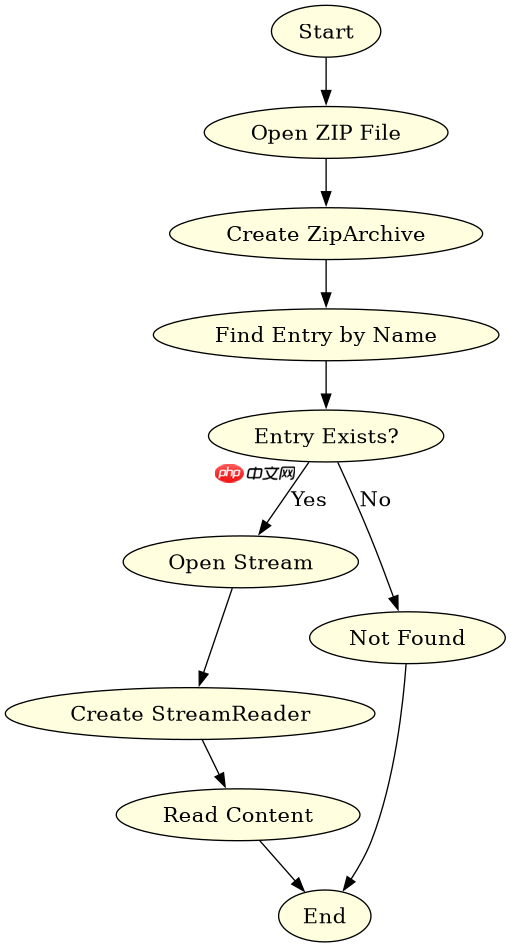
可以直接使用,但前提是压缩包中的文件必须支持流式读取(如 zip 格式),且你需要通过 ziparchiveentry.open() 获取内部文件的流,再将其作为参数传入 streamreader。具体做法是:先打开压缩包创建 ziparchive,找到目标条目后调用 open() 获得 stream,最后用 new streamreader(stream) 进行读取。如果压缩包是 gzip 或 tar 等不支持随机访问或非流式的格式,则不能直接这样用,需先解压到内存或磁盘。

如何从 ZIP 压缩包中读取单个文本文件的内容?
对于标准的 ZIP 压缩包,你可以直接使用 System.IO.Compression.ZipFile 或 ZipArchive 类来访问内部文件。核心步骤是定位到具体的 ZipArchiveEntry,调用其 Open() 方法返回一个可读的 Stream,然后将这个流传递给 StreamReader 构造函数。这样做的好处是不需要将整个压缩包解压到磁盘,而是按需读取,节省 I/O 开销。
using System;
using System.IO;
using System.IO.Compression;

namespace ZipReaderDemo
{
    class Program
    {
        static void Main(string[] args)
        {
            string zipPath = @"C:\temp\archive.zip";
            string entryName = "data.txt";

            try
            {
                using (FileStream zipToOpen = new FileStream(zipPath, FileMode.Open))
                {
                    using (ZipArchive archive = new ZipArchive(zipToOpen, ZipArchiveMode.Read))
                    {
                        ZipArchiveEntry entry = archive.GetEntry(entryName);
                        if (entry != null)
                        {
                            using (Stream stream = entry.Open())
                            {
                                using (StreamReader reader = new StreamReader(stream))
                                {
                                    string content = reader.ReadToEnd();
                                    Console.WriteLine(content);
                                }
                            }
                        }
                        else
                        {
                            Console.WriteLine("Entry not found.");
                        }
                    }
                }
            }
            catch (Exception ex)
            {
                Console.WriteLine($"Error: {ex.Message}");
            }
        }
    }
}
上述代码展示了完整的读取流程。首先通过 FileStream 打开物理 ZIP 文件,接着用 ZipArchive 包装它以便进行只读操作。通过 GetEntry 方法根据文件名查找条目,若找到则调用 Open() 获取流。最后将流注入 StreamReader 并读取全部内容。注意所有资源都使用了 using 语句确保正确释放。
读取时遇到编码问题该如何处理?
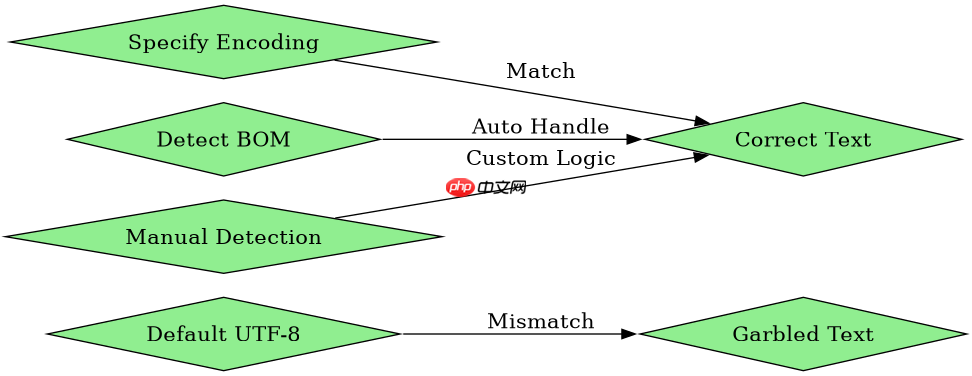
StreamReader 默认使用 UTF-8 编码,但如果压缩包内的文本文件是使用 GBK、ISO-8859-1 或其他编码保存的,直接读取会导致乱码。解决方法是在创建 StreamReader 实例时显式指定 Encoding 参数。例如,如果已知文件是 GBK 编码,可以传入 Encoding.GetEncoding("gbk")。此外,如果文件包含 BOM(字节顺序标记),StreamReader 通常能自动检测并处理,但在某些非标准情况下,手动指定编码更可靠。

using System;
using System.IO;
using System.IO.Compression;
using System.Text;

namespace ZipReaderEncodingDemo
{
    class Program
    {
        static void Main(string[] args)
        {
            string zipPath = @"C:\temp\archive.zip";
            string entryName = "chinese_data.txt";

            try
            {
                using (FileStream zipToOpen = new FileStream(zipPath, FileMode.Open))
                {
                    using (ZipArchive archive = new ZipArchive(zipToOpen, ZipArchiveMode.Read))
                    {
                        ZipArchiveEntry entry = archive.GetEntry(entryName);
                        if (entry != null)
                        {
                            // 假设文件是 GBK 编码
                            Encoding gbk = Encoding.GetEncoding("gbk");

                            using (Stream stream = entry.Open())
                            {
                                // 显式指定编码
                                using (StreamReader reader = new StreamReader(stream, gbk))
                                {
                                    string content = reader.ReadToEnd();
                                    Console.WriteLine(content);
                                }
                            }
                        }
                    }
                }
            }
            catch (Exception ex)
            {
                Console.WriteLine($"Error: {ex.Message}");
            }
        }
    }
}
在第二个示例中,我们引入了 Encoding 类来处理特定编码的文件。通过 Encoding.GetEncoding("gbk") 获取对应的编码对象,并在初始化 StreamReader 时传入。这确保了无论内部文件使用何种编码,都能被正确解析。如果不确定编码,可以尝试先读取前几个字节判断 BOM,或者使用第三方库如 ICU.NET 进行智能检测,但对于大多数场景,显式指定已知编码是最简单有效的方案。
如果压缩包内包含多个文本文件,如何批量读取?
当需要读取 ZIP 包中的所有文本文件时,可以遍历 ZipArchive.Entries 集合。对每个条目检查其扩展名是否为 .txt 或其他文本格式,然后重复之前的流读取过程。为了避免内存溢出,建议逐条处理而不是将所有内容加载到一个大字符串中。可以使用 yield return 生成器模式返回每个文件的内容,或者将结果写入列表。这种方法适用于日志分析、配置提取等场景。
using System;
using System.Collections.Generic;
using System.IO;
using System.IO.Compression;

namespace ZipBatchReaderDemo
{
    class Program
    {
        static IEnumerable<string> ReadAllTextFiles(string zipPath)
        {
            using (FileStream zipToOpen = new FileStream(zipPath, FileMode.Open))
            {
                using (ZipArchive archive = new ZipArchive(zipToOpen, ZipArchiveMode.Read))
                {
                    foreach (var entry in archive.Entries)
                    {
                        if (entry.FullName.EndsWith(".txt", StringComparison.OrdinalIgnoreCase))
                        {
                            using (Stream stream = entry.Open())
                            {
                                using (StreamReader reader = new StreamReader(stream))
                                {
                                    yield return reader.ReadToEnd();
                                }
                            }
                        }
                    }
                }
            }
        }

        static void Main(string[] args)
        {
            string zipPath = @"C:\temp\archive.zip";
            int index = 0;
            foreach (string content in ReadAllTextFiles(zipPath))
            {
                Console.WriteLine($"--- File {++index} ---");
                Console.WriteLine(content);
            }
        }
    }
}
此代码演示了批量读取的逻辑。通过 LINQ 风格的迭代或直接遍历 Entries,筛选出以 .txt 结尾的条目。使用 yield return 可以避免一次性将所有文件内容加载到内存中,从而降低内存压力。主函数中通过循环消费这些生成的内容,逐个打印。这种模式在处理大型压缩包时尤为有效,因为它实现了惰性求值,只有在真正需要时才读取数据。


















