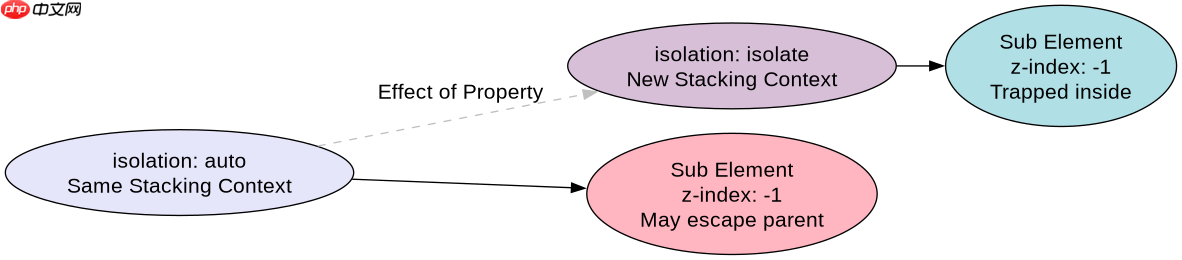
在css3中,将 isolation 属性设置为 isolate 可以创建一个独立的层叠上下文(stacking context),使该元素及其子元素的层叠顺序与页面其他部分完全隔离。具体做法是在目标元素上添加 isolation: isolate;,这样该元素内部的 z-index 值不会影响到外部同级或祖先元素,也不会被外部的 z-index 所影响。
isolation: isolate 如何改变 z-index 的作用范围?
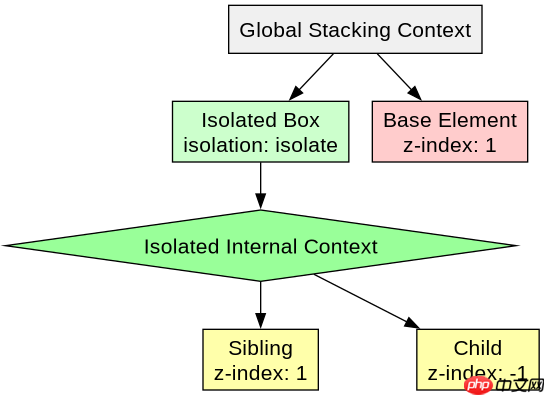
当元素设置了 isolation: isolate; 后,它自身就形成了一个包含块内的独立层叠上下文。这意味着该元素内部子元素的 z-index 排序仅在它们之间有效,而不会与父级或其他兄弟元素的 z-index 发生冲突。例如,一个设置了 z-index: -1 的子元素,在普通流中可能会跑到父级背景之下,但在隔离上下文中,它只会相对于父级内部的其他元素排序,而不会穿透到父级之外。
/* HTML结构 */
<div class="container">
  <div class="base">Base Layer (z-index: 0)</div>
  <div class="isolated-box">
    <div class="child" style="z-index: -1;">Child Inside Isolated Box</div>
    <div class="sibling">Sibling Inside Isolated Box</div>
  </div>
</div>

/* CSS样式 */
.container {
  position: relative;
  height: 400px;
  background: #f0f0f0;
}
.base {
  position: absolute;
  top: 50px;
  left: 50px;
  width: 100px;
  height: 100px;
  background: blue;
  z-index: 1; /* 外部层级较高 */
}
.isolated-box {
  position: relative;
  top: 80px;
  left: 80px;
  width: 150px;
  height: 150px;
  background: rgba(255, 0, 0, 0.5);
  isolation: isolate; /* 关键:创建独立层叠上下文 */
}
.child {
  position: absolute;
  top: 0;
  left: 0;
  width: 50px;
  height: 50px;
  background: green;
  z-index: -1; /* 在隔离上下文中,它位于 .isolated-box 内容之下,但仍在 .isolated-box 背景之上(如果背景有颜色)或者根据层叠规则处理,关键是它不会跑到 .base 下面去,除非 .isolated-box 本身被覆盖 */
}
.sibling {
  position: absolute;
  top: 60px;
  left: 60px;
  width: 50px;
  height: 50px;
  background: yellow;
  z-index: 1;
}
预期结果:
1. .base(蓝色)会覆盖 .isolated-box 的左上角部分,因为 .base 的 z-index: 1 高于 .isolated-box 默认的 auto(即0)。
2. 在 .isolated-box 内部,.sibling(黄色)会覆盖 .child(绿色),尽管 .child 的 z-index: -1,但在隔离上下文中,负 z-index 子元素通常位于其格式化上下文的内容层之下,背景层之上。关键在于,.child 不会跑到 .base 的后面去,因为它被限制在 .isolated-box 的层叠上下文内。
立即学习“前端免费学习笔记(深入)”;

对比 isolation: auto 与 isolation: isolate 的实际渲染差异
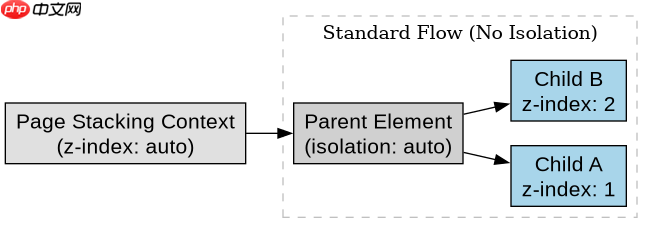
默认情况下,isolation 的值为 auto,此时元素不会创建新的层叠上下文,除非它同时满足了其他条件(如 position 为绝对/相对且 z-index 不为 auto,或 opacity 小于1等)。当显式设置 isolation: isolate; 时,即使没有 z-index、opacity 等其他触发条件,也会强制创建层叠上下文。这允许开发者在不改变布局或视觉透明度的情况下,纯粹为了控制层叠顺序而使用此属性。
/* 场景:两个重叠的半透明盒子,无 z-index */
<div class="wrapper">
  <div class="box-a" style="background: red; opacity: 0.5;">Box A</div>
  <div class="box-b" style="background: blue; opacity: 0.5; isolation: isolate;">Box B (Isolated)</div>
</div>

/* CSS */
.wrapper {
  position: relative;
  width: 300px;
  height: 300px;
}
.box-a {
  position: absolute;
  top: 50px;
  left: 50px;
  width: 100px;
  height: 100px;
}
.box-b {
  position: absolute;
  top: 80px;
  left: 80px;
  width: 100px;
  height: 100px;
}
预期结果:
1. 如果没有 isolation: isolate,.box-a 和 .box-b 都在同一个层叠上下文中。由于它们在DOM中的顺序,.box-b(后出现)通常会覆盖 .box-a,混合模式或透明度会导致重叠区域颜色混合。
2. 当 .box-b 设置 isolation: isolate 后,它创建了独立的层叠上下文。虽然 .box-b 仍然在 .box-a 之后渲染,因此视觉上 .box-b 依然覆盖 .box-a,但 .box-b 内部的任何子元素(如果有)的层叠行为将被隔离。更重要的是,如果 .box-a 也有 isolation: isolate,那么它们的层叠顺序仅由DOM顺序决定,且互不干扰内部子元素的层叠。此示例主要展示 isolation 作为一个独立的触发层叠上下文的机制,即使在没有 z-index 的情况下也能生效(注:实际上,仅 isolation: isolate 并不总是创建完整的层叠上下文以阻挡外部 z-index 的影响,它主要是为了隔离子元素的层叠。更准确的对比是看子元素的行为。让我们修正解释:重点在于子元素。如果 .box-b 有一个 z-index: -1 的子元素,在 auto 模式下,该子元素可能跑到 .box-a 后面;在 isolate 模式下,该子元素被限制在 .box-b 内部,不会跑到 .box-a 后面。)
当隔离元素内部存在负 z-index 子元素时,其行为表现如何?
在设置了 isolation: isolate; 的元素内部,如果子元素使用了负的 z-index,这些子元素会被限制在该隔离层叠上下文的“背景”层之下,但不会穿透到隔离元素之外的其他层叠上下文中。这与未设置隔离时的行为不同,未设置时,负 z-index 子元素可能会穿透父级并出现在父级兄弟元素之下。
/* 验证负 z-index 在隔离上下文中的行为 */
<div class="parent">
  <div class="outside-sibling" style="background: black; width: 200px; height: 200px; z-index: 10; position: absolute;">Outside Sibling</div>
  <div class="isolated-parent" style="isolation: isolate; position: relative; width: 200px; height: 200px; background: white; margin-top: 50px;">
    <div class="negative-child" style="position: absolute; top: 50px; left: 50px; width: 100px; height: 100px; background: red; z-index: -1;">Negative Child</div>
    <div class="normal-child" style="position: absolute; top: 60px; left: 60px; width: 100px; height: 100px; background: green;">Normal Child</div>
  </div>
</div>

/* 注意:.outside-sibling 在 DOM 中位于 .isolated-parent 之前,但 z-index 更高 */
/* 实际结构中,为了让测试清晰,调整DOM顺序或z-index */
/* 修正后的HTML以便观察 */
<div class="scene">
  <div class="back-layer" style="background: gray; width: 300px; height: 300px; position: relative;">
    <div class="front-element" style="background: blue; width: 100px; height: 100px; position: absolute; top: 100px; left: 100px; z-index: 5;">Front Element</div>
    <div class="isolated-container" style="isolation: isolate; position: absolute; top: 120px; left: 120px; width: 150px; height: 150px; background: rgba(255,255,255,0.8);">
      <div class="hidden-child" style="position: absolute; top: 0; left: 0; width: 50px; height: 50px; background: red; z-index: -1;">Hidden Child</div>
    </div>
  </div>
</div>
预期结果:
1. .front-element(蓝色)会覆盖 .isolated-container 的一部分,因为其 z-index: 5 高于 .isolated-container 的默认 auto。
2. .hidden-child(红色)虽然在 .isolated-container 内部且 z-index: -1,但它不会跑到 .front-element 的后面去。它只会在 .isolated-container 的内部层叠上下文中,位于其背景和内容之下。如果 .isolated-container 没有背景色,.hidden-child 可能会被 .front-element 遮挡,但这不是因为 .hidden-child 的 z-index 低于 .front-element,而是因为 .isolated-container 本身被 .front-element 遮挡。关键点在于,.hidden-child 的层叠行为被限制在 .isolated-container 内,不会影响到 .front-element 与 .back-layer 之间的关系。