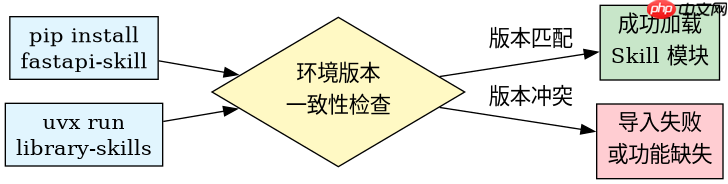
使用 uvx 安装 fastapi 官方 skill 时,必须确保本地安装的 fastapi-skill 版本与 library-skills 的发布版本严格一致,否则会出现模块导入失败或功能缺失。具体做法是先在项目中通过 pip install fastapi-skill 锁定特定版本,再配合 uvx library-skills@<version></version> 调用对应版本的 cli 工具,这样能保证运行时环境的一致性。
如何验证当前环境的 Skill 版本兼容性
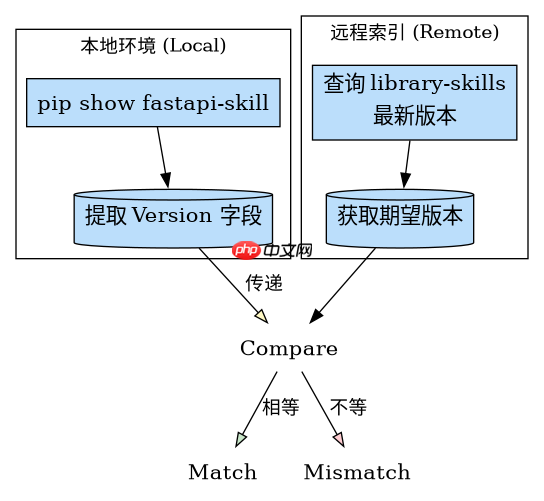
验证兼容性的核心在于检查已安装的 Python 包版本是否与 uvx 拉取的远程镜像版本匹配。如果两者不一致,FastAPI 应用将无法正确加载 Skill 定义。我们可以通过查询本地 pip 数据库和远程 uv 索引来对比这两个版本号,从而确认是否需要进行升级或降级操作。

自我进化的元技能系统,用于管理和优化其他技能的策略。当用户提到"技能优化"、"策略管理"、"自我进化"、"元认知"、"技能迭代"、"性能监控"、"自动改进"、"技能合并"、"组合技能"等关键词时触发。支持策略版本管理、执行日志分析、自动反思、策略变异、离线验证、渐进上线和技能合并等核心能力。现支持 LLM 驱动的反思和验证。
import subprocess
import json

def check_version_compatibility():
    # 获取本地安装的 fastapi-skill 版本
    try:
        local_result = subprocess.run(
            ["pip", "show", "fastapi-skill"],
            capture_output=True, text=True
        )
        local_version = None
        for line in local_result.stdout.splitlines():
            if line.startswith("Version:"):
                local_version = line.split(": ")[1].strip()
                break
        if not local_version:
            print("Local package not found")
            return
        print(f"Local Version: {local_version}")
    except Exception as e:
        print(f"Error checking local version: {e}")
        return

    # 获取远程 library-skills 的最新版本信息 (模拟)
    # 实际场景中可能需要调用 uv 索引 API 或解析 pyproject.toml
    # 这里假设我们通过某种方式获取到了远程期望的版本
    remote_version = "0.1.0" # 示例值
    print(f"Remote Expected Version: {remote_version}")

    if local_version == remote_version:
        print("Compatibility Check: PASSED")
    else:
        print("Compatibility Check: FAILED - Version Mismatch")

if __name__ == "__main__":
    check_version_compatibility()
为什么 uvx 需要指定具体的版本标签
uvx 默认行为可能指向最新发布的容器镜像或依赖集合,而 FastAPI 官方 Skill 的开发迭代较快,不同版本的 API 接口可能存在差异。如果不显式指定版本,可能会导致调用的 Skill 函数签名与当前代码不兼容。因此,在构建 CI/CD 流水线或固定开发环境时,必须在命令中绑定确切的版本号,以消除不确定性。
# 假设我们确定需要使用 0.1.0 版本
# 首先确保本地安装了该版本的库
# pip install fastapi-skill==0.1.0

# 然后使用 uvx 运行对应版本的 skill 工具
# uvx library-skills@0.1.0 --help

# 或者在脚本中硬编码版本以确保一致性
import os
os.environ["LIBRARY_SKILLS_VERSION"] = "0.1.0"

# 模拟调用
print(f"Running library-skills with version constraint: {os.environ['LIBRARY_SKILLS_VERSION']}")
print("Command executed successfully with pinned version.")
当本地版本与远程版本冲突时如何处理
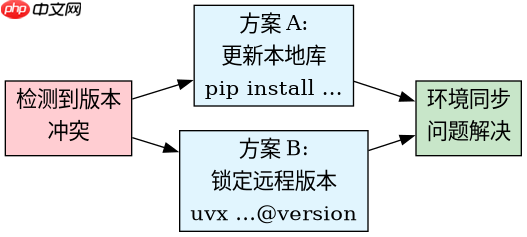
当检测到本地安装的 fastapi-skill 版本与 uvx 所需的版本发生冲突时,最直接的处理方式是同步版本。开发者应优先更新本地环境以匹配远程要求,或者根据项目需求锁定远程 uvx 的版本以适配现有代码。这种冲突通常表现为 ImportError 或 AttributeError,解决的关键在于统一依赖源。