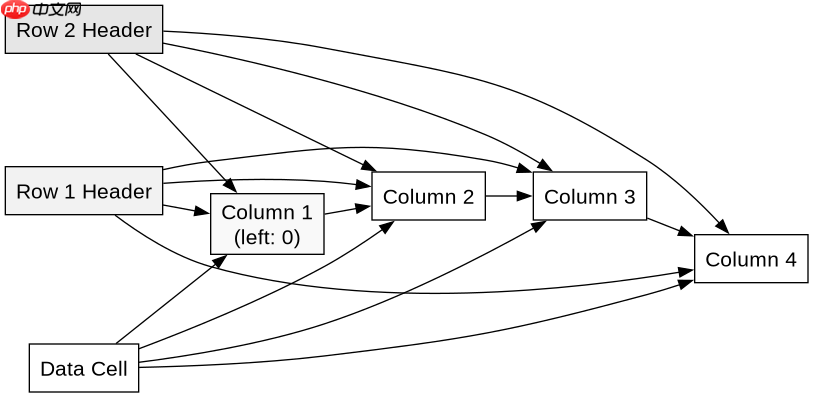
利用css3的`position: sticky`实现多级表头与首列同时冻结,核心在于为每一层表头的单元格设置`top`属性,为首列的单元格设置`left`属性,并配合`z-index`控制层级。具体做法是:第一行表头单元格的`top`设为0,第二行表头单元格的`top`设为第一行的高度,首列单元格的`left`设为0,后续列的首行单元格`left`设为对应列宽之和。这样做能让表头在垂直滚动时固定,首列在水平滚动时固定,且多层表头能依次覆盖。需注意,所有sticky元素必须位于一个设置了`overflow: auto`或`scroll`的容器内,且不能破坏表格的布局结构。
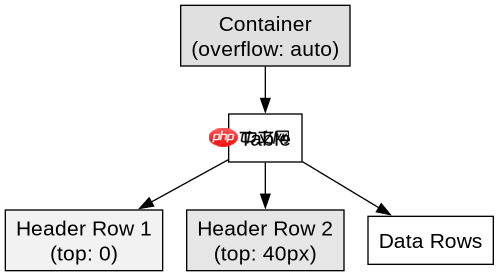
如何设置多级表头的垂直冻结位置?
多级表头冻结的关键是为不同行的`
<style>
.sticky-table-container {
  max-height: 300px;
  overflow-y: auto;
  overflow-x: auto;
}
.sticky-table th,
.sticky-table td {
  border: 1px solid #ddd;
  padding: 8px;
  text-align: left;
}
/* 第一行表头 */
.sticky-table thead tr:first-child th {
  position: sticky;
  top: 0;
  background-color: #f2f2f2;
  z-index: 2;
}
/* 第二行表头 */
.sticky-table thead tr:nth-child(2) th {
  position: sticky;
  top: 40px; /* 假设第一行高度为40px */
  background-color: #e6e6e6;
  z-index: 2;
}
</style>

<div class="sticky-table-container">
  <table class="sticky-table">
    <thead>
      <tr>
        <th colspan="2">Group A</th>
        <th colspan="2">Group B</th>
      </tr>
      <tr>
        <th>Name</th>
        <th>Age</th>
        <th>Score</th>
        <th>Grade</th>
      </tr>
    </thead>
    <tbody>
      <tr><td>Alice</td><td>25</td><td>90</td><td>A</td></tr>
      <tr><td>Bob</td><td>30</td><td>85</td><td>B</td></tr>
      <tr><td>Charlie</td><td>22</td><td>92</td><td>A</td></tr>
      <tr><td>David</td><td>28</td><td>78</td><td>C</td></tr>
      <tr><td>Eve</td><td>24</td><td>88</td><td>B</td></tr>
      <tr><td>Frank</td><td>35</td><td>95</td><td>A</td></tr>
      <tr><td>Grace</td><td>29</td><td>82</td><td>B</td></tr>
      <tr><td>Hank</td><td>26</td><td>91</td><td>A</td></tr>
      <tr><td>Ivy</td><td>23</td><td>87</td><td>B</td></tr>
      <tr><td>Jack</td><td>31</td><td>79</td><td>C</td></tr>
    </tbody>
  </table>
</div>
上述代码中,`.sticky-table-container`设置了最大高度和溢出滚动,这是`sticky`生效的前提。第一行`
立即学习“前端免费学习笔记(深入)”;

如何实现首列的水平冻结?
首列冻结需要为第一列的`
<style>
.sticky-table-container {
  max-height: 300px;
  overflow-y: auto;
  overflow-x: auto;
}
.sticky-table th,
.sticky-table td {
  border: 1px solid #ddd;
  padding: 8px;
  text-align: left;
}
/* 第一行表头 */
.sticky-table thead tr:first-child th {
  position: sticky;
  top: 0;
  background-color: #f2f2f2;
  z-index: 3;
}
/* 第二行表头 */
.sticky-table thead tr:nth-child(2) th {
  position: sticky;
  top: 40px;
  background-color: #e6e6e6;
  z-index: 3;
}
/* 首列 */
.sticky-table th:first-child,
.sticky-table td:first-child {
  position: sticky;
  left: 0;
  background-color: #f9f9f9;
  z-index: 2;
}
/* 修正左上角交叉区域 */
.sticky-table thead tr:first-child th:first-child {
  z-index: 4;
  background-color: #dcdcdc;
}
.sticky-table thead tr:nth-child(2) th:first-child {
  z-index: 4;
  background-color: #d0d0d0;
}
</style>

<div class="sticky-table-container">
  <table class="sticky-table">
    <thead>
      <tr>
        <th colspan="2">Group A</th>
        <th colspan="2">Group B</th>
      </tr>
      <tr>
        <th>Name</th>
        <th>Age</th>
        <th>Score</th>
        <th>Grade</th>
      </tr>
    </thead>
    <tbody>
      <tr><td>Alice</td><td>25</td><td>90</td><td>A</td></tr>
      <tr><td>Bob</td><td>30</td><td>85</td><td>B</td></tr>
      <tr><td>Charlie</td><td>22</td><td>92</td><td>A</td></tr>
      <tr><td>David</td><td>28</td><td>78</td><td>C</td></tr>
      <tr><td>Eve</td><td>24</td><td>88</td><td>B</td></tr>
      <tr><td>Frank</td><td>35</td><td>95</td><td>A</td></tr>
      <tr><td>Grace</td><td>29</td><td>82</td><td>B</td></tr>
      <tr><td>Hank</td><td>26</td><td>91</td><td>A</td></tr>
      <tr><td>Ivy</td><td>23</td><td>87</td><td>B</td></tr>
      <tr><td>Jack</td><td>31</td><td>79</td><td>C</td></tr>
    </tbody>
  </table>
</div>
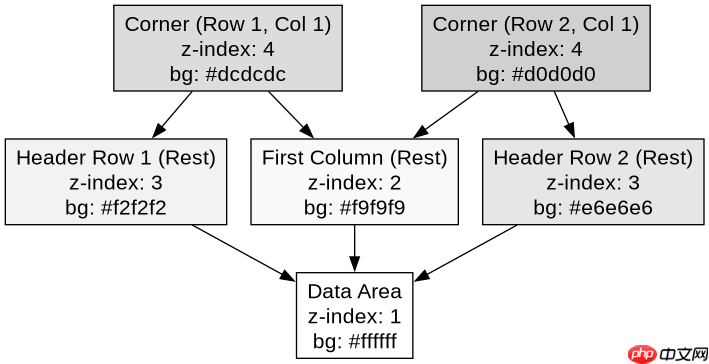
此代码在上一节基础上增加了首列冻结。`.sticky-table th:first-child, .sticky-table td:first-child`选择器选中第一列的所有单元格,设置`left: 0`使其在水平滚动时固定。左上角的交叉区域(即第一行第一列和第二行第一列)需要更高的`z-index`(如4)以确保它们在最上层,避免被其他表头或数据单元格覆盖。背景色也做了相应调整以区分区域。
当表格同时水平和垂直滚动时,左上角交叉区域如何处理?
当表格同时水平和垂直滚动时,左上角的交叉区域(即第一行第一列和第二行第一列的交汇处)需要特别处理,因为它们既是表头的一部分,又是首列的一部分。这些单元格必须拥有最高的`z-index`,以确保它们在滚动时始终可见且不与其他单元格重叠。此外,它们的背景色应与对应的表头和首列背景色协调,通常使用一种中间色调或深色以突出其重要性。如果不正确处理,可能会出现内容被遮挡、背景色不一致或滚动不流畅的问题。
<!-- 复用上一节的完整HTML结构 -->
<style>
/* ... 之前的样式 ... */
/* 修正左上角交叉区域 */
.sticky-table thead tr:first-child th:first-child {
  z-index: 4;
  background-color: #dcdcdc;
}
.sticky-table thead tr:nth-child(2) th:first-child {
  z-index: 4;
  background-color: #d0d0d0;
}
</style>
在上述代码中,`.sticky-table thead tr:first-child th:first-child`和`.sticky-table thead tr:nth-child(2) th:first-child`分别对应第一行第一列和第二行第一列的单元格。通过设置`z-index: 4`,确保它们在滚动时始终位于最顶层。背景色`#dcdcdc`和`#d0d0d0`分别与第一行和第二行表头的背景色`#f2f2f2`和`#e6e6e6`以及首列的背景色`#f9f9f9`形成对比,视觉上清晰区分。这种处理方式保证了在多级表头和首列同时冻结的情况下,表格的可读性和用户体验。