如何在CSS中实现表格首行或首列冻结固定效果
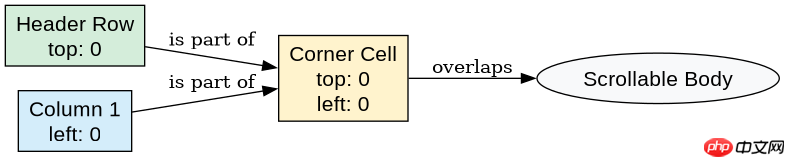
使用 position: sticky 属性即可实现。将表头单元格的 top 设为 0 可冻结首行,将首列单元格的 left 设为 0 可冻结首列。若同时冻结首行和首列,需为左上角单元格同时设置 top: 0 和 left: 0。
如何冻结多行或多列
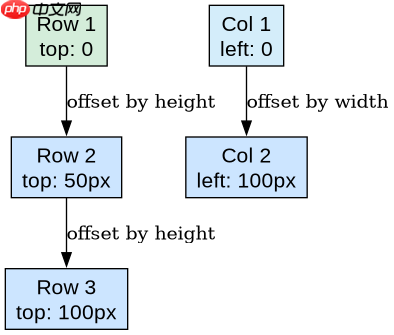
通过为不同位置的单元格设置不同的 top 或 left 偏移量来实现。例如,第二行的 top 应等于第一行的高度,以此类推。对于多列,左侧各列的 left 值依次累加其宽度。

<style>
.sticky-header {
  position: sticky;
  top: 0;
  background-color: white;
}
.sticky-col-1 {
  position: sticky;
  left: 0;
  background-color: #f0f0f0;
}
.sticky-corner {
  position: sticky;
  top: 0;
  left: 0;
  z-index: 2;
}
</style>

<table>
  <thead>
    <tr>
      <th class="sticky-corner">ID</th>
      <th class="sticky-header">Name</th>
      <th class="sticky-header">Age</th>
    </tr>
  </thead>
  <tbody>
    <tr>
      <td class="sticky-col-1">1</td>
      <td>Alice</td>
      <td>25</td>
    </tr>
  </tbody>
</table>
为什么冻结区域背景需要显式设置
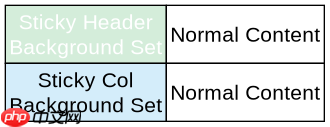
因为 position: sticky 元素在滚动时会覆盖后续内容,若不设置背景色,下方滚动的单元格文字会透过透明背景显示出来,造成视觉干扰。必须为每个冻结单元格设置不透明的 background-color。
立即学习“前端免费学习笔记(深入)”;
<style>
.sticky-header {
  position: sticky;
  top: 0;
  background-color: white; /* 关键:防止透底 */
}
.sticky-col-1 {
  position: sticky;
  left: 0;
  background-color: #f0f0f0; /* 关键:防止透底 */
}
</style>