CSS Grid 中 footer 始终固定在页面底部的核心方法
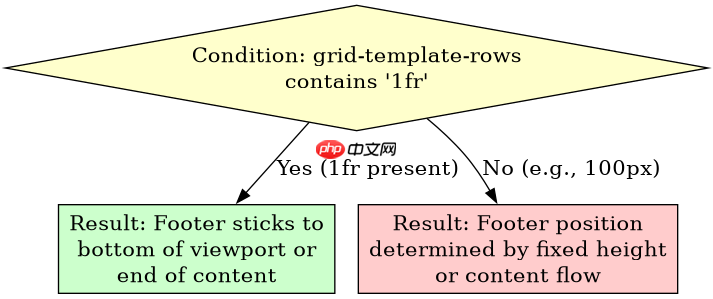
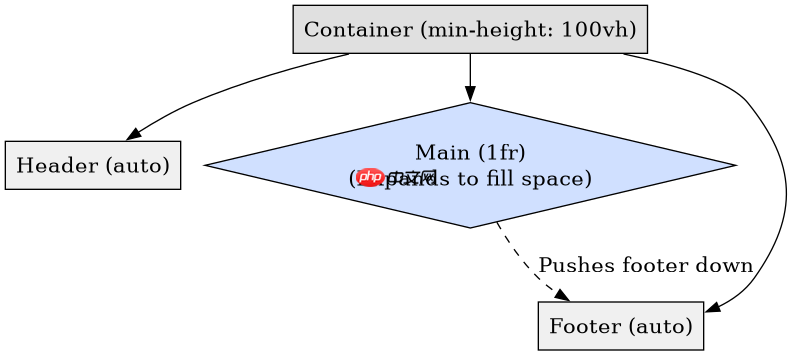
在 css grid 布局中,让 footer 始终固定在页面底部(即圣杯布局或 sticky footer)的核心方法是利用网格轨道的 1fr 单位。具体做法是将容器的 grid-template-rows 设置为 auto 1fr auto,其中中间的 1fr 会占据所有剩余空间,从而将位于第三行的 footer 推到底部。如果内容超过视口高度,中间区域会自动滚动,而 header 和 footer 保持相对位置不变。
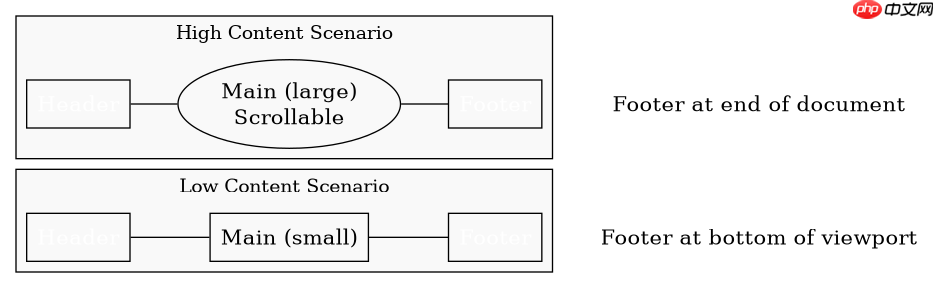
当内容不足时 footer 贴底与内容超出的行为对比
这种布局方式在处理不同长度的内容时表现一致:内容少时 footer 贴底,内容多时 footer 随页面滚动。关键在于容器必须明确高度,通常使用 min-height: 100vh 确保网格容器至少占满视口高度,这样 1fr 才能正确计算剩余空间。
基于 grid-template-rows 属性值的具体问题
基于程序中 grid-template-rows: auto 1fr auto 这一输入条件,具体的问题是:如果将中间的 1fr 改为 100px,footer 还会固定在底部吗?答案是不会。此时中间区域固定为 100px,若内容不足,footer 会紧随其后,不再贴底;若内容超出 100px,则会出现滚动条,但 footer 的位置由内容决定而非视口底部。
立即学习“前端免费学习笔记(深入)”;

html
<!DOCTYPE html>
<html lang="en">
<head>
    <meta charset="UTF-8">
    <meta name="viewport" content="width=device-width, initial-scale=1.0">
    <title>Sticky Footer with CSS Grid</title>
    <style>
        body {
            margin: 0;
            font-family: sans-serif;
        }
        .container {
            display: grid;
            min-height: 100vh;
            grid-template-rows: auto 1fr auto;
        }
        header {
            background: #333;
            color: white;
            padding: 1rem;
        }
        main {
            padding: 1rem;
            background: #f4f4f4;
        }
        footer {
            background: #333;
            color: white;
            padding: 1rem;
        }
    </style>
</head>
<body>
    <div class="container">
        <header>Header</header>
        <main><p>Content goes here.</p></main>
        <footer>Footer</footer>
    </div>
</body>
</html>
预期结果:无论 main 中的内容多少,footer 始终位于视口底部或页面最下方。
html
<!DOCTYPE html>
<html lang="en">
<head>
    <meta charset="UTF-8">
    <meta name="viewport" content="width=device-width, initial-scale=1.0">
    <title>Fixed Height Middle Row</title>
    <style>
        body {
            margin: 0;
            font-family: sans-serif;
        }
        .container {
            display: grid;
            min-height: 100vh;
            grid-template-rows: auto 100px auto; /* Changed from 1fr to 100px */
        }
        header {
            background: #333;
            color: white;
            padding: 1rem;
        }
        main {
            padding: 1rem;
            background: #f4f4f4;
            overflow: auto; /* Allow scrolling if content exceeds 100px */
        }
        footer {
            background: #333;
            color: white;
            padding: 1rem;
        }
    </style>
</head>
<body>
    <div class="container">
        <header>Header</header>
        <main><p>Short content.</p></main>
        <footer>Footer</footer>
    </div>
</body>
</html>
预期结果:当内容少于 100px 时,footer 不贴底;当内容多于 100px 时,main 内部滚动,footer 位置固定在其后。