








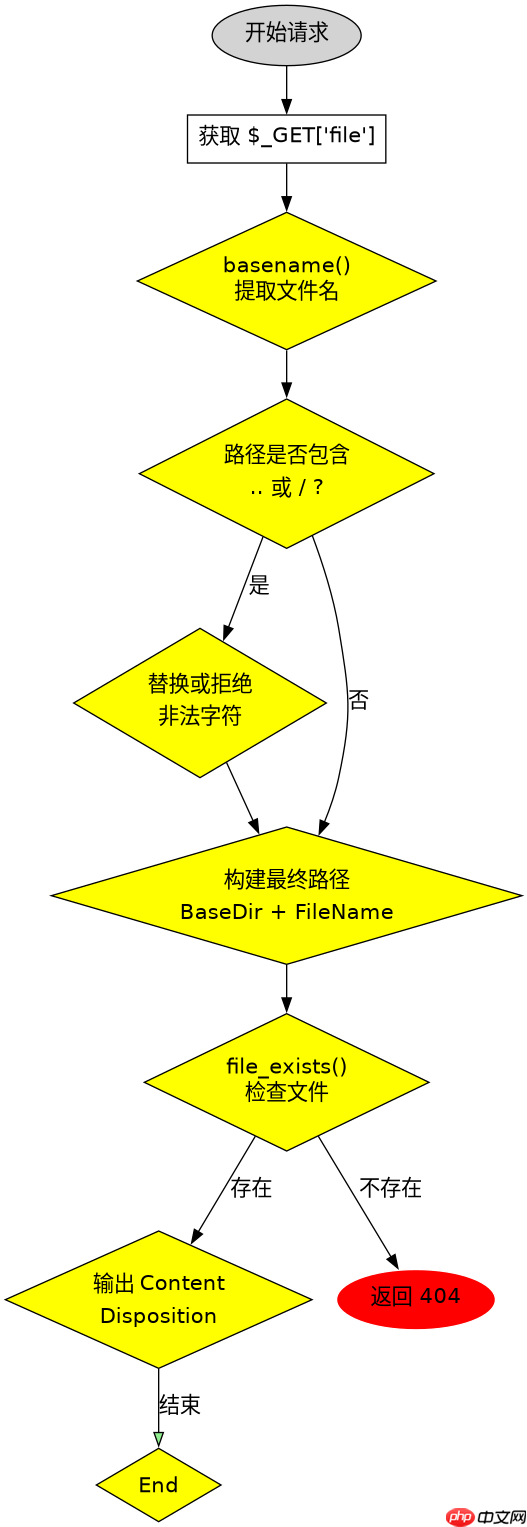
使用 basename() 函数提取文件名并配合 header() 设置响应头,即可实现强制下载并防止路径注入。核心做法是获取用户传入的路径后,仅保留最后一层文件名,从而剥离掉任何试图通过 ../ 进行的目录穿越攻击,确保文件只能从当前脚本所在的允许目录中被读取。

basename() 如何过滤路径注入
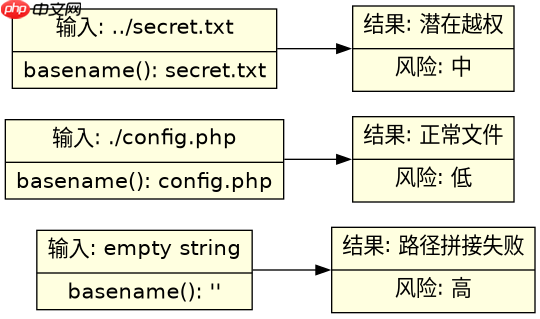
basename() 会移除字符串中最后一个斜杠及其之前的所有字符。如果输入包含 ../../etc/passwd,该函数只返回 passwd。这种机制天然阻断了相对路径的越权访问,因为最终生成的文件路径始终基于安全的基础目录拼接。
$file_path = '/var/www/html/uploads/' . basename($_GET['file']);
if (file_exists($file_path)) {
    header('Content-Type: application/octet-stream');
    header('Content-Disposition: attachment; filename="' . basename($_GET['file']) . '"');
    readfile($file_path);
}
完整下载逻辑与头信息设置
除了文件名处理,还需要正确设置 HTTP 响应头以触发浏览器的下载行为。Content-Type 设为 application/octet-stream 表示二进制流,Content-Disposition 设为 attachment 并指定文件名。代码中需检查文件是否存在,避免报错。

立即学习“PHP免费学习笔记(深入)”;
// 假设基础目录为 /var/www/html/uploads/
$base_dir = '/var/www/html/uploads/';
$user_input = $_GET['file'] ?? '';

// 1. 获取纯净文件名
$safe_filename = basename($user_input);

// 2. 构建完整路径
$full_path = $base_dir . $safe_filename;

// 3. 验证文件存在且位于基础目录下(双重保险)
if (file_exists($full_path) && strpos(realpath($full_path), realpath($base_dir)) === 0) {
    header('Content-Description: File Transfer');
    header('Content-Type: application/octet-stream');
    header('Content-Disposition: attachment; filename="' . $safe_filename . '"');
    header('Expires: 0');
    header('Cache-Control: must-revalidate');
    header('Pragma: public');
    header('Content-Length: ' . filesize($full_path));
    readfile($full_path);
    exit;
} else {
    http_response_code(404);
    echo 'File not found.';
}
当 basename() 遇到空输入或特殊字符时
如果用户传入空字符串或纯路径分隔符,basename() 可能返回空值或当前目录标识。在实际代码中,必须对 $safe_filename 进行非空校验。此外,若文件名包含中文或特殊符号,建议在 header 中使用 urlencode() 或遵循 RFC 5987 标准编码,以确保浏览器能正确显示下载文件名而不出现乱码。



















