使用 fetch 获取 mp4 数据时,应调用 response.blob() 方法将响应体转换为 blob 对象,随后通过 url.createobjecturl() 生成临时 url 并赋值给视频元素的 src 属性。这样做能避免手动处理二进制流,直接利用浏览器原生能力播放视频。若需限制内存占用或实现流式加载,可改用 response.body.getreader() 配合 mediasource api 进行分段处理。

如何验证接口返回的是有效的 MP4 文件
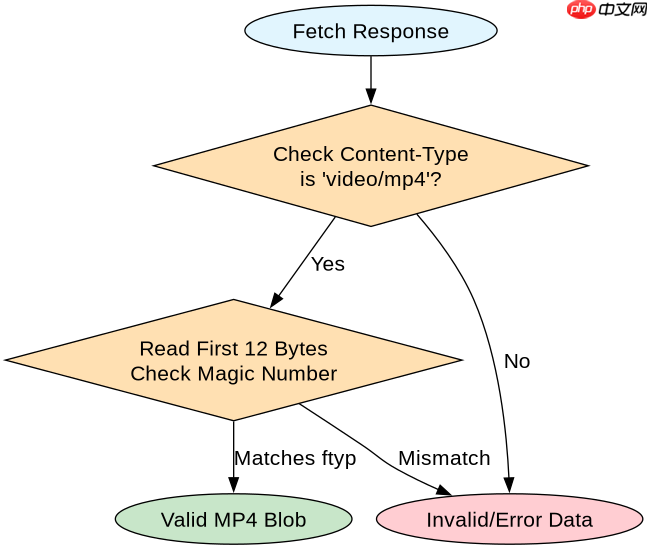
在转换前检查响应的 Content-Type 是否为 video/mp4,并通过 blob.type 确认类型匹配。同时读取少量字节验证魔数(Magic Number),确保文件头符合 ISO Base Media File Format 标准。这能防止因服务端错误返回 HTML 错误页而导致播放器崩溃。
const url = 'https://api.example.com/video/123.mp4';

async function loadVideo() {
  try {
    const response = await fetch(url);

    // 1. 检查 HTTP 状态
    if (!response.ok) {
      throw new Error(`HTTP error! status: ${response.status}`);
    }

    // 2. 检查 Content-Type
    const contentType = response.headers.get('content-type');
    if (!contentType || !contentType.includes('video/mp4')) {
      console.warn('Warning: Response is not video/mp4, type:', contentType);
    }

    // 3. 转换为 Blob
    const blob = await response.blob();

    // 4. 验证 Blob 大小和类型
    if (blob.size === 0) {
      throw new Error('Received empty video file');
    }
    if (blob.type !== 'video/mp4' && blob.type !== '') {
       console.warn('Blob type mismatch:', blob.type);
    }

    // 5. 创建 Object URL
    const videoUrl = URL.createObjectURL(blob);
    const videoElement = document.getElementById('myVideo');
    videoElement.src = videoUrl;

    // 可选:监听加载完成以清理 URL(如果不再需要)
    videoElement.onloadedmetadata = () => {
      console.log('Video loaded successfully');
      // URL.revokeObjectURL(videoUrl); // 注意:不要立即释放,否则视频无法播放
    };

  } catch (error) {
    console.error('Failed to load video:', error);
  }
}
如何处理大文件导致的内存溢出问题
对于超过几十 MB 的 MP4 文件,response.blob() 会将整个文件加载到内存中,可能导致页面卡顿或崩溃。此时应使用 response.body.getReader() 分块读取数据,并结合 MediaSource API 将数据追加到媒体源中,实现流式播放。这种方式只保留当前播放缓冲区的内存,适合长视频场景。

立即学习“Java免费学习笔记(深入)”;

// 简化版流式加载示例(需完整 MediaSource 实现)
async function streamVideo() {
  const response = await fetch('https://api.example.com/video/large.mp4');
  const reader = response.body.getReader();

  const mediaSource = new MediaSource();
  const video = document.getElementById('streamingVideo');
  video.src = URL.createObjectURL(mediaSource);

  mediaSource.addEventListener('sourceopen', async () => {
    const sourceBuffer = mediaSource.addSourceBuffer('video/mp4; codecs="avc1.42E01E, mp4a.40.2"');

    while (true) {
      const { done, value } = await reader.read();
      if (done) break;

      // 将 chunk 追加到 SourceBuffer
      if (!sourceBuffer.updating) {
        sourceBuffer.appendBuffer(value);
      }
    }
    mediaSource.endOfStream();
  });
}
当接口返回 403 或 CORS 错误时该如何排查
如果 fetch 请求 MP4 资源时遇到 CORS 错误或 403 Forbidden,通常是因为服务端未配置正确的跨域头或缺乏鉴权。开发者应检查响应头是否包含 Access-Control-Allow-Origin,并在请求中添加必要的认证头如 Authorization。此外,MP4 视频通常需要支持 Range 请求以实现拖拽进度条,需确认服务端支持 Accept-Ranges: bytes。