








如何为防抖和节流函数添加任务调度能力
通过给防抖和节流函数返回的包装函数挂载自定义方法(如 cancel、flush 或 runnow)来实现任务调度。在闭包中维护定时器 id 和状态标志,暴露的方法直接操作这些内部变量,从而允许调用者在触发前取消执行或在等待期间强制立即执行。

如何实现防抖函数的任务调度
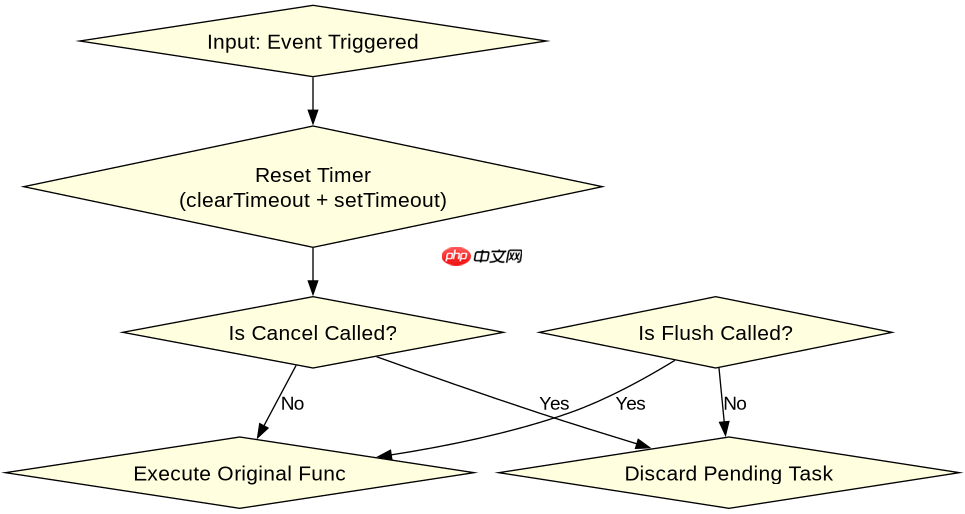
防抖的核心是重置定时器,因此调度功能主要体现为 cancel(清除未执行的定时器)和 flush(立即执行并清除定时器)。实现时,在返回的函数对象上挂载这两个方法,它们分别调用 clearTimeout 和手动触发原函数逻辑。
function debounce(func, wait) {
  let timeoutId;

  function debounced(...args) {
    const context = this;
    // 每次调用都清除之前的定时器
    if (timeoutId) clearTimeout(timeoutId);

    timeoutId = setTimeout(() => {
      func.apply(context, args);
      timeoutId = null; // 执行后清空ID
    }, wait);
  }

  // 调度方法:取消待执行的任务
  debounced.cancel = function() {
    if (timeoutId) {
      clearTimeout(timeoutId);
      timeoutId = null;
    }
  };

  // 调度方法:立即执行当前等待的任务
  debounced.flush = function(...args) {
    if (timeoutId) {
      clearTimeout(timeoutId);
      timeoutId = null;
    }
    return func.apply(this, args);
  };

  return debounced;
}
预期结果:调用 debounced.cancel() 会停止后续执行;调用 debounced.flush() 会立即运行 func 并重置状态。
立即学习“Java免费学习笔记(深入)”;

如何实现节流函数的任务调度
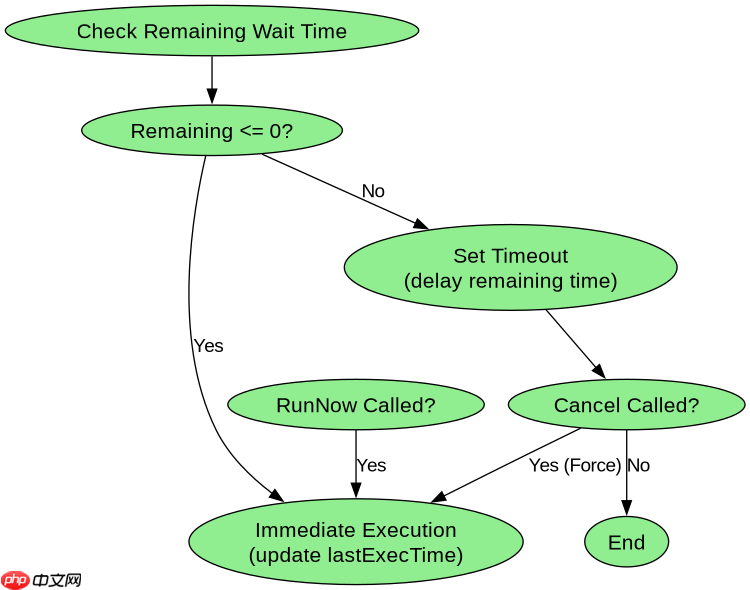
节流通常有两种模式:时间戳模式和定时器模式。为了支持调度,我们需要在返回的函数上挂载 cancel 和 runNow。对于时间戳模式,runNow 可以重置上次执行时间以允许立即再次触发;对于定时器模式,cancel 用于清除正在进行的延迟执行。
function throttle(func, wait) {
  let timeoutId;
  let lastExecTime = 0;

  function throttled(...args) {
    const now = Date.now();
    const remainingWait = wait - (now - lastExecTime);

    // 如果距离上次执行已超过等待时间,立即执行
    if (remainingWait <= 0) {
      if (timeoutId) {
        clearTimeout(timeoutId);
        timeoutId = null;
      }
      lastExecTime = now;
      return func.apply(this, args);
    }
    // 否则设置新的定时器
    else if (!timeoutId) {
      timeoutId = setTimeout(() => {
        lastExecTime = Date.now();
        timeoutId = null;
        func.apply(this, args);
      }, remainingWait);
    }
  }

  // 调度方法:取消剩余的延迟执行
  throttled.cancel = function() {
    if (timeoutId) {
      clearTimeout(timeoutId);
      timeoutId = null;
    }
  };

  // 调度方法:强制立即执行并重置状态
  throttled.runNow = function(...args) {
    if (timeoutId) {
      clearTimeout(timeoutId);
      timeoutId = null;
    }
    lastExecTime = Date.now();
    return func.apply(this, args);
  };

  return throttled;
}预期结果:throttled.cancel() 清除定时器;throttled.runNow() 忽略剩余等待时间,立即执行并更新 lastExecTime。
基于 cancel 方法的实际调度场景验证
在实际开发中,最典型的调度需求是在用户交互中断时取消 pending 的任务。例如,在搜索框输入时,如果用户快速切换标签页或关闭弹窗,应取消尚未触发的防抖请求,避免无效的网络请求。
// 模拟使用场景
const searchInput = document.getElementById('search');
const handleSearch = debounce((query) => {
  console.log('Fetching data for:', query);
}, 500);

searchInput.addEventListener('input', (e) => {
  handleSearch(e.target.value);
});

// 当用户离开页面或点击取消按钮时
function onUserLeave() {
  handleSearch.cancel(); // 取消所有待处理的搜索请求
  console.log('Search tasks cancelled.');
}
验证结论:调用 handleSearch.cancel() 后,即使继续输入,也不会再触发 console.log,直到重新初始化或再次正常触发。这证明了调度方法能有效控制任务的执行生命周期。


















