在 java 日志记录中开启 resttemplate 的日志,核心做法是将 resttemplate 的请求和响应拦截器替换为 loggingclienthttprequestinterceptor。通过配置 commonslogclienthttprequestinterceptor 或 slf4jclienthttprequestinterceptor,可以自动将 http 请求头、url、方法以及响应状态码和正文打印到日志文件中。这样做能直接观察到网络交互细节,便于排查连接超时、参数错误或响应异常等问题。

如何配置 Slf4j 风格的 RestTemplate 日志拦截器
要使用基于 SLF4J 的日志记录,需要引入 spring-boot-starter-logging(通常已包含)并确保使用了支持该拦截器的 Spring Web 版本。主要步骤是创建一个自定义的 RestTemplate 实例,并在其拦截器列表中插入 Slf4jClientHttpRequestInterceptor。默认情况下,它只会记录请求的基本信息,若需记录请求体和响应体,需显式设置日志级别为 DEBUG 或 TRACE,并配置拦截器以允许读取流内容。
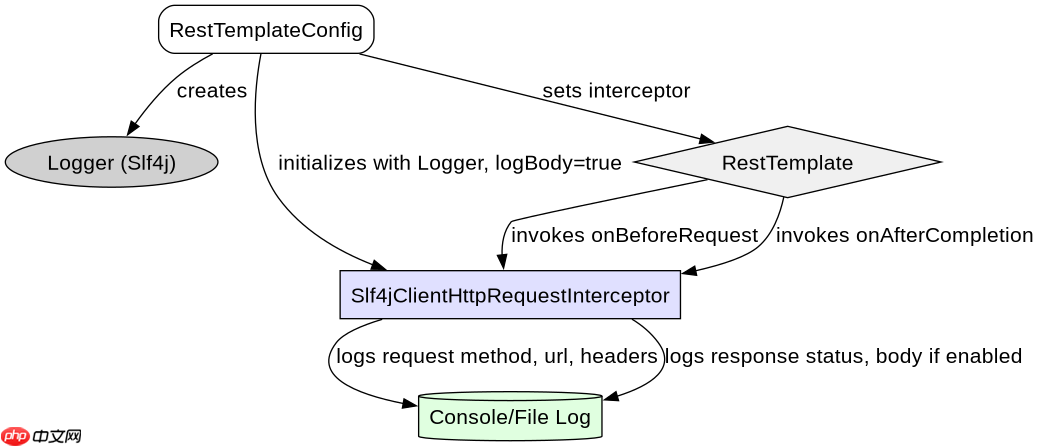
import org.springframework.http.client.ClientHttpRequestInterceptor; import org.springframework.web.client.RestTemplate; import org.springframework.http.client.support.LoggingInterceptors; import org.slf4j.Logger; import org.slf4j.LoggerFactory; import java.util.Collections; public class RestTemplateConfig { private static final Logger logger = LoggerFactory.getLogger(RestTemplateConfig.class); public RestTemplate getLoggingRestTemplate() { RestTemplate restTemplate = new RestTemplate(); // 添加 Slf4j 拦截器,启用详细日志 ClientHttpRequestInterceptor interceptor = new LoggingInterceptors.Slf4jClientHttpRequestInterceptor(logger, true, true); restTemplate.setInterceptors(Collections.singletonList(interceptor)); return restTemplate; } }上述代码创建了一个新的 RestTemplate 实例,并通过 setInterceptors 方法注入了 Slf4jClientHttpRequestInterceptor。构造函数中的两个布尔参数分别控制是否记录请求体和响应体。当调用此模板发起请求时,SLF4J 会将详细的 HTTP 报文输出到控制台或日志文件。注意,由于 HTTP 流只能被读取一次,拦截器内部会缓存响应体以便后续处理,这可能会轻微影响内存使用,但在大多数场景下可忽略。
立即学习“Java免费学习笔记(深入)”;

如何区分不同 RestTemplate 实例的日志来源
当应用中存在多个 RestTemplate 实例时,默认的日志输出可能难以区分来源。解决方法是为每个实例绑定特定的 Logger 名称,或者在日志配置文件中按包名或类名过滤。通过在创建 RestTemplate 时传入带有特定名称的 Logger 对象给拦截器,可以在日志输出中看到明确的标识。此外,也可以在 logback.xml 或 log4j2.xml 中配置特定的 Appender 来捕获这些日志。

import org.springframework.http.client.ClientHttpRequestInterceptor; import org.springframework.web.client.RestTemplate; import org.slf4j.Logger; import org.slf4j.LoggerFactory; import org.springframework.http.client.support.LoggingInterceptors; import java.util.Collections; public class SpecificRestTemplateConfig { public RestTemplate getApiServiceRestTemplate() { Logger apiLogger = LoggerFactory.getLogger("com.example.api.service"); RestTemplate restTemplate = new RestTemplate(); ClientHttpRequestInterceptor interceptor = new LoggingInterceptors.Slf4jClientHttpRequestInterceptor(apiLogger, true, false); restTemplate.setInterceptors(Collections.singletonList(interceptor)); return restTemplate; } public RestTemplate getInternalServiceRestTemplate() { Logger internalLogger = LoggerFactory.getLogger("com.example.internal.service"); RestTemplate restTemplate = new RestTemplate(); ClientHttpRequestInterceptor interceptor = new LoggingInterceptors.Slf4jClientHttpRequestInterceptor(internalLogger, false, true); restTemplate.setInterceptors(Collections.singletonList(interceptor)); return restTemplate; } }这段代码展示了如何为不同的业务场景创建独立的 RestTemplate 实例。第一个实例用于外部 API 服务,启用了请求体日志但禁用了响应体日志(假设响应体较大),并使用名为 com.example.api.service 的 Logger。第二个实例用于内部服务调用,禁用了请求体日志但启用了响应体日志,并使用 com.example.internal.service 的 Logger。这样在日志文件中可以通过搜索特定的 Logger 名称来快速定位相关请求,避免日志混杂。
当 RestTemplate 抛出 HttpClientErrorException 时日志中会显示什么
当 RestTemplate 接收到 4xx 或 5xx 状态码时,它会抛出 HttpClientErrorException 或 HttpServerErrorException。此时,日志中不仅会包含之前配置的请求和响应详情,还会在异常堆栈中附带完整的错误响应体。如果拦截器配置为记录响应体,那么在异常发生前,响应体已经被读取并记录在日志中;如果未配置记录响应体,则需要在 catch 块中手动获取 getResponseBodyAsString() 来补充日志信息。确保日志级别足够低(如 DEBUG)才能看到完整的报文内容。