在 java 文件读写中,path 接口的 startswith() 方法用于判断当前路径是否以指定的前缀路径开头。调用该实例方法并传入一个 path 对象作为参数,若匹配则返回 true,否则返回 false。该方法基于路径的组成部分进行精确比较,不会自动处理相对路径或符号链接的解析,因此常用于验证文件是否属于某个特定目录。

startsWith() 如何处理绝对路径与相对路径的差异
当使用 startsWith() 时,如果当前路径是绝对路径而参数是相对路径(或反之),方法会直接返回 false,因为两者的根节点不同。要正确判断包含关系,必须确保两个路径具有相同的类型(同为绝对或同为相对),或者先通过 normalize() 和 toAbsolutePath() 统一格式后再进行比较。
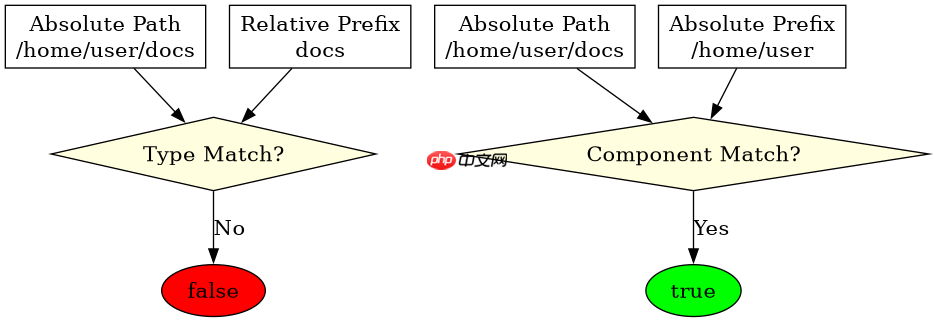
import java.nio.file.Path;
import java.nio.file.Paths;

public class PathStartsWithExample {
    public static void main(String[] args) {
        // 定义绝对路径
        Path absPath = Paths.get("/home/user/docs/file.txt");
        // 定义绝对前缀
        Path absPrefix = Paths.get("/home/user");

        // 定义相对路径
        Path relPath = Paths.get("docs/file.txt");
        // 定义相对前缀
        Path relPrefix = Paths.get("docs");

        System.out.println(absPath.startsWith(absPrefix)); // true
        System.out.println(relPath.startsWith(relPrefix)); // true
        System.out.println(absPath.startsWith(relPrefix)); // false, 类型不匹配
    }
}
startsWith() 在权限校验中的具体应用
在实现安全文件读取功能时,常需限制用户只能访问特定目录下的文件。startsWith() 可用于快速检查请求的文件路径是否在允许的白名单目录内。例如,若允许访问 /data/uploads,则任何试图访问 /data/uploads/../etc/passwd 的路径在经过规范化后仍应以 /data/uploads 开头,从而被拦截或放行。

javascript-typescript-typescript-scaffold
下载
你是 TypeScript 项目架构专家,专注于脚手架搭建生产就绪的 Node.js 和前端应用。生成包含现代工具链(pnpm、Vite、Next.js)、类型
立即学习“Java免费学习笔记(深入)”;

import java.nio.file.Path;
import java.nio.file.Paths;

public class SecurityCheckExample {
    public static void main(String[] args) {
        Path allowedDir = Paths.get("/data/uploads");
        Path requestedFile = Paths.get("/data/uploads/report.pdf");
        Path maliciousFile = Paths.get("/data/etc/passwd");

        boolean isAllowed = requestedFile.startsWith(allowedDir);
        boolean isMalicious = maliciousFile.startsWith(allowedDir);

        System.out.println(isAllowed);   // true
        System.out.println(isMalicious); // false
    }
}
基于 normalize() 处理后 startsWith() 的行为差异
当输入路径包含 .. 或 . 等冗余部分时,直接使用 startsWith() 可能产生意外结果。例如,/a/b/../c 不以 /a 开头,但规范化后为 /a/c 则以 /a 开头。因此,在实际应用中,建议先调用 normalize() 清理路径结构,再执行 startsWith() 判断,以确保逻辑符合预期。