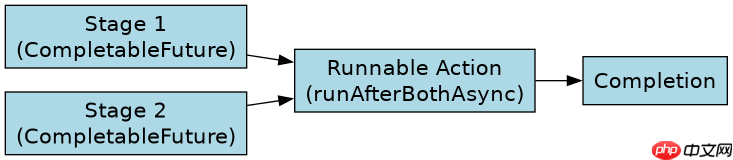
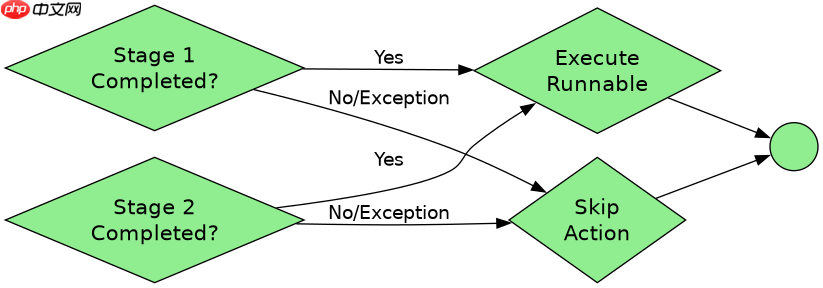
在 completionstage 的 runafterbothasync 方法中,直接传入一个函数式接口(如 runnable)即可触发异步执行。该方法要求两个阶段都完成,然后在新线程中运行提供的动作,不接收也不返回值。具体做法是调用 stage1.runafterbothasync(stage2, runnable),其中 runnable 通过 lambda 表达式实现,例如 (() -> system.out.println("done"))。如果两个前置阶段抛出异常,该动作不会执行;若需处理异常,应在动作内部捕获或提前使用 exceptionally。
如何传递带参数的业务逻辑
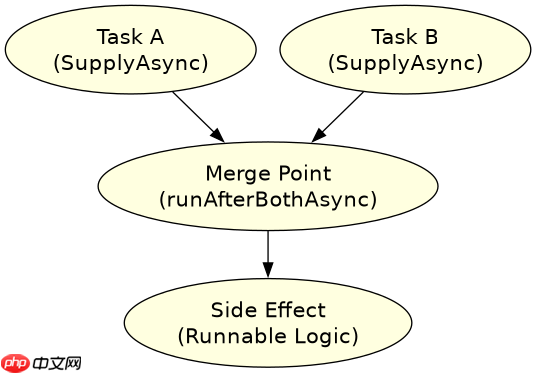
当需要执行带有特定参数或复杂逻辑的任务时,只需将具体的业务代码封装进 Runnable 的 Lambda 体中。由于 runAfterBothAsync 本身不支持传参给回调函数,所有需要的数据必须在创建 CompletableFuture 时通过闭包捕获,或者在动作内部从其他共享状态获取。这种方式适用于不需要返回结果、仅用于副作用操作(如日志记录、通知发送)的场景。
import java.util.concurrent.CompletableFuture;
import java.util.concurrent.ExecutionException;

public class RunAfterBothExample {
    public static void main(String[] args) throws ExecutionException, InterruptedException {
        CompletableFuture<String> stage1 = CompletableFuture.supplyAsync(() -> {
            try { Thread.sleep(100); } catch (InterruptedException e) {}
            return "Data from Stage 1";
        });

        CompletableFuture<String> stage2 = CompletableFuture.supplyAsync(() -> {
            try { Thread.sleep(200); } catch (InterruptedException e) {}
            return "Data from Stage 2";
        });

        // 定义要执行的 Runnable 逻辑
        Runnable action = () -> {
            System.out.println("Both stages completed. Executing side effect.");
            // 这里可以访问外部变量,因为它们是 effectively final
            String result1 = null;
            String result2 = null;
            // 注意:runAfterBothAsync 不直接提供结果,通常需要在外部存储或通过其他方式获取
            // 实际开发中,如果需要结果,建议使用 thenCombine
        };

        // 执行 runAfterBothAsync
        CompletableFuture<?> combined = stage1.runAfterBothAsync(stage2, action);

        // 等待主线程结束以观察输出
        combined.join();
        System.out.println("Main thread finished.");
    }
}
上述代码展示了两个异步任务完成后,执行一个简单的打印动作。预期输出为:
Both stages completed. Executing side effect.
Main thread finished.

你是 TypeScript 项目架构专家,专注于脚手架搭建生产就绪的 Node.js 和前端应用。生成包含现代工具链(pnpm、Vite、Next.js)、类型
立即学习“Java免费学习笔记(深入)”;
如何处理 runAfterBothAsync 中的异常
如果前置阶段之一失败,runAfterBothAsync 注册的 Runnable 将不会被执行。这是因为 runAfterBothAsync 依赖于两个阶段的正常完成(completion)。若要确保即使有异常也能执行清理工作,应结合 whenComplete 或在每个阶段单独注册异常处理器。此外,如果在 Runnable 内部发生未捕获异常,它将被传递给默认的 ForkJoinPool 异常处理器,可能导致线程终止而不影响其他并行任务。
import java.util.concurrent.CompletableFuture;
import java.util.concurrent.ExecutionException;

public class ExceptionHandlingExample {
    public static void main(String[] args) throws ExecutionException, InterruptedException {
        CompletableFuture<String> failingStage = CompletableFuture.supplyAsync(() -> {
            throw new RuntimeException("Simulated failure");
        });

        CompletableFuture<String> successStage = CompletableFuture.supplyAsync(() -> {
            return "Success";
        });

        // 由于 failingStage 失败,runAfterBothAsync 的动作不会执行
        failingStage.runAfterBothAsync(successStage, () -> {
            System.out.println("This will NOT be printed.");
        }).exceptionally(ex -> {
            System.out.println("Exception in the chain: " + ex.getMessage());
            return null;
        });

        // 为了看到结果,我们需要等待并处理可能的异常
        try {
            failingStage.join();
        } catch (Exception e) {
            System.out.println("Caught exception from failingStage: " + e.getMessage());
        }
    }
}
运行此代码将输出:
Caught exception from failingStage: Simulated failure
The "This will NOT be printed." message will not appear because one of the stages failed.