为什么设置了 cursor: pointer 鼠标手型还是没反应?
cursor: pointer 失效通常是因为元素本身没有可交互的语义,或者被其他样式属性覆盖了。最常见的原因是给非按钮类的标签(如 div)设置后,发现点击事件没触发,或者鼠标移上去没变手型。这往往是因为 css 优先级问题、display 属性导致无法接收鼠标事件,或者被父元素的 pointer-events 禁用了。

哪些 CSS 属性会覆盖或阻止 cursor: pointer 生效?
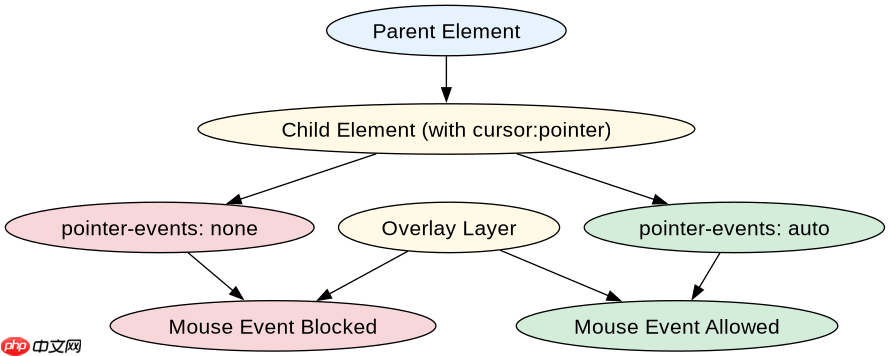
主要有三个属性会干扰:pointer-events、user-select 和 z-index 层级遮挡。如果父元素设置了 pointer-events: none,子元素即使写了 cursor: pointer 也不会显示手型。另外,如果元素被另一个透明层遮挡,虽然 CSS 写对了,但实际鼠标落在遮挡层上,自然看不到手型变化。
如何验证并修复 cursor: pointer 不生效的问题?
通过检查元素是否被遮挡、是否有 pointer-events 限制,以及是否正确应用了选择器来修复。例如,使用浏览器开发者工具检查 computed styles,确认 cursor 属性值是否为 pointer。同时,确保元素不是 display: none 或 visibility: hidden,这些状态会导致鼠标事件无法传递。
立即学习“前端免费学习笔记(深入)”;
<!DOCTYPE html>
<html lang="en">
<head>
    <meta charset="UTF-8">
    <title>Cursor Pointer Fix</title>
    <style>
        .container {
            position: relative;
            width: 200px;
            height: 200px;
            background-color: #f0f0f0;
        }
        .btn {
            cursor: pointer;
            padding: 10px 20px;
            background-color: #007bff;
            color: white;
            border: none;
            border-radius: 4px;
        }
        .overlay {
            position: absolute;
            top: 0;
            left: 0;
            width: 100%;
            height: 100%;
            /* 模拟遮挡层 */
            background-color: rgba(0,0,0,0.1);
            pointer-events: auto;
        }
        .disabled-pointer {
            pointer-events: none;
            cursor: not-allowed;
        }
    </style>
</head>
<body>
    <div class="container">
        <button class="btn" id="myBtn">Click Me</button>
        <div class="overlay"></div>
    </div>
    <script>
        const btn = document.getElementById('myBtn');
        btn.addEventListener('click', () => {
            console.log('Button clicked!');
        });
        // 检查 cursor 样式
        const style = window.getComputedStyle(btn);
        console.log('Cursor style:', style.cursor);
    </script>
</body>
</html>