在css3中,利用 :nth-of-type 选择相同标签类型的第一项,应使用伪类 :nth-of-type(1)。该选择器会匹配父元素下指定标签类型的第一个子元素,忽略其他类型的兄弟节点。例如,若需选中 <div> 容器内的第一个 <code><p></p><div class="aritcle_card flexRow">
<div class="artcardd flexRow">
<a class="aritcle_card_img" href="/xiazai/gongju/2905" title="CSS"><img
src="https://img.php.cn/upload/manual/000/969/633/6af2b1226ad9e733.png" alt="CSS" ></a>
<div class="aritcle_card_info flexColumn">
<a href="/xiazai/gongju/2905" title="CSS">CSS</a>
<p>CSS 官方网站入口。访问 W3C 的 CSS 页面,查看 CSS 标准、学习资料与工作组动态;CSS 是 Web 标准,无需下载安装。</p>
</div>
<a href="/xiazai/gongju/2905" title="CSS" class="aritcle_card_btn flexRow flexcenter"><b></b><span>下载</span> </a>
</div>
</div> 标签,可编写 p:nth-of-type(1)。此方法比 :first-child 更灵活,因为它不要求目标元素必须是父元素的第一个子节点,仅关注同类标签的顺序。
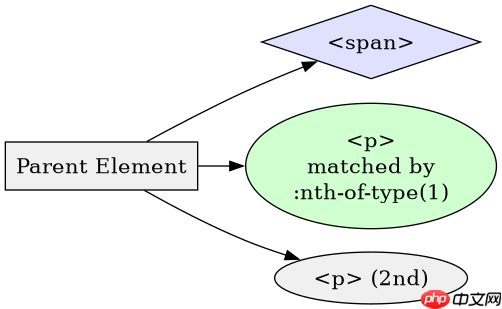
:nth-of-type(1) 与 :first-child 的选择差异是什么
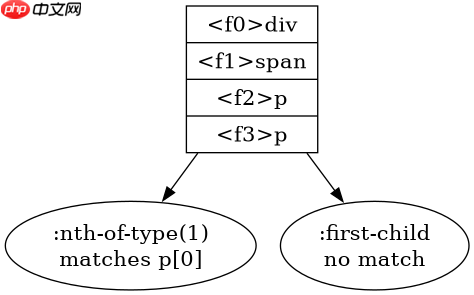
:nth-of-type(1) 仅按标签类型计数,而 :first-child 要求元素必须是父节点的第一个子节点且类型匹配。当父节点包含不同标签时,两者行为可能不同。例如,若 <div> 内以 <code><span></span> 开头,p:first-child 将失效,但 p:nth-of-type(1) 仍能选中第一个 <p></p>。以下代码演示了两种选择器的实际效果。
<!DOCTYPE html>
<html lang="zh">
<head>
    <meta charset="UTF-8">
    <title>nth-of-type vs first-child</title>
    <style>
        /* 选中第一个 p 标签,无论其位置 */
        p:nth-of-type(1) {
            color: red;
        }
        /* 仅当 p 是 div 的第一个子节点时才生效 */
        p:first-child {
            font-weight: bold;
        }
    </style>
</head>
<body>
    <div>
        <span>Span 1</span>
        <p>Para 1 (red, not bold)</p><p><span>立即学习</span>“<a href="https://pan.quark.cn/s/cb6835dc7db1" style="text-decoration: underline !important; color: blue; font-weight: bolder;" rel="nofollow" target="_blank">前端免费学习笔记(深入)</a>”;</p>
        <p>Para 2</p>
    </div>
</body>
</html>
运行上述代码后,第一个 <p></p> 文本显示为红色(因 :nth-of-type(1) 匹配),但不加粗(因 :first-child 未匹配,其前存在 <span></span>)。第二个 <p></p> 无样式。这验证了 :nth-of-type(1) 不受非同类节点干扰的特性。
如何确保 :nth-of-type(1) 在动态内容中稳定工作
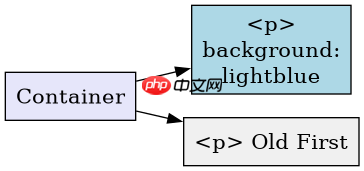
在动态渲染场景中,:nth-of-type(1) 始终基于当前DOM结构中的同类标签顺序生效,无需额外逻辑。只要浏览器支持CSS3(所有现代浏览器均支持),该选择器即可稳定工作。以下代码展示了在React-like虚拟DOM环境中,即使节点插入顺序变化,:nth-of-type(1) 仍正确应用样式。
<!DOCTYPE html>
<html lang="zh">
<head>
    <meta charset="UTF-8">
    <title>Dynamic nth-of-type</title>
    <style>
        .container p:nth-of-type(1) {
            background-color: lightblue;
        }
    </style>
</head>
<body>
    <div class="container" id="app">
        <!-- 初始状态 -->
        <p>First P</p>
        <p>Second P</p>
    </div>
    <script>
        // 模拟动态插入:在第一个 p 前添加新 p
        const app = document.getElementById('app');
        const newP = document.createElement('p');
        newP.textContent = 'New First P';
        app.insertBefore(newP, app.firstChild);
        // 此时原 'First P' 变为第二个 p,不再被 :nth-of-type(1) 选中
        // 新插入的 p 成为第一个 p,获得背景色
    </script>
</body>
</html>
执行脚本后,新插入的 <p></p> 获得浅蓝色背景,原第一个 <p></p> 失去样式。这表明 :nth-of-type(1) 自动响应DOM变更,无需JavaScript干预样式逻辑。开发者可直接依赖此行为处理动态列表的首项高亮。
当父元素内无目标标签类型时 :nth-of-type(1) 的行为如何
若父元素内不存在指定标签类型的子节点,:nth-of-type(1) 不会匹配任何元素,即返回空集。例如,在仅含 <span></span> 的 <div> 中,<code>p:nth-of-type(1) 无效。此行为符合CSS规范:伪类仅在存在匹配实例时生效。以下代码验证了该边界情况。
<!DOCTYPE html>
<html lang="zh">
<head>
    <meta charset="UTF-8">
    <title>Empty type case</title>
    <style>
        .empty-container p:nth-of-type(1) {
            color: green;
        }
    </style>
</head>
<body>
    <div class="empty-container">
        <span>No p tags here</span>
    </div>
</body>
</html>
运行后,页面中无任何绿色文本,证实 :nth-of-type(1) 在无目标标签时不产生样式应用。开发者应避免在此场景下假设默认样式,需通过JS或备用CSS规则处理缺失情况。