引入自定义css后bootstrap 4排版出现错位,通常是因为自定义样式覆盖了bootstrap的默认重置规则或盒模型设置。要解决这个问题,需要检查并调整样式的加载顺序,确保bootstrap的核心文件在自定义样式之前加载,或者使用更具体的选择器来覆盖冲突。

如何正确加载CSS以解决冲突
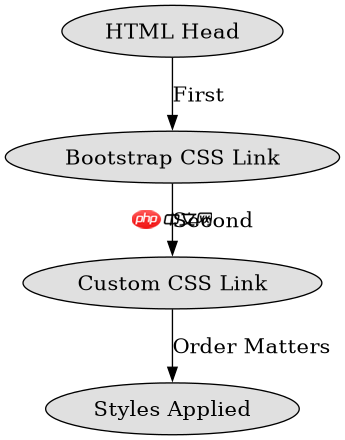
通过调整HTML中标签的顺序,可以确保Bootstrap的样式优先加载,从而避免被自定义样式意外覆盖。将Bootstrap的CSS文件放在自定义CSS文件之前,可以有效减少样式冲突。
<!DOCTYPE html>
<html lang="en">
<head>
    <meta charset="UTF-8">
    <meta name="viewport" content="width=device-width, initial-scale=1.0">
    <title>Bootstrap CSS Order</title>
    <!-- Bootstrap CSS -->
    <link rel="stylesheet" href="https://stackpath.bootstrapcdn.com/bootstrap/4.5.2/css/bootstrap.min.css">
    <!-- Custom CSS -->
    <link rel="stylesheet" href="custom.css">
</head>
<body>
    <div class="container">
        <h1>Hello, world!</h1>
        <p>This is a test paragraph.</p><p><span>立即学习</span>“<a href="https://pan.quark.cn/s/cb6835dc7db1" style="text-decoration: underline !important; color: blue; font-weight: bolder;" rel="nofollow" target="_blank">前端免费学习笔记(深入)</a>”;</p><div class="aritcle_card flexRow">
                                                        <div class="artcardd flexRow">
                                                                <a class="aritcle_card_img" href="/xiazai/gongju/2905" title="CSS"><img
                                                                                src="https://img.php.cn/upload/manual/000/969/633/6af2b1226ad9e733.png" alt="CSS" ></a>
                                                                <div class="aritcle_card_info flexColumn">
                                                                        <a href="/xiazai/gongju/2905" title="CSS">CSS</a>
                                                                        <p>CSS 官方网站入口。访问 W3C 的 CSS 页面,查看 CSS 标准、学习资料与工作组动态;CSS 是 Web 标准,无需下载安装。</p>
                                                                </div>
                                                                <a href="/xiazai/gongju/2905" title="CSS" class="aritcle_card_btn flexRow flexcenter"><b></b><span>下载</span> </a>
                                                        </div>
                                                </div>
    </div>
</body>
</html>
上述代码展示了正确的CSS加载顺序。首先加载Bootstrap的CSS文件,然后加载自定义CSS文件。这样可以确保Bootstrap的样式优先应用,而自定义样式可以在需要时进行覆盖。
如何使用更具体的选择器解决样式冲突
当自定义样式与Bootstrap样式发生冲突时,可以通过使用更具体的选择器来提高样式的优先级。例如,使用类名组合或ID选择器可以更精确地控制样式的适用范围。

/* custom.css */
.container {
    margin-top: 20px;
}

.container h1 {
    color: blue;
    font-size: 2em;
}
在上述自定义CSS文件中,使用了更具体的选择器`.container h1`来覆盖Bootstrap对`h1`元素的默认样式。这样可以确保只有`.container`内的`h1`元素才会应用这些样式,从而避免全局样式冲突。
如何调试和排查样式冲突问题
在使用浏览器开发者工具时,可以通过检查元素的计算样式来定位样式冲突的具体原因。查看哪些样式被覆盖或未被应用,可以帮助快速找到问题所在。