在 javascript 运行时中查看 fairplay 耗时,核心做法是结合浏览器 devtools 的 performance 面板与 web vitals 指标。通过记录关键渲染路径的时间戳,可以精确计算从页面加载到 fairplay drm 解密完成并播放首帧的总耗时。

如何通过 Performance API 捕获 FairPlay 初始化耗时
要获取 FairPlay 初始化的具体耗时,需使用 performance.now() 在 MediaSource 附加数据源和 EncryptedMediaEvent 触发时分别打点。将这两个时间戳相减,即可得到 DRM 系统初始化和密钥请求的网络延迟总和。
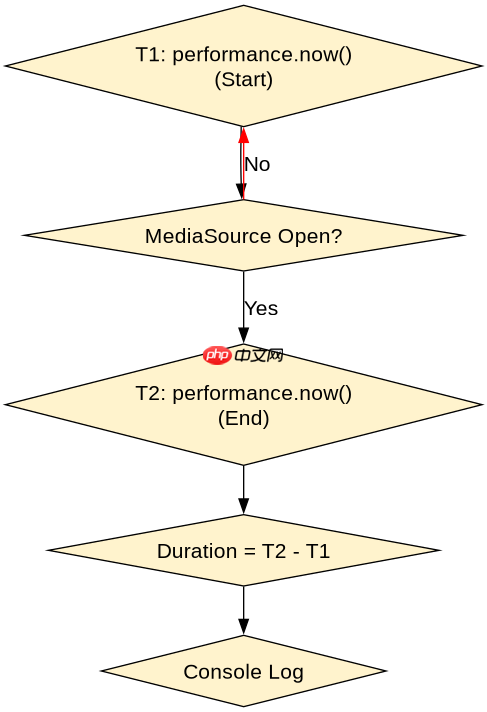
const startTime = performance.now();

// 1. 创建 MediaSource 并附加
const mediaSource = new MediaSource();
videoElement.src = URL.createObjectURL(mediaSource);
mediaSource.addEventListener('sourceopen', async () => {
  const sourceBuffer = await mediaSource.addSourceBuffer('video/mp4; codecs="avc1.42E01E, mp4a.40.2"');

  // 2. 设置 EME 配置
  await videoElement.setMediaKeys(new MediaKeys());
  const keySystemAccess = await navigator.requestMediaKeySystemAccess(
    'com.apple.fairplay',
    [{ initDataTypes: ['cenc'], videoCapabilities: [{ contentType: 'video/mp4; codecs="avc1.42E01E"' }] }]
  );
  await videoElement.mediaKeys.setCapability('playback');

  // 3. 监听加密事件
  videoElement.addEventListener('encrypted', (e) => {
    const endTime = performance.now();
    console.log(`FairPlay Init Duration: ${endTime - startTime}ms`);
    // 处理 license request...
  });
});
如何测量 FairPlay 解密后的首帧渲染耗时
FairPlay 解密完成后,视频流进入解码器。此时应监控 loadeddata 或 canplaythrough 事件,并结合 requestVideoFrameCallback 获取实际显示时间。这能反映从 DRM 解锁到用户看到画面的端到端延迟。

立即学习“Java免费学习笔记(深入)”;

let fairPlayUnlockTime = null;

videoElement.addEventListener('encrypted', async (e) => {
  // 模拟获取 License 并设置 Key
  await videoElement.mediaKeys.createSession('temporary').addKey(e.initData, e.keyId);
  fairPlayUnlockTime = performance.now();
});

videoElement.addEventListener('loadeddata', () => {
  if (fairPlayUnlockTime) {
    const decodeDuration = performance.now() - fairPlayUnlockTime;
    console.log(`Decoding & Render after FairPlay: ${decodeDuration}ms`);
  }
});
FairPlay 耗时受哪些网络条件影响
FairPlay 的总耗时主要取决于 License Server 的响应速度和证书验证链的长度。在弱网环境下,HTTP 请求的重试机制会显著增加 setMediaKeys 阶段的阻塞时间。建议通过模拟网络节流来测试极端情况下的超时阈值。