








使用 fetch 获取 dsv 数据后,调用 response.text() 将响应体转为字符串,再交给 d3.dsvformat() 解析为对象数组。这样做能直接获得结构化数据,无需手动处理 csv 的逗号冲突或 dsv 的引号逻辑。

如何指定自定义分隔符并处理空值
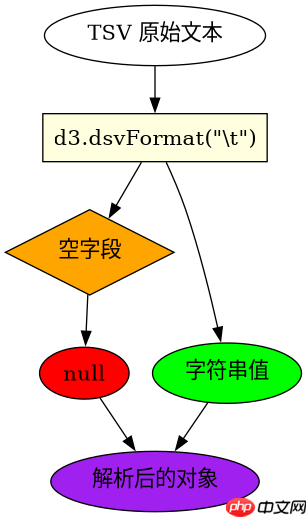
通过 d3.dsvFormat(sep) 创建特定分隔符的解析器,默认情况下解析器会将空字段转为 null。在第一节中,我们演示了如何使用 作为分隔符读取 TSV 数据,并观察空值转换行为。
const d3 = require('d3');

async function loadTSV() {
  const response = await fetch('/data/sample.tsv');
  const text = await response.text();
  // 使用制表符作为分隔符
  const parse = d3.dsvFormat('\t');
  const data = parse.parse(text);
  console.log(data);
}

loadTSV();
如何过滤和转换解析后的字段类型
在第二节中,我们展示了如何在解析过程中使用 row 回调函数来清洗数据。例如,将字符串类型的数字转换为浮点数,或者根据条件过滤掉无效行。这确保了后续数据处理时类型的一致性。

立即学习“Java免费学习笔记(深入)”;

const d3 = require('d3');

async function loadAndProcessCSV() {
  const response = await fetch('/data/sales.csv');
  const text = await response.text();
  // 使用逗号作为分隔符,并定义行转换逻辑
  const parse = d3.dsvFormat(',');
  const data = parse.parse(text, row => {
    if (row.amount === '') return null; // 跳过空金额行
    return {
      id: row.id,
      amount: +row.amount, // 转换为数字
      date: new Date(row.date)
    };
  });
  console.log(data.filter(d => d !== null));
}

loadAndProcessCSV();
当接口返回非标准编码(如 GBK)时会发生什么
如果服务器返回的 DSV 数据不是 UTF-8 编码,直接使用 response.text() 会导致乱码。此时需要利用 response.arrayBuffer() 配合 TextDecoder 进行转码,或者在后端统一转为 UTF-8。本节以 GBK 编码为例,展示如何正确解码并解析。
const d3 = require('d3');

async function loadGBKDSV() {
  const response = await fetch('/data/gbk_data.dsv');
  const buffer = await response.arrayBuffer();
  // 假设使用 GBK 编码
  const decoder = new TextDecoder('gbk', {fatal: true});
  const text = decoder.decode(buffer);
  const parse = d3.dsvFormat(';');
  const data = parse.parse(text);
  console.log(data[0]);
}

loadGBKDSV(); 















