在java的try-with-resources语句中,资源声明位于紧跟在关键字 try 之后的圆括号 () 内部。开发者只需在括号内实例化实现了 autocloseable 接口的对象,这些对象会在 try 代码块执行完毕后自动关闭,无需手动调用 close() 方法。

try-with-resources 的基本语法结构是怎样的
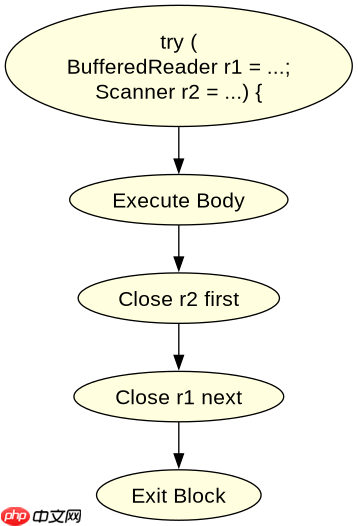
基本语法将资源初始化直接嵌入到 try 头的括号中。这种结构确保了即使 try 块中发生异常,资源也会被正确清理。如果声明多个资源,它们会按照声明的逆序进行关闭。
import java.io.*;

public class ResourceExample {
    public static void main(String[] args) {
        // 在 try 括号中声明资源
        try (BufferedReader reader = new BufferedReader(new FileReader("data.txt"))) {
            String line = reader.readLine();
            System.out.println(line);
        } catch (IOException e) {
            e.printStackTrace();
        }
    }
}
预期结果:程序读取 data.txt 的第一行并打印,随后 reader 自动关闭。若文件不存在,抛出 FileNotFoundException 并被捕获。
立即学习“Java免费学习笔记(深入)”;

如何同时管理多个不同类型的资源
当需要处理多个资源时,可以在同一个 try 括号内用分号 ; 分隔各个资源的声明。每个资源必须独立实现 AutoCloseable。关闭顺序与声明顺序相反,即最后一个声明的资源最先关闭。

import java.io.*;

public class MultiResourceExample {
    public static void main(String[] args) {
        try (
            InputStream is = new FileInputStream("input.txt");
            OutputStream os = new FileOutputStream("output.txt")
        ) {
            byte[] buffer = new byte[1024];
            int bytesRead;
            while ((bytesRead = is.read(buffer)) != -1) {
                os.write(buffer, 0, bytesRead);
            }
        } catch (IOException e) {
            e.printStackTrace();
        }
    }
}
预期结果:数据从 input.txt 复制到 output.txt。os 先关闭,然后 is 关闭。若复制过程中出错,两个流仍会被安全关闭。
如果在 try-with-resources 中声明了 null 会发生什么
如果在 try 括号中声明的资源变量初始化为 null,则不会对该变量调用 close() 方法。这允许开发者在条件满足时才创建资源,而无需额外的嵌套 if 判断来检查空值。