java 线程启动后等待执行完成,最直接且推荐的做法是使用 thread.join() 方法。调用该方法的线程会进入阻塞状态,直到目标线程执行完毕或达到指定的超时时间。对于更复杂的场景,如需要获取返回值或管理多个线程,可以使用 java.util.concurrent 包中的 executorservice 配合 future.get() 或 countdownlatch。

使用 Thread.join() 等待单个线程结束
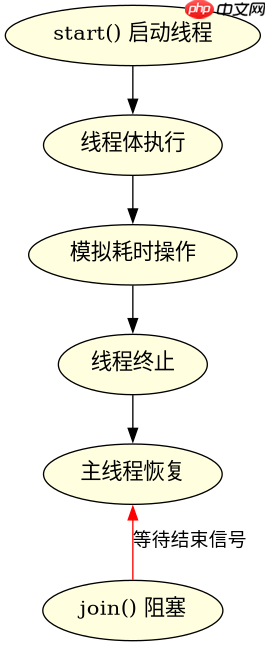
当只需要等待一个特定的线程完成时,直接调用该线程实例的 join() 方法是标准做法。这会导致当前调用者暂停执行,直到目标线程终止。如果希望避免无限期等待,可以传入毫秒数作为参数,实现超时控制。
public class JoinExample {
    public static void main(String[] args) throws InterruptedException {
        Thread worker = new Thread(() -> {
            System.out.println("Worker started");
            try { Thread.sleep(2000); } catch (InterruptedException e) {}
            System.out.println("Worker finished");
        });

        worker.start();
        // 主线程在此处阻塞,直到 worker 线程结束
        worker.join();

        System.out.println("Main thread continues after worker finishes");
    }
}上述代码中,worker.join() 确保主线程在打印最后一行之前,必须等待 worker 线程完全执行完毕。若 worker 抛出未捕获异常,join() 也会正常返回,但需注意异常处理逻辑。
立即学习“Java免费学习笔记(深入)”;

使用 ExecutorService 和 Future 等待任务完成
在现代 Java 开发中,推荐使用 ExecutorService 来管理线程池。通过 submit() 提交任务并获取 Future 对象,调用 Future.get() 可以阻塞当前线程直到任务完成,同时还能获取任务的返回值或捕获异常。

import java.util.concurrent.*;

public class FutureExample {
    public static void main(String[] args) throws Exception {
        ExecutorService executor = Executors.newSingleThreadExecutor();

        Future<String> future = executor.submit(() -> {
            System.out.println("Task running in thread pool");
            return "Result from task";
        });

        // 阻塞直到任务完成并获取结果
        String result = future.get();
        System.out.println("Got result: " + result);

        executor.shutdown();
    }
}
此方式不仅支持等待完成,还天然支持取消任务和异常传播。相比 join(),它更适合批量任务管理和资源复用。
基于程序中某个输入、条件或结果的具体问题
在实际应用中,如果线程执行过程中发生中断(例如用户取消操作),join() 或 get() 可能会抛出 InterruptedException 或 CancellationException。此时应检查线程是否被中断,并根据业务逻辑决定是重试、记录日志还是优雅退出。此外,若需等待多个线程全部完成,可结合 CountDownLatch 或使用 invokeAll() 一次性提交所有任务并等待其集合结果。