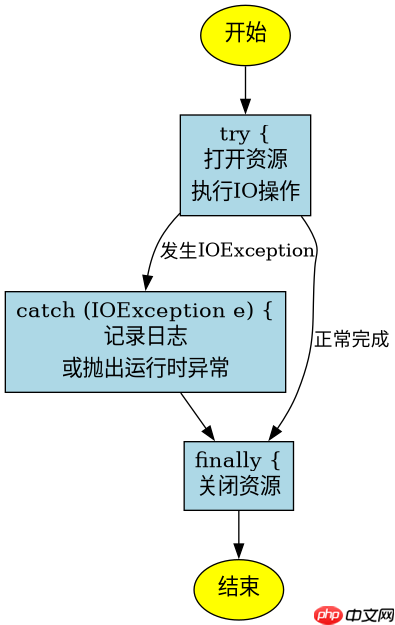
java 中处理 ioexception 的标准做法是使用 try-catch-finally 结构或 try-with-resources 语句。推荐使用 try-with-resources 自动关闭资源,并在 catch 块中记录日志或抛出新的运行时异常,避免吞掉异常。
try-with-resources 如何简化 IO 操作
使用 try-with-resources 可以自动调用实现了 AutoCloseable 接口的资源的 close() 方法,从而简化代码并防止资源泄漏。在创建流对象时将其放在括号内,即可实现自动管理。
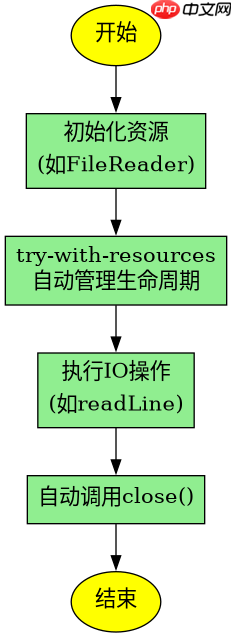
import java.io.*;

public class TryWithResourcesExample {
    public static void main(String[] args) {
        // 定义文件路径
        String filePath = "test.txt";

        // 使用 try-with-resources 自动管理 BufferedReader
        try (BufferedReader reader = new BufferedReader(new FileReader(filePath))) {
            String line;
            while ((line = reader.readLine()) != null) {
                System.out.println(line);
            }
        } catch (IOException e) {
            System.err.println("读取文件失败: " + e.getMessage());
        }
    }
}
预期结果:如果文件存在且可读,程序将逐行打印内容;如果文件不存在,将捕获 FileNotFoundException(它是 IOException 的子类)并打印错误信息。
立即学习“Java免费学习笔记(深入)”;

传统 try-catch-finally 如何处理资源
在没有使用 Java 7 的 try-with-resources 之前,开发者需要在 finally 块中手动关闭资源。这种方式代码冗长,且容易因为忘记关闭或关闭逻辑出错导致问题。每个资源都需要单独判断是否为 null 再关闭。
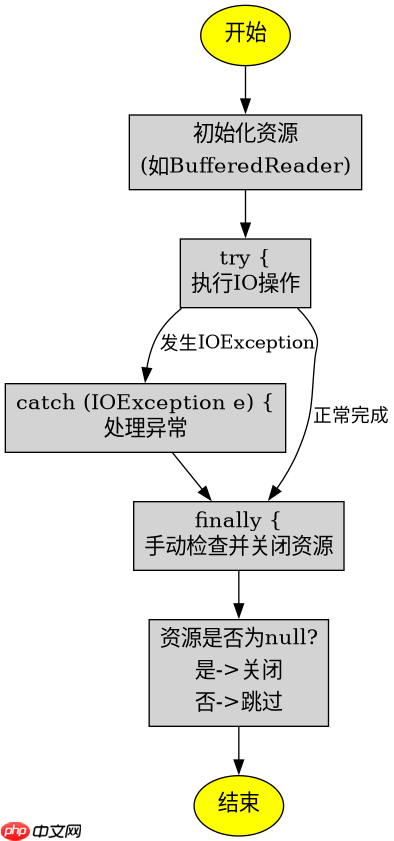
import java.io.*;

public class TraditionalTryCatchFinallyExample {
    public static void main(String[] args) {
        BufferedReader reader = null;
        try {
            reader = new BufferedReader(new FileReader("test.txt"));
            String line;
            while ((line = reader.readLine()) != null) {
                System.out.println(line);
            }
        } catch (IOException e) {
            System.err.println("读取文件失败: " + e.getMessage());
        } finally {
            if (reader != null) {
                try {
                    reader.close();
                } catch (IOException e) {
                    System.err.println("关闭资源失败: " + e.getMessage());
                }
            }
        }
    }
}
预期结果:与传统方式相比,虽然功能相同,但代码量显著增加,且需要处理 close() 可能抛出的异常。推荐优先使用 try-with-resources。
当 IOException 被吞掉时会发生什么
如果在 catch 块中没有记录日志或重新抛出异常,而是简单地忽略它,会导致程序静默失败,难以排查问题。例如,只写一个空的 catch 块,或者只打印堆栈但不传播异常,都会掩盖真实错误。
import java.io.*;

public class SwallowedExceptionExample {
    public static void main(String[] args) {
        try (BufferedReader reader = new BufferedReader(new FileReader("nonexistent.txt"))) {
            reader.readLine();
        } catch (IOException e) {
            // 错误做法:吞掉异常,不记录任何信息
        }
        System.out.println("程序继续运行...");
    }
}
预期结果:程序不会报错,也不会输出任何错误信息,直接打印“程序继续运行...”。这种静默失败会让调试变得极其困难,因此必须记录日志或抛出运行时异常。